

The Orator: Speech Prompter
GEUM SANG YOO Productivity iPhoneiPadiPod touch
The Orator: Speech Prompter is a free Productivity app for iPhone and iPad by GEUM SANG YOO. Requires iOS 17.0. Updated October 23, 2026.
- Price
- Free
- on the App Store
- Size
- 22 MB
- Age 4+
- Updated
- Oct 23
- 2026 · v1.2.0
Screenshots



About The Orator: Speech Prompter
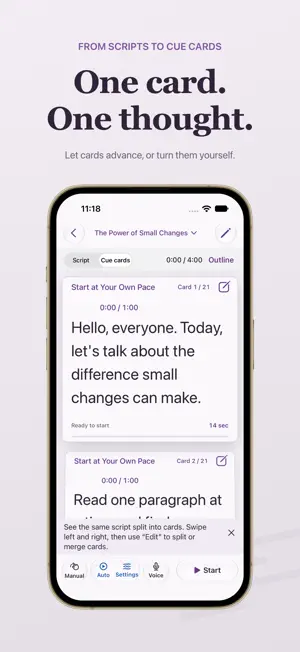
Focus on what you want to say. The Orator brings your script, reading pace and presentation time together. For a talk, lesson, work presentation or wedding toast: prepare your words, rehearse at your own pace and take them with you on iPhone and iPad. Prepare your script Paste text or import TXT, Markdown, RTF, PDF and Word (.docx) files. Review section timing, edit headings and paragraphs, and split or merge text while keeping the original source. Read at your own pace Measure a comfortable pace with a short reading exercise, or start with the default pace. Choose a scrolling manuscript or cue cards, use automatic movement or advance manually, and mark places to pause. PDF import extracts selectable text; Word import supports .docx body text and directly applied bold and underline. Scanned-PDF OCR, document image layout and legacy .doc files are not supported. Follow your presentation time See planned and used time for each section alongside the overall elapsed time. Explore another part of your script, return to where you were reading, or reset the progress to rehearse again. Pause your presentation to stop both the timer and script movement, then resume when you are ready. If you started by mistake, pause and cancel the start. You can also undo an accidental finish before confirming the result. Keep a complete manuscript file An .orator file includes the text, formatting, timing, reading settings and saved reading position. Save it with Files or iCloud Drive and open it on another device. Save the file again to transfer later edits. Each device keeps its own local library. Made for iPhone and iPad Adjust the text size, use light or dark appearance, and read and edit with controls that adapt to your screen. Create and present one personal script for free. A one-time in-app purchase unlocks multiple scripts, script duplication, records of talks you have given and voice follow. Customers who bought the paid app keep full access at no extra charge. No subscription, advertising or separate app account is required. Available in Korean, English, Japanese, Simplified Chinese and Traditional Chinese. On iPhone Duo in tabletop posture, keep your current cue card above the fold while the next card and presentation controls stay below. In book posture, view your cue cards and outline side by side. Voice follow · Beta Try voice follow with your own manuscript three times for free, then continue with Full Unlock. A trial is used only after a paragraph is recognized, the screen follows it and progress saves successfully. Pausing and resuming remains the same trial. Start voice follow to recognize speech on your device and follow nearby sentences. Recognized text is highlighted; the reader waits when you go off script. Scroll manually to continue from a new position. View recognized speech below the script, tap it to read more, or hide it when you prefer. Voice follow requires iOS 26 or later or iPadOS 26 or later, plus a supported device and language. Update your operating system to use this feature on an older version. Script editing, reading and timing remain available on iOS 17 and iPadOS 17 or later. First use may download language assets. Audio and recognition results are not saved as files or sent to a developer server.
What’s new
Version 1.2.0 · Updated October 23, 2026
• Preview and import text from PDF and Word (.docx), including direct bold and underline formatting from Word. • Try voice follow with your own manuscript three times for free. A trial is used only after a paragraph is recognized and the screen follows it. Pausing and resuming stays in the same trial. • Review requests appear at a suitable break after your first completed practice or a successful sample voice experience. • Share the app’s installation link and open its App Store review page from Settings. • Find guidance for moving manuscript files between devices. Conflicting files are clearly named “Imported copy.” • Refined reading, settings and guidance in five languages.
App privacy
The developer, GEUM SANG YOO, reported these privacy practices to Apple.
Data Linked to You
The following data, which may be collected and linked to your identity, may be used for the following purposes:
- Purchases: Purchase History
- Location: Coarse Location
- Identifiers: Device ID
- Usage Data: Product Interaction, Other Usage Data
- Diagnostics: Crash Data, Other Diagnostic Data
Used for: Analytics, App Functionality
Alternatives to The Orator: Speech Prompter
Looking for apps like The Orator: Speech Prompter? Here are 6 similar apps on the App Store. The highest rated is Studio: Teleprompter (5.0/5), and all 6 are free to download.
-
 BitEditor
-
 Studio: Teleprompter
5.0
Studio: Teleprompter
5.0
-
 Stackbox - RSS Reader
-
 TeamChat Team
-
 DayKit: Personal Logbook
5.0
DayKit: Personal Logbook
5.0
-
 VelNotes: Handwriting Notes
| App | Rating | Price | Last updated | Compare |
|---|---|---|---|---|
| The Orator: Speech Prompter | – | Free | October 23, 2026 | |
| BitEditor | – | Free | Sep 28, 2026 | Compare |
| Studio: Teleprompter | 5.0 / 5 (1) | Free | Jun 13, 2026 | Compare |
| Stackbox - RSS Reader | – | Free | Oct 26, 2026 | Compare |
| TeamChat Team | – | Free | Jun 4, 2026 | Compare |
| DayKit: Personal Logbook | 5.0 / 5 (1) | Free | Jul 1, 2026 | Compare |
| VelNotes: Handwriting Notes | – | Free | Oct 18, 2026 | Compare |