

Slowdial – Visual Timer
Minari Taniguchi Education iPhoneiPadiPod touch
Slowdial – Visual Timer is a free Education app for iPhone and iPad by Minari Taniguchi. Requires iOS 17.0. Updated October 19, 2026.
- Price
- Free
- on the App Store
- Size
- 4 MB
- Age 4+
- Updated
- Oct 19
- 2026 · v1.1.1
Screenshots


About Slowdial – Visual Timer
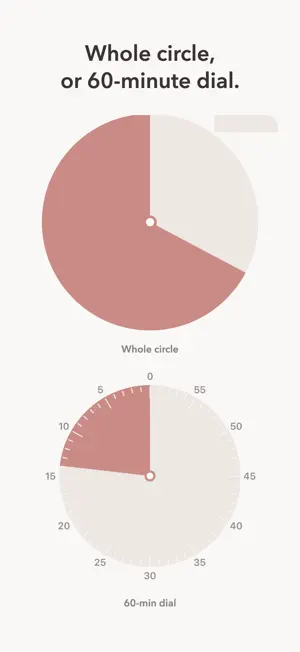
Slowdial shows time as an amount: a colored disc that shrinks as time passes. Children (and grown-ups) can see "how much is left" without reading a clock. NO ADS, EVER. Slowdial never shows an ad — not before the timer, not after it. It is safe to hand to a child or to put in front of a class. THE TIME YOU PICK FILLS THE WHOLE CIRCLE Pick 5 minutes or 45 — the disc starts full either way. Prefer the classic 60-minute dial? Switch with one tap. ON YOUR LOCK SCREEN TOO — FREE The disc keeps shrinking on the Lock Screen and in the Dynamic Island, without opening the app. Use it as a laundry timer — watch the washer and dryer count down on your Lock Screen. When time is up you get a sound and a vibration, even with the screen locked. FREE • Full-screen shrinking disc • Presets from 1 minute to 1 hour, Wash 52 min and Dry 60 min, or any time you like • Whole-circle or 60-minute dial • End sound and vibration • Lock Screen and Dynamic Island disc SLOWDIAL PRO — one-time purchase, no subscription • Classroom mode: just the disc, full screen. Taps don't stop it. Hide the numbers. Pick the color. • Sequences: "Clean up 5 min → Wash hands 3 min → Snack", with a picture and a word for each step • Intervals: get ready, then work and rest for up to 20 rounds (a Tabata sample is included). Each interval session can be saved to Apple Health as a workout if you turn it on. • Controls (iOS 18 or later): start your favorite timer from Control Center, the Lock Screen or the Action Button • Home Screen and Lock Screen widgets PRIVATE BY DESIGN • No account. Your timers stay on your iPhone. • Only anonymous usage counts are sent (which parts of the app are used) — never your timer names. You can turn this off in Settings.
What’s new
Version 1.1.1 · Updated October 19, 2026
You can now preview the widgets and see how to add them, anytime, right in the app.
App privacy
The developer, Minari Taniguchi, reported these privacy practices to Apple.
Data Not Linked to You
The following data, which may be collected but is not linked to your identity, may be used for the following purposes:
- Usage Data: Product Interaction
Used for: Analytics
Alternatives to Slowdial – Visual Timer
Looking for apps like Slowdial – Visual Timer? Here are 6 similar apps on the App Store. The highest rated is Wedge: Visual Countdown Timer (5.0/5), and all 6 are free to download.
-
 いすとりミュージック
-
 Melody Music: Kids Music Maker
-
 Handwriting: Montessori
-
 MathZombie!
-
 Wedge: Visual Countdown Timer
5.0
Wedge: Visual Countdown Timer
5.0
-
 Visual Timer - See Time Left
| App | Rating | Price | Last updated | Compare |
|---|---|---|---|---|
| Slowdial – Visual Timer | – | Free | October 19, 2026 | |
| いすとりミュージック | – | Free | Oct 25, 2026 | Compare |
| Melody Music: Kids Music Maker | – | Free | Aug 19, 2026 | Compare |
| Handwriting: Montessori | – | Free | Sep 11, 2026 | Compare |
| MathZombie! | – | Free | Mar 27, 2026 | Compare |
| Wedge: Visual Countdown Timer | 5.0 / 5 (2) | Free | Sep 12, 2026 | Compare |
| Visual Timer - See Time Left | – | Free | Aug 18, 2026 | Compare |