

FretFlow: Guitar Chords & TAB
haoge wu Music iPhoneiPadiPod touch
FretFlow: Guitar Chords & TAB is a free Music app for iPhone and iPad by haoge wu. Requires iOS 17.0. Updated November 16, 2026.
- Price
- Free
- on the App Store
- Size
- 49 MB
- Age 4+
- Updated
- Nov 16
- 2026 · v1.3.0
Screenshots



About FretFlow: Guitar Chords & TAB
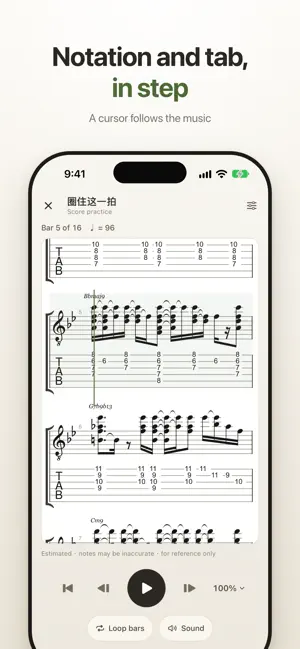
FretFlow turns a song into something you can play. Import a video or audio clip and get its chords and tab, with fingerings on a real guitar fretboard. Loop one bar, slow it down, or arrange the song for your level. FROM SONG TO CHORDS • Import a video or audio clip from Photos or Files and get a chord timeline and tab • Recognizes more extended chords (9, 11, 13) and names them the way players write them: Cm9, F13 • Listen to verify: every result is a draft you can check against the recording • Solo mode turns a single-note melody into suggested TAB positions • Import MusicXML, Guitar Pro (GP3, GP4, GP5, GPX, GP) or ChordPro files, or type the chords in PRACTICE ON A REAL FRETBOARD • Chord shapes and notes move across a photo-real guitar neck in time • Chord diagrams sit above the scrolling tab and move with it • For imported songs, chord diagrams show shapes worked out from that song's own tab • Scale degrees on every chord show how the harmony moves • Focus mode: hide the controls, drag to any bar, or loop a single bar • Loop the whole song, a chord pair or a single chord, and slow the tempo down • Score practice: notation and tab in step, with a cursor that follows the music • Count-in and rhythm patterns keep time with you PLAY IT AT YOUR LEVEL • Arrange the same song at Basic, Intermediate or R&B level, with a capo when it helps • Capo and transpose, or simplify every chord to plain triads and 7ths • Sing along: chords over the lyrics, your arranged guitar with the song's own drums, bass and vocals • Tone Studio: amp, cabinet, EQ and effects for the built-in guitar sound • Two guitars to choose from: Classical or Electric · Clean KEEP PRACTICING • Practice log with a daily goal and a calendar of the days you played • Score memos you can pin to the chord you're on • Built-in tuner • Score library with folders, saved on your device and synced with iCloud when available • Export analyzed parts as Guitar Pro files English and Simplified Chinese. Analysis needs an internet connection. Files you choose are uploaded only to analyze them and are deleted from our server within 24 hours. The app has no accounts, no ads and no tracking.
What’s new
Version 1.3.0 · Updated November 16, 2026
This update makes the results page and chord renaming simpler. • Results are now a single card: the song title, Practice, Practice from score, playback, Save to library and Export, all in one place. • All export options now live in one menu. • Renaming a chord has moved to Home, under Fingering & video: pick the chord and tap the pencil. Under “Also called” you'll see its other names; tap one to switch.
App privacy
The developer, haoge wu, reported these privacy practices to Apple.
Data Linked to You
The following data, which may be collected and linked to your identity, may be used for the following purposes:
- User Content: Photos or Videos, Audio Data, Other User Content
- Identifiers: User ID
- Diagnostics: Other Diagnostic Data
Used for: App Functionality
Alternatives to FretFlow: Guitar Chords & TAB
Looking for apps like FretFlow: Guitar Chords & TAB? Here are 6 similar apps on the App Store. The highest rated is Beater (5.0/5), and 5 of the 6 are free to download.
-
 Guitar Chord Converter
4.0
-
 GuitarHub Scale & Chord Master
-
 Beater
5.0
-
 TabRider
-
 Pan Flute Real
-
 Arpeggio Forge
| App | Rating | Price | Last updated | Compare |
|---|---|---|---|---|
| FretFlow: Guitar Chords & TAB | – | Free | November 16, 2026 | |
| Guitar Chord Converter | 4.0 / 5 (1) | Free | Mar 27, 2026 | Compare |
| GuitarHub Scale & Chord Master | – | Free | Oct 18, 2026 | Compare |
| Beater | 5.0 / 5 (1) | 0.99 USD | Apr 28, 2025 | Compare |
| TabRider | – | Free | Oct 26, 2026 | Compare |
| Pan Flute Real | – | Free | Oct 30, 2026 | Compare |
| Arpeggio Forge | – | Free | Nov 2, 2026 | Compare |