

Nurunuru Checker
3810 Production Utilities iPhoneiPadiPod touch
Nurunuru Checker is a free Utilities app for iPhone and iPad by 3810 Production. Requires iOS 17.0. Updated October 27, 2026.
- Price
- Free
- on the App Store
- Size
- 23 MB
- Age 4+
- Updated
- Oct 27
- 2026 · v1.12.0
Screenshots



About Nurunuru Checker
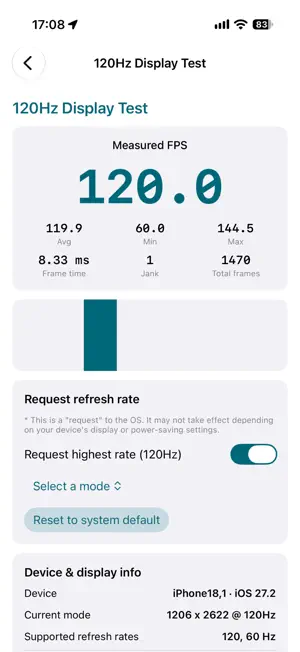
Is your iPhone or iPad really displaying smoothly? Even on a "ProMotion 120Hz" display, the screen does not always run at its top speed. Nurunuru Checker shows your device's actual refresh rate and rendering, measured on the device itself. ■ Free - Live FPS / refresh rate measurement See the frame rate actually shown on screen, with average, minimum and maximum FPS, frame time and jank count. ■ Premium features (unlock everything for 24 hours by watching one ad, or permanently with a one-time purchase) - ProMotion Min/Max Test Ask the display for its highest and lowest refresh rates and compare the smoothness with a moving bar. - Motion Blur & Response Test Check motion blur (ghosting) and response with moving objects. - Sustained & Throttling Test Graph FPS over time to see performance drops caused by heat (throttling). - Full-screen Check Patterns Find dead pixels and uneven colors with solid colors, gradients and grids. - Bonus: Hoshimori Rinka Wallpaper Save a wallpaper of Hoshimori Rinka from 3810 Production's Information Management Dept. to Photos. ■ Rinka Mode Choose "Rinka Mode" in Settings to recolor the whole app in Rinka's colors and show her illustrations across the screens. ■ Recommended for - People using a ProMotion iPhone or iPad Pro - Checking the display of a new or used device - Anyone who wants to see their device's smoothness in numbers and with their own eyes ■ Pricing Free to use. Some features are unlocked for 24 hours by watching one ad. The one-time in-app purchase "Unlock All Features" unlocks everything permanently and removes ads. On a new device, use "Restore purchase". Privacy policy: https://3810.pro/privacy-policy/nurunuru-checker Contact: https://3810.pro/contact
What’s new
Version 1.12.0 · Updated October 27, 2026
v1.12.0 ・Added a free 15-second screen check. You can share the result as an image. ・Added a Reaction Speed Test that compares how fast you react at the highest refresh rate and at 60Hz. ・The check result now shows your rank among devices of the same model (you can turn this off in Settings). ・Live Measurement (formerly the 120Hz Display Test) is now unlocked for 24 hours, like the other tests. ・When the display is limited to 60Hz (for example by Low Power Mode), the app now tells you why. ・While limited to 60Hz, jank is now counted against 60Hz (previously every frame was shown as jank). ・Choosing Rinka Mode now also switches the app icon to Rinka. ・If you close the ad before it ends, the app now explains why nothing was unlocked and how to unlock.
App privacy
The developer, 3810 Production, reported these privacy practices to Apple.
Data Not Linked to You
The following data, which may be collected but is not linked to your identity, may be used for the following purposes:
- Identifiers: Device ID
- Usage Data: Product Interaction, Advertising Data
- Diagnostics: Crash Data, Performance Data
Used for: Third-Party Advertising, Analytics
Alternatives to Nurunuru Checker
Looking for apps like Nurunuru Checker? Here are 6 similar apps on the App Store. The highest rated is DomainLens Pro (5.0/5), and all 6 are free to download.
-
 PhoneCheck Pro
-
 PanelScope: Monitor Tester
-
 PBXMonitor Mobile
-
 DomainLens Pro
5.0
DomainLens Pro
5.0
-
 GlancePro X
-
 BaNANA Solar
| App | Rating | Price | Last updated | Compare |
|---|---|---|---|---|
| Nurunuru Checker | – | Free | October 27, 2026 | |
| PhoneCheck Pro | – | Free | May 10, 2026 | Compare |
| PanelScope: Monitor Tester | – | Free | Sep 18, 2026 | Compare |
| PBXMonitor Mobile | – | Free | Nov 17, 2025 | Compare |
| DomainLens Pro | 5.0 / 5 (1) | Free | Sep 30, 2026 | Compare |
| GlancePro X | – | Free | Jul 2, 2026 | Compare |
| BaNANA Solar | – | Free | Nov 7, 2025 | Compare |
Compare Nurunuru Checker with the top alternatives: ratings, updates, ASO score and keyword gaps →