

Moss Nook - Moss Terrarium
Yuya Tsuru Games iPhoneiPadiPod touch
Moss Nook - Moss Terrarium is a free Games app for iPhone and iPad by Yuya Tsuru. Requires iOS 18.0. Updated October 16, 2026.
- Price
- Free
- on the App Store
- Size
- 75 MB
- Age 4+
- Updated
- Oct 16
- 2026 · v1.2.1
Screenshots


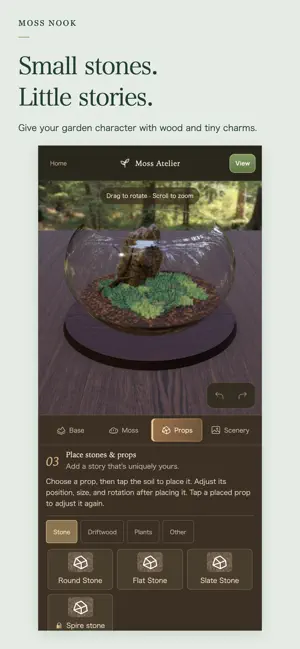

About Moss Nook - Moss Terrarium
At a quiet workbench, build your own moss terrarium inside a small glass container — a first-person 3D terrarium-making app. There's no score and no way to fail. Choose a container, lay down the soil, tear off moss and arrange it, then place stones, driftwood and small charms. The hands-on process itself is the point — a slow, calming experience to sink into. ■ Build it piece by piece, by hand Pick a container shape and size, lay a base (soil, gravel, or sand), then choose from several kinds of moss on a palette and place them. Stones, driftwood, and figurines can be placed at any position, angle, and size you like. ■ Finish it with scenery and lighting Pick a background, desk, and effects like dappled sunlight, water reflections, or a gentle breeze from the Scenery tab to give your terrarium its own mood. ■ Admire your finished piece on a turntable Once it's done, slowly rotate your terrarium on a turntable to admire it from every angle. You can also take and share screenshots. ■ Manage your work in the Gallery Every terrarium you make is saved to the Gallery, so you can look back on it or continue editing anytime. ■ Optional ad removal and theme pack A small banner ad appears only on the title screen and at the bottom of the Gallery (never while you're making or admiring a terrarium). A one-time "Remove Ads" purchase hides it completely, and the "Deep Green Garden Pack" adds exclusive charms, bases, moss, and colors (both one-time purchases, no subscriptions). No failure, no penalties — just a quiet moment to focus on working with your hands, whenever you have a little time to spare.
What’s new
Version 1.2.1 · Updated October 16, 2026
- Fixed an unnecessary confirmation on the title screen's "Start" button when your draft is already saved as a finished work. - The material list is now laid out wider and easier to browse on tablets in portrait orientation. - The hashtags in the share text now include the shared Nook Series tag.
Play today's Threadline puzzle
Draw one line through every cell, visiting the numbers in order. A free daily puzzle from Fiplay, same board for everyone. It plays right here, no download.
App privacy
The developer, Yuya Tsuru, reported these privacy practices to Apple.
Data Used to Track You
The following data may be used to track you across apps and websites owned by other companies:
- Identifiers: Device ID
- Usage Data: Product Interaction, Advertising Data
Data Linked to You
The following data, which may be collected and linked to your identity, may be used for the following purposes:
- Purchases: Purchase History
Used for: Analytics, App Functionality
Data Not Linked to You
The following data, which may be collected but is not linked to your identity, may be used for the following purposes:
- Identifiers: Device ID
- Usage Data: Product Interaction, Advertising Data
- Diagnostics: Crash Data, Performance Data
Used for: Third-Party Advertising, Analytics, App Functionality
Alternatives to Moss Nook - Moss Terrarium
Looking for apps like Moss Nook - Moss Terrarium? Here are 6 similar apps on the App Store. The highest rated is CryptoPlay: trade simulator (5.0/5), and all 6 are free to download.
-
 RenzBaseballSimulator
-
 雫の庭
-
 Hello, Lizards: Pixel Pet Care
3.0
-
 Gacha Lizard
3.7
-
 My Plant Room: Houseplant Game
4.8
-
 CryptoPlay: trade simulator
5.0
| App | Rating | Price | Last updated | Compare |
|---|---|---|---|---|
| Moss Nook - Moss Terrarium | – | Free | October 16, 2026 | |
| RenzBaseballSimulator | – | Free | Sep 30, 2026 | Compare |
| 雫の庭 | – | Free | Sep 8, 2026 | Compare |
| Hello, Lizards: Pixel Pet Care | 3.0 / 5 (4) | Free | Oct 24, 2026 | Compare |
| Gacha Lizard | 3.7 / 5 (3) | Free | Aug 29, 2026 | Compare |
| My Plant Room: Houseplant Game | 4.8 / 5 (109) | Free | Oct 11, 2026 | Compare |
| CryptoPlay: trade simulator | 5.0 / 5 (6) | Free | Jan 19, 2026 | Compare |