

Nom: Screenshot & File Cleaner
Younghwa Kim Utilities iPhoneiPadiPod touch
Nom: Screenshot & File Cleaner is a free Utilities app for iPhone and iPad by Younghwa Kim. Requires iOS 15.1. Updated October 7, 2026.
- Price
- Free
- on the App Store
- Size
- 40 MB
- Age 4+
- Updated
- Oct 7
- 2026 · v1.1.1
Screenshots



About Nom: Screenshot & File Cleaner
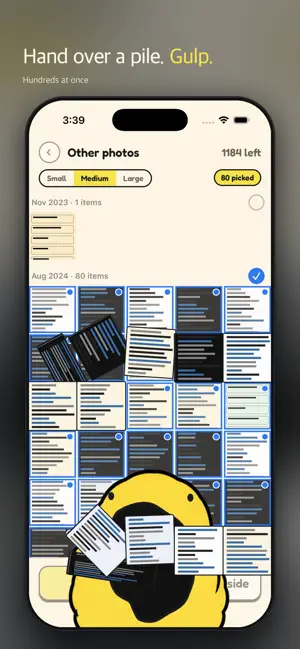
Screenshots, downloaded files, images apps saved — they pile up. Nom eats them. Nom is a yellow blob. No expression, no nagging, no streaks to keep. Just hungry. Feeding is not deleting • What Nom eats sits in its belly. Have it spat back out any time — after 7 days Nom asks whether to digest. • Only Digest deletes for real. Photos then stay in Recently Deleted for another 30 days. • Files stay in the folder when fed; they only leave Nom’s list. Only “Digest” deletes them. • Files have no Recently Deleted, so Nom lists them by name and asks once more. Picking • Every screenshot you have left, laid out like the Photos app. Tap the ones you don't need. • Tap a month to take the whole month, then tap back whatever you want to keep. • Pinch for 3, 5 or 8 across. Press and hold to see one large and flip through them. • Favourites and anything from the last 24 hours never show up. Photos with a location, Live Photos and portraits are kept out of Other photos too. What it eats • Screenshots • Other photos — not screenshots, and not ones that look camera-taken. App-saved images land here • Videos and screen recordings — biggest first, press and hold to play one • PDFs and zips in your Downloads folder Keeping something? Set it aside • Tap Set aside and Nom leaves it alone. • Send them to a Photos album later, all at once. The photo stays where it is — only the album is new. No subscription. Clear 50 free every day, and 50 more each time you watch an ad. Settings keeps a running total of what you've freed. Photos never leave your phone. No account, no sign-in.
What’s new
Version 1.1.1 · Updated October 7, 2026
• Early bird: start by Oct 31 and get 100 a day, for good • 50 free a day, +50 per ad • Home shows your belly at a glance • Small fixes
App privacy
The developer, Younghwa Kim, reported these privacy practices to Apple.
Data Not Linked to You
The following data, which may be collected but is not linked to your identity, may be used for the following purposes:
- Location: Coarse Location
- Identifiers: Device ID, User ID
- Usage Data: Product Interaction, Advertising Data
- Diagnostics: Crash Data, Performance Data, Other Diagnostic Data
Used for: Third-Party Advertising, Analytics, App Functionality