

FamilyGraph: Family Tree
Takuya Abe Lifestyle iPhoneiPadiPod touch
FamilyGraph: Family Tree is a free Lifestyle app for iPhone and iPad by Takuya Abe. Requires iOS 18.0. Updated October 20, 2026.
- Price
- Free
- on the App Store
- Size
- 83 MB
- Age 4+
- Updated
- Oct 20
- 2026 · v1.2.1
Screenshots



About FamilyGraph: Family Tree
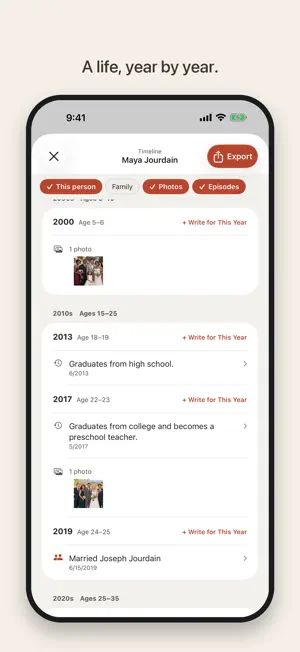
FamilyGraph is a family tree app that brings your family's connections, photos, and memories together in one place. Build your family tree Add people and relationships (parent-child, spouse, partner), and FamilyGraph builds your family tree automatically. Multiple marriages, separations, and bereavements are all supported. Generation bands show at a glance which generation you're looking at. Switch the person at the center at any time, zoom out to see the whole tree, or explore it in 3D Family Tree. Go Back in Time shows who in your family was alive in a chosen year, and how old they were. Use − and + to show your family one step wider or narrower at a time, and in the 3D Family Tree each family spreads out into its own branch. Connect photos to people Add several photos at once and tag each face to the right person. You can also send photos from the Share menu in the Photos app. Photos from the same scene are grouped into large cards. Register photos from a wedding, memorial, trip, or other event as an Event, and they appear on the timeline of everyone in them. For old photos with no date, tap "Around what year?" to add an approximate year. Type an address into a photo's location and a pin drops on the map. Bring black-and-white photos to color Add AI-estimated color to old black-and-white photos (part of the Unlimited Version; you can preview the result on your own photos before buying). Processing happens entirely on your device, and photos are never uploaded. The original is kept, so you can switch back or delete the color version at any time. Every life, as a timeline A person's page brings together their family's faces, photos, and timeline. The timeline lays out births, marriages, events, and photos decade by decade. A Profile brings together Life at a Glance, family, photos, episodes, and timeline, and can be exported as a PDF (A4 landscape spread) or an HTML file. Question cards help you ask about memories, and Compare at Same Age places family members' face photos from the same age side by side. You can also record places of birth, occupations, maiden names, multiple phone numbers, email addresses, and addresses, and uncertain dates such as "c. 1925". Over the New Year holidays, your timeline suggests questions to ask when the family gets together, and you can keep the stories you hear in the Family Story Book. Find and tidy up Search people and photos together, merge two entries for the same person, and import people from Contacts. Keep your family's records safe All data is stored on your device, and can sync automatically across devices via iCloud. You can export and restore backup files at any time from Settings. Deleted people and photos can be restored from Recently Deleted for 30 days. A lock using Face ID, Touch ID, or your device passcode keeps sensitive family records private. Multilingual, in your colors Available in 13 languages: Japanese, English, Korean, Traditional Chinese, Simplified Chinese, German, Spanish, French, Italian, Portuguese (Brazil), Thai, Indonesian, and Vietnamese. Choose from five color themes under Screen Theme in Settings. Privacy-respecting by design No ads, no analytics, no data sent to our servers. Access to Contacts and Photos happens only through the system's standard picker, so the app never reads your entire library. Free to try The free version supports up to 5 people and 10 photos. The Unlimited Version (a one-time purchase, not a subscription) removes those limits and includes Photo Colorization.
What’s new
Version 1.2.1 · Updated October 20, 2026
• Fixed an issue where names and family members sometimes didn't appear in the family tree right after you added them. • You can now add siblings even when only one parent is registered. If you add a second parent later, they also become the siblings' parent (you can undo this). • When adding family, you can now see how many more people you can add for free. When you reach the limit, you can continue to the Unlimited Version right there. • The app now checks with you when you enter only a surname, or when someone with the same name already exists. • Improved the starting values for surname, gender, and birth date when adding family. • The sample family tree on the welcome screen now matches the real family tree. • Added "News & Feedback (X)" to Settings. • Other small display and translation improvements.
App privacy
The developer, Takuya Abe, reported these privacy practices to Apple.
Data Not Collected
The developer does not collect any data from this app.
Alternatives to FamilyGraph: Family Tree
Looking for apps like FamilyGraph: Family Tree? Here are 6 similar apps on the App Store. The highest rated is RootsLore (5.0/5), and all 6 are free to download.





| App | Rating | Price | Last updated | Compare |
|---|---|---|---|---|
| FamilyGraph: Family Tree | – | Free | October 20, 2026 | |
| Family Puzzle Tree | – | Free | May 27, 2026 | Compare |
| Famscape | – | Free | Jan 21, 2026 | Compare |
| MonuTree - Family Tree | – | Free | Oct 25, 2026 | Compare |
| Treelume | – | Free | Oct 7, 2026 | Compare |
| Heirloom Family Tree | – | Free | Aug 24, 2026 | Compare |
| RootsLore | 5.0 / 5 (1) | Free | Oct 12, 2026 | Compare |