

Renotify: Notification History
HAKJAE KIM Utilities iPhoneiPadiPod touch
Renotify: Notification History is a free Utilities app for iPhone and iPad by HAKJAE KIM. Rated 4.0/5 from 1 ratings. Requires iOS 27.0.
- Rating
- 4.0
- 1 ratings
- Price
- Free
- on the App Store
- Size
- 2 MB
- Age 4+
- Updated
- Oct 19
- 2026 · v1.3
Screenshots
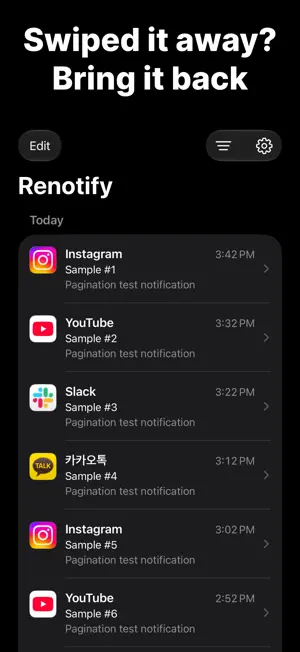


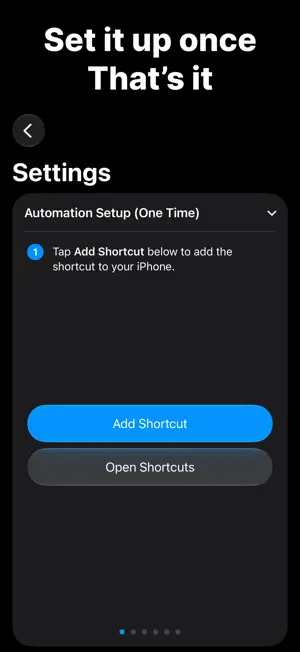
About Renotify: Notification History
Dismissed a notification by accident? Cleared one before you read it? Now you can see it again in Renotify. Renotify uses the Notification automation in iOS 27 Shortcuts to keep the notifications you receive on your iPhone. Set it up once, and new notifications are saved automatically. Features • Timeline: See your notifications grouped by day. • Search: Find past notifications by app name, title, or message. • Date & app filters: Show only a specific day or a specific app. • App icons: See at a glance which app each notification came from. • Light and dark themes, in English and Korean. One-time setup 1. In the Settings tab, tap Add Shortcut to add the shortcut. 2. In the added shortcut, choose the apps whose notifications you want to save. 3. Turn on Automation. That's it! (Send a test notification to check your setup right away.) Your notifications stay on your iPhone • Your history is stored only on your device. • No accounts, ads, or tracking. • Notification content is never sent to a server. Good to know • Requires iOS 27 or later. • Only notifications from apps added to the Shortcuts automation are saved. Add newly installed apps to the shortcut yourself. • Notifications are saved starting from when you install Renotify and turn on the automation. Contact: [email protected]
What’s new
Version 1.3 · Updated October 19, 2026
New features - Groups: Collect notifications from the apps and titles you choose in one place. (1 free, unlimited with Renotify Pro) - Group actions: Never miss important group alerts. Add them to Reminders, alert even in Focus, or repeat until you confirm. (Renotify Pro) - Notifications with dates: Renotify finds dates in your notifications and lists them by the nearest date. Set a reminder or add them to Calendar so you don't miss what matters. (Renotify Pro)
App privacy
The developer, HAKJAE KIM, reported these privacy practices to Apple.
Data Not Collected
The developer does not collect any data from this app.
Alternatives to Renotify: Notification History
Looking for apps like Renotify: Notification History? Here are 6 similar apps on the App Store. The highest rated is Notification History Archive (5.0/5), and 5 of the 6 are free to download.
-
 Notification History Archive
5.0
-
 선물차곡 : 편리한 기프티콘 멤버십 관리, 공유
-
 Missed - Notification Keeper
-
 인간지표 - 데이터 분석
-
 Evoke: Remote Desktop
-
 Server Engine
| App | Rating | Price | Last updated | Compare |
|---|---|---|---|---|
| Renotify: Notification History | 4.0 / 5 (1 rating) | Free | October 19, 2026 | |
| Notification History Archive | 5.0 / 5 (1) | Free | Oct 7, 2026 | Compare |
| 선물차곡 : 편리한 기프티콘 멤버십 관리, 공유 | – | Free | May 5, 2026 | Compare |
| Missed - Notification Keeper | – | Free | Oct 21, 2026 | Compare |
| 인간지표 - 데이터 분석 | – | Free | Mar 10, 2026 | Compare |
| Evoke: Remote Desktop | – | 6.99 USD | Oct 23, 2026 | Compare |
| Server Engine | – | Free | Jan 12, 2026 | Compare |