

CineCut: Video Editor & LUTs
Umair Wadood Photo & Video iPhoneiPadiPod touch
CineCut: Video Editor & LUTs is a free Photo & Video app for iPhone and iPad by Umair Wadood. Rated 5.0/5 from 1 ratings. Requires iOS 16.0.
- Rating
- 5.0
- 1 ratings
- Price
- Free
- on the App Store
- Size
- 207 MB
- Age 4+
- Updated
- Oct 21
- 2026 · v1.8
Screenshots


About CineCut: Video Editor & LUTs
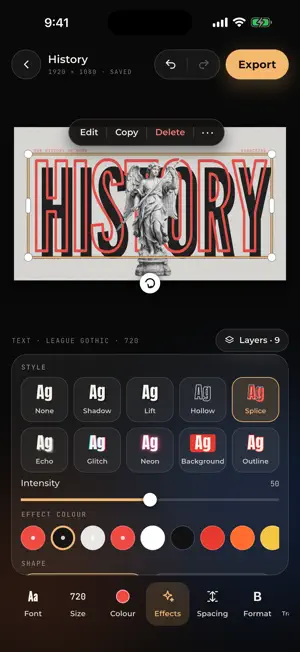
CineCut turns iPhone and iPad footage into cinematic video, edits your photos, and now designs your thumbnails, posts and posters too. It is built around real colour grades from photographer Umair Wadood: the same looks behind his Instagram work, calibrated for iPhone HDR footage so the colour you see is the colour you get. Pick a look, fine-tune it, export in full quality. PHOTOGRAPHY (FREE) • A full photo editor: light, colour, curves, colour grading, detail, optics and effects, with a live histogram • Masks: select the sky or the subject, or paint with a brush; linear, radial, colour and luminance masks • Crop, auto straighten, rotate and flip • 102 presets plus your own; JPEG, HEIF or 16-bit PNG export • Pro photo camera: ProRAW and RAW up to 48 MP, manual controls, bracketing DESIGN (FREE) • 59 templates for YouTube thumbnails, Instagram posts, stories, posters and ads • Swap the photos and words; your subject cut out and placed behind the title, on the device • Move, size, turn and snap anything; text effects and curved text; photo crop, adjust, looks and tones • Shapes, frames and stickers; layers you can lock, hide and reorder; resize to any format • Export JPEG or PNG with no watermark RECORD • Record in 4K, 60 fps, HDR with a look previewed live on the viewfinder; zoom glides between lenses • Pro camera: Apple Log (iPhone 15 Pro and later), manual ISO, shutter, white balance and focus, zebras, peaking and preview LUTs • A teleprompter that follows your voice • Or import any video, HDR or SDR PODCAST AUTO-CUT • Add your cameras and each person's mic: CineCut syncs them by sound and cuts to whoever is talking • Trims long pauses, mixes the voices, adds name tags and your logo; every cut stays editable LOOKS AND COLOUR • 23 calibrated looks for HDR, SDR and Apple Log footage, plus your own .cube LUTs • Log to Rec.709 for Apple, Sony, Canon, Panasonic, Fujifilm, Nikon, ARRI, DJI, RED and Blackmagic Log • Film stocks with halation, bloom and grain • Adjust, Colors, Curves, three-way Grade wheels, HDR zones and Glow • Color Warper, scopes, Compare and Shot Match; masks and My Looks AI TOOLS, ON THE DEVICE • Select the sky or any subject in one tap, tracked through the clip • Depth masks and cinematic background blur • Relight: add a light after the shot • Face Refinement: smooth skin, brighter eyes, whiter teeth, a subtle slim • Remove an object that walked through the shot • Smart Reframe for vertical video Nothing is uploaded; the AI runs on your iPhone or iPad. AUDIO • Voice Isolation, Hiss & hum, Dialogue Leveler, EQ, dynamics and voice effects • Mixer with meters, ducking, Auto mix and loudness targets GRAPHICS • 25 animated charts, lower thirds, quotes and text boxes from your own numbers and words, styled and animated your way A REAL EDITOR • Magnetic multitrack timeline with keyframes, overlays and blend modes • Speed ramps, and AI slow motion that plays at 60 fps • Auto captions; text in 30 fonts or your own, animated or following a subject • Music, extracted audio and voice-overs, Beat Sync and stabilisation • Transitions and every canvas; export in original quality, HDR preserved • Designed for iPhone and iPad, in portrait or landscape CINECUT PRO The editor is free. Free exports carry a small CineCut watermark and a short CineCut ending. Pro removes both, includes every look we add in future, and unlocks the AI tools (AI masks, Depth, Relight, Face Refinement, object removal), Auto mix, Dialogue Leveler, voice effects and graphics in exports. Monthly or yearly, with a free trial on the yearly plan. Payment is charged to your Apple ID account; subscriptions renew automatically unless cancelled at least 24 hours before the end of the period. Manage or cancel in your account settings. Help: https://cinecut.drumairwadood.com/ Privacy Policy: https://cinecut.drumairwadood.com/privacy/ Terms of Use: https://www.apple.com/legal/internet-services/itunes/dev/stdeula/
What’s new
Version 1.8 · Updated October 21, 2026
Teleprompter, a camera that stays awake, and Storage. • Teleprompter: write or paste a script and read it beside the lens while you record, on iPhone and iPad. It scrolls at your speed, or follows your voice and waits when you go off script. Countdown, mirror, text size, and Urdu read right to left • The screen stays on while the camera is open and through every take, so the phone never dims or locks mid-recording. If you leave CineCut during a take, the take is kept • Storage: deleting a project now frees the space its clips and renders used. Filmmaking › Storage shows what CineCut uses and frees what earlier versions left behind • About: the version and how to reach us, from the ⓘ on the first screen • Fixes: titles and graphics in Montserrat, Archivo and Oswald show at their real weight again; leaving the Pro camera while it was starting no longer leaves it running; transparent Design photos keep their transparency with a look
App privacy
The developer, Umair Wadood, reported these privacy practices to Apple.
Data Not Linked to You
The following data, which may be collected but is not linked to your identity, may be used for the following purposes:
- Purchases: Purchase History
Used for: App Functionality
Alternatives to CineCut: Video Editor & LUTs
Looking for apps like CineCut: Video Editor & LUTs? Here are 6 similar apps on the App Store. The highest rated is Ocean: Video Editor (5.0/5), and all 6 are free to download.
-
 VisionCut: Pro Video Editor
-
 Bolti AI
-
 Wallovia
-
 Mobile Darkroom: Film & RAW
-
 Ocean: Video Editor
5.0
Ocean: Video Editor
5.0
-
 UMBRAL: Premium Photo Camera
| App | Rating | Price | Last updated | Compare |
|---|---|---|---|---|
| CineCut: Video Editor & LUTs | 5.0 / 5 (1 rating) | Free | October 21, 2026 | |
| VisionCut: Pro Video Editor | – | Free | Oct 21, 2026 | Compare |
| Bolti AI | – | Free | Aug 6, 2026 | Compare |
| Wallovia | – | Free | Aug 11, 2026 | Compare |
| Mobile Darkroom: Film & RAW | – | Free | Oct 12, 2026 | Compare |
| Ocean: Video Editor | 5.0 / 5 (1) | Free | Jun 11, 2026 | Compare |
| UMBRAL: Premium Photo Camera | – | Free | Oct 18, 2026 | Compare |