

EarnTime: Learn & Earn
ImprvHealth Education iPhoneiPadiPod touch
EarnTime: Learn & Earn is a free Education app for iPhone and iPad by ImprvHealth. Requires iOS 26.5. Updated September 30, 2026.
- Price
- Free
- on the App Store
- Size
- 12 MB
- Age 4+
- Updated
- Sep 30
- 2026 · v1.0
Screenshots

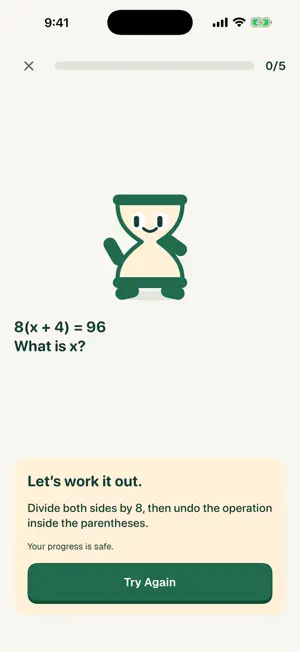
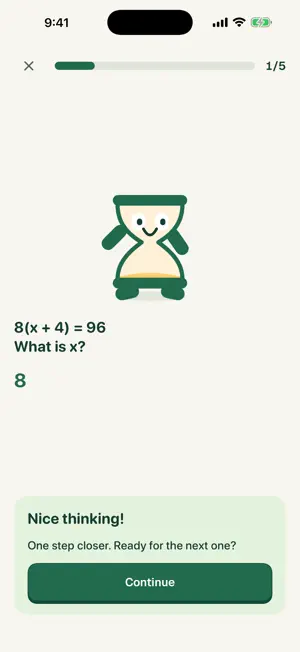

About EarnTime: Learn & Earn
Make learning a small, positive part of your screen-time routine. EarnTime combines short math, logic, and English challenges with optional time in selected apps. Use it for yourself without an EarnTime account, or set up a routine for your family. START FOR YOURSELF Choose Start for Myself to practice immediately. An EarnTime account and Family Sharing are not required for personal use. You can optionally authorize Apple Screen Time on your device and choose apps to limit. Personal app limits can be turned off from EarnTime. VARIED, OFFLINE PRACTICE Questions include arithmetic, patterns, logic, vocabulary, spelling, and grammar across grade and difficulty levels. Questions and answer choices are randomized. Incorrect answers keep you on the question with helpful feedback and Try Again. Practice works offline, builds learning progress, and does not award screen-time minutes. LEARN, THEN EARN Once app limits are configured, tap Earn minutes on your EarnTime home screen and complete a challenge. Each new reward starts one countdown for all selected apps, so you can switch between them. The countdown continues when you leave EarnTime or put your phone down. Earlier device usage does not reduce a new reward. Daily limits, cooldowns, and quiet hours still apply. Optional ending sounds depend on iOS notification, Silent mode, and Focus settings. SEE YOUR PROGRESS See correct answers for today, yesterday, and all time, plus a seven-day chart and daily learning history. Build a learning streak, earn XP, and reach new levels. Levels do not change your screen-time limits. Learning history is saved on this device; deleting the app or changing devices can remove local history. SET UP YOUR FAMILY Guardians sign in with Apple and pair a child's device using a QR code or manual code. Children do not need an EarnTime email or password. Child Screen Time authorization requires the child's own Apple Account in the guardian's Apple Family Sharing group. Do not share an Apple Account or password. KEEP CONTROL Adjust the learning routine and app limits. Selected app information stays on the device. Guardian account deletion is available under Account. EarnTime is free, with no advertising, social feed, or in-app purchases. Requires iOS or iPadOS 26.5 or later. EarnTime manages only its own app restrictions; separate Apple Screen Time limits or restrictions from another app may still apply. Questions or feedback: [email protected]
App privacy
The developer, ImprvHealth, reported these privacy practices to Apple.
Data Linked to You
The following data, which may be collected and linked to your identity, may be used for the following purposes:
- Contact Info: Email Address, Name
- Identifiers: User ID, Device ID
- Usage Data: Product Interaction
- Diagnostics: Other Diagnostic Data
- Other Data: Other Data Types
Used for: App Functionality
Alternatives to EarnTime: Learn & Earn
Looking for apps like EarnTime: Learn & Earn? Here are 6 similar apps on the App Store. The highest rated is Junga Co (4.8/5), and all 6 are free to download.
-
 Umka: Kids Math & Screen Time
-
 Junga Co
4.8
Junga Co
4.8
-
 Screen Smart
-
 Earn Screen Time: Kids Chores
3.2
Earn Screen Time: Kids Chores
3.2
-
 Parental Control - ScreenTreat
4.4
Parental Control - ScreenTreat
4.4
-
 Campus Mobile Payments
2.4
Campus Mobile Payments
2.4
| App | Rating | Price | Last updated | Compare |
|---|---|---|---|---|
| EarnTime: Learn & Earn | – | Free | September 30, 2026 | |
| Umka: Kids Math & Screen Time | – | Free | Aug 30, 2026 | Compare |
| Junga Co | 4.8 / 5 (6) | Free | Aug 5, 2026 | Compare |
| Screen Smart | – | Free | Oct 13, 2026 | Compare |
| Earn Screen Time: Kids Chores | 3.2 / 5 (5) | Free | Oct 5, 2026 | Compare |
| Parental Control - ScreenTreat | 4.4 / 5 (14) | Free | Oct 19, 2026 | Compare |
| Campus Mobile Payments | 2.4 / 5 (7) | Free | Aug 26, 2026 | Compare |