

LinkFold: Bookmark Saver
Codekyt Software LLP Productivity iPhoneiPadiPod touch
LinkFold: Bookmark Saver is a free Productivity app for iPhone and iPad by Codekyt Software LLP. Requires iOS 17.0. Updated November 10, 2026.
- Price
- Free
- on the App Store
- Size
- 27 MB
- Age 17+
- Updated
- Nov 10
- 2026 · v1.3.0
Screenshots
Save to Pinterest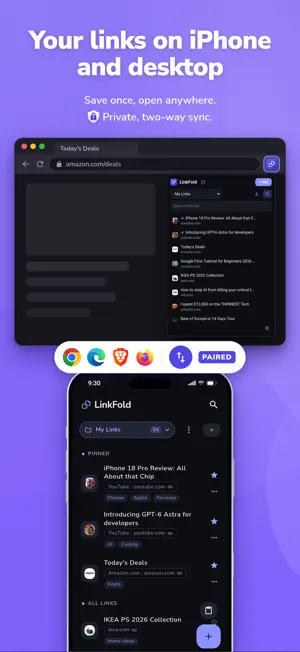


About LinkFold: Bookmark Saver
LinkFold is a private bookmark manager with two-way sync between your iPhone and your computer. Add the LinkFold browser extension on your desktop: save a page there and it appears on your iPhone, and changes you make on your iPhone show up in your browser. Synced links are end-to-end encrypted, readable only on your devices, with no account and no ads. LinkFold is available in 10+ languages, including German, French, Spanish, Dutch, Japanese and Korean. • Two-way sync with up to 5 desktop browsers (LinkFold Plus) • Open any saved link in one tap from a home screen widget • Paste a link copied in any app, or save from the built-in browser • Smart Tags and smart search to find any link fast • Lists with pins, notes, reminders, Face ID lock and dark theme Upgrade to LinkFold Plus for browser sync, multiple lists, backup and restore, an archive, and export of tagged links. TWO-WAY SYNC WITH YOUR DESKTOP Add the LinkFold extension to Chrome, Edge, Brave or Firefox, and scan the QR code it shows with the app. Choose which lists sync. Pages you save in your browser appear in LinkFold on your phone, and links you add or change on your phone appear in your browser. Connect up to 5 browsers, at work and at home. There is no account or password: synced links are end-to-end encrypted so only your devices can read them. YOUR LINKS ON THE HOME SCREEN Add the LinkFold widget in medium or large size and it shows your saved links, ready to open straight from the home screen. Touch and hold the widget and choose Edit Widget to pick which list it shows, a light, dark, or automatic background, the text size, and whether web addresses and the header appear. SAVE A LINK IN SECONDS Paste a web address and LinkFold fills in the page title and site icon. Share a link into LinkFold from any app, or save the page you are reading in the built-in browser. A link saved offline completes itself the next time you are online. SMART TAGS AND SMART SEARCH Lists decide where a link lives; tags describe what it is about, so one link can sit under several topics at once. Pick tags from suggestions as you save, and tap any tag to see its links from all your lists. Search every list at once and see the best matches first, filter by one or more tags, and long-press results to act on several links together. ORGANIZE LINKS YOUR WAY Keep links in lists, shown as tabs with a count on each. Pin favourites to the top and drag anything else into place. Add a note, an emoji or your own image to a link, and set a reminder to come back to it later. Recently opened links stay in your history, and deleted ones wait in the trash for 30 days. MAKE IT FIT YOUR PHONE Choose a light or dark theme, lock the app with your fingerprint, face or PIN, and pick the app's language. Open links in the built-in browser or any other app, and export any list to plain text or CSV. LINKFOLD PLUS Upgrade for the premium LinkFold experience. Sync your lists with up to 5 desktop browsers. Create as many lists as you need, each with its own name, colour and widgets. Back up your whole library and restore it on a new phone. Archive links without deleting them, and export the links from any tagged search as a text or CSV file. PRIVATE BY DESIGN, NO APP ACCOUNT Your links, lists, notes and images are stored on your device, and no account is required. With browser sync, only the lists you choose leave your phone, end-to-end encrypted; turning sync off deletes the synced copy from the server. The app uses usage and crash reporting to improve reliability; web addresses, titles, notes and list names are not included in it. Privacy Policy: https://apps.codekyt.com/legal/privacy/ Terms of Use: https://apps.codekyt.com/legal/terms/
What’s new
Version 1.3.0 · Updated November 10, 2026
Introducing Browser Sync for LinkFold Plus: • Keep your links in step between your phone and computer with two-way sync. • Save any page on your desktop in one click and find it on your phone. • Get the new extension for Chrome, Edge or Firefox. End-to-end encrypted, no account needed. • Performance and stability improvements.
App privacy
The developer, Codekyt Software LLP, reported these privacy practices to Apple.
Data Not Linked to You
The following data, which may be collected but is not linked to your identity, may be used for the following purposes:
- Location: Coarse Location
- Identifiers: Device ID
- Usage Data: Product Interaction
- Diagnostics: Performance Data, Crash Data
- Purchases: Purchase History
Used for: Analytics, App Functionality
Alternatives to LinkFold: Bookmark Saver
Looking for apps like LinkFold: Bookmark Saver? Here are 6 similar apps on the App Store. The highest rated is Cataloger AI (5.0/5), and all 6 are free to download.
-
 Cataloger AI
5.0
-
 Vocce: AI Receptionist
-
 AI Employees by Heynet
4.3
-
 Digital Signature Stamp E Sign
4.2
-
 Widget Web 27
4.2
-
 Foxit eSign
3.3
| App | Rating | Price | Last updated | Compare |
|---|---|---|---|---|
| LinkFold: Bookmark Saver | – | Free | November 10, 2026 | |
| Cataloger AI | 5.0 / 5 (1) | Free | Oct 26, 2026 | Compare |
| Vocce: AI Receptionist | – | Free | Nov 12, 2026 | Compare |
| AI Employees by Heynet | 4.3 / 5 (3) | Free | Jul 19, 2026 | Compare |
| Digital Signature Stamp E Sign | 4.2 / 5 (58) | Free | Jan 9, 2025 | Compare |
| Widget Web 27 | 4.2 / 5 (171) | Free | Oct 22, 2026 | Compare |
| Foxit eSign | 3.3 / 5 (14) | Free | Jul 10, 2026 | Compare |