

Lift Diary
Hyunjin Jang Health & Fitness iPhoneiPadiPod touchApple Watch
Lift Diary is a free Health & Fitness app for iPhone and iPad by Hyunjin Jang. Requires iOS 15.5. Updated November 1, 2026.
- Price
- Free
- on the App Store
- Size
- 29 MB
- Age 4+
- Updated
- Nov 1
- 2026 · v0.1.12
Screenshots


About Lift Diary
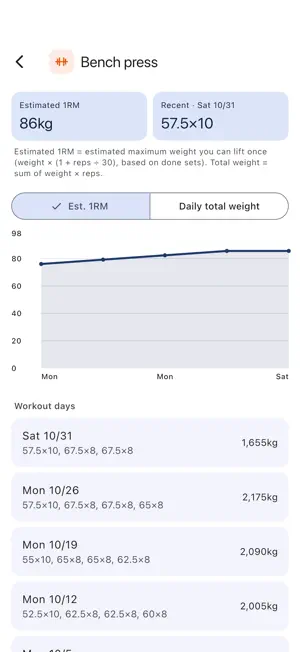
Open it, tap one button, and log your first set. No account, no setup. Lift Diary is a gym workout log. After each set, you write down the weight and reps in about 3 seconds. ■ Start the moment you open it There is no sign-up, no body measurements to enter and no tutorial. Tap "Start empty workout" on the Home tab and the exercise list opens. ■ About 3 seconds per set Pick an exercise, enter the weight and reps, and mark the set done. What you lifted last time shows faintly in each field, so when it is the same you only tap done. Buttons above the keyboard add +2.5 or +5, and one tap copies a set to the sets below it. Weights are in kg. ■ Rest timer Marking a set done starts the rest timer. When the rest is over, you get a notification, even if you put your phone down. Each exercise can have its own rest time. ■ Routines Save your usual split, such as chest and triceps or back and biceps, as a routine. The workout starts with your exercises and last weights ready. You can also save the workout you just finished as a routine. ■ Colors and icons Each exercise has a muscle group color and an equipment icon. The week view shows which muscle groups you trained each day as colored dots. Choose a navy, charcoal or teal color theme. ■ Records that build up Workout days are filled in on the calendar, darker when the total weight is higher. For each exercise, see charts of estimated 1RM and total weight. When you finish a workout, the app tells you about any new record. ■ Apple Watch See the workout you started on your iPhone on your wrist: the weight and reps for your next set, a button to mark it done, the rest time left, and a tap on your wrist when the rest ends. ■ Nothing gets in your way No pop-ups cover the screen between sets or while the timer runs. You can keep your attention on the next set. ■ Your records stay on your device All records are stored on your device and are not sent to a server. Export a backup file and import it on a new device. App lock with a PIN or Face ID is also available. Contact: [email protected]
What’s new
Version 0.1.12 · Updated November 1, 2026
Added a 1RM calculator to exercise stats. Enter a weight and reps to see the estimate. Settings now shows when you last backed up, and Home reminds you when it has been a while. Backup files are checked more carefully when imported.
App privacy
The developer, Hyunjin Jang, reported these privacy practices to Apple.
Data Used to Track You
The following data may be used to track you across apps and websites owned by other companies:
- Identifiers: Device ID
Data Not Linked to You
The following data, which may be collected but is not linked to your identity, may be used for the following purposes:
- Location: Coarse Location
- Identifiers: Device ID
- Usage Data: Product Interaction
- Diagnostics: Crash Data, Performance Data
Used for: Analytics, App Functionality
Alternatives to Lift Diary
Looking for apps like Lift Diary? Here are 6 similar apps on the App Store. The highest rated is Quit Smoking Hero - Stop Now! (4.7/5), and all 6 are free to download.
-
 RoutineFlow: Daily Routine
-
 Lightly Weight Tracker
-
 Bodybuilding app: GymMonster
-
 MORA - 모라
-
 Quit Smoking Hero - Stop Now!
4.7
-
 Plankstar: Plank workout timer
3.5
| App | Rating | Price | Last updated | Compare |
|---|---|---|---|---|
| Lift Diary | – | Free | November 1, 2026 | |
| RoutineFlow: Daily Routine | – | Free | Sep 9, 2026 | Compare |
| Lightly Weight Tracker | – | Free | Jul 15, 2026 | Compare |
| Bodybuilding app: GymMonster | – | Free | Nov 4, 2026 | Compare |
| MORA - 모라 | – | Free | Oct 14, 2026 | Compare |
| Quit Smoking Hero - Stop Now! | 4.7 / 5 (21) | Free | Apr 13, 2026 | Compare |
| Plankstar: Plank workout timer | 3.5 / 5 (2) | Free | Oct 14, 2026 | Compare |
Compare Lift Diary with the top alternatives: ratings, updates, ASO score and keyword gaps →