

Flip Clock: Desk & Alarm Clock
Umesh Ghimire Utilities iPhoneiPadiPod touch
Flip Clock: Desk & Alarm Clock is a free Utilities app for iPhone and iPad by Umesh Ghimire. Requires iOS 26.0. Updated October 20, 2026.
- Price
- Free
- on the App Store
- Size
- 18 MB
- Age 4+
- Updated
- Oct 20
- 2026 · v1.1.0
Screenshots

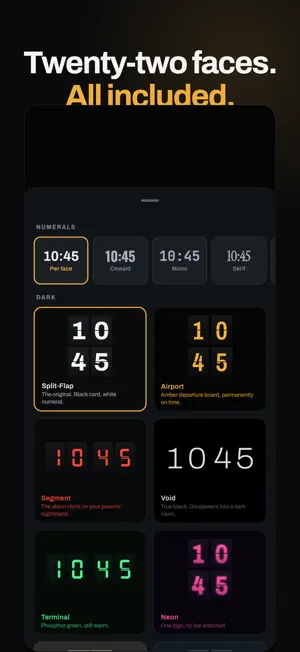


About Flip Clock: Desk & Alarm Clock
Seven days free. Then $1.99 a year — or one payment of $5.99 and it is yours for good. Two ways to pay, both unlocking exactly the same app. No advertising. No account to make. No analytics, no identifiers, nothing following you anywhere. Everything is in the seven days. Not a sampler — all twenty-two faces, the alarms, the world clock and the timers, for the full week, so you can decide after a week on your actual nightstand rather than from a screenshot. Stand your iPhone or iPad on a desk or a nightstand and Flip Clock becomes a split-flap clock you can read from across a room — a real mechanical flip, twenty-two faces, and a night mode you can genuinely sleep beside. THE FLIP IS THE POINT Most flip clocks fade one number into the next and hope you do not look closely. This one is drawn: the card folds about its seam in two stages, gravity pulls it through the turn, and it dips just past flat before it settles. It is the reason this app exists. TWENTY-TWO FACES, ALL OF THEM YOURS Split-Flap, Airport, Paper, Segment, Void, Station, Terminal, Neon, E-Ink, Brutalist, Cassette, Vintage Amber, Obsidian, Mercury, Gold Leaf, Midnight, Copper, Forest, Ivory, Sakura, Blueprint and Ink. Not a sampler with the good ones locked behind a higher tier. Every face is in the app from the first minute, along with five numeral typefaces — so the same face can read as an airport departure board or a station platform clock. BUILT FOR THE HOURS YOU LEAVE IT RUNNING This is the part other flip clocks skip, and it is the reason to choose this one for a nightstand. • Burn-in protection: the clock shifts a little every so often so no pixel holds a shape all night — and it rests between moves rather than animating, so it costs nothing to leave on • True black night mode, dimmable well below the system's own minimum brightness • Night warmth: the display shifts towards red after dark, because blue light is the part that keeps you awake • Nothing on the screen animates when nothing is changing ALARMS THAT ACTUALLY WAKE YOU Real system alarms — the same kind the built-in Clock uses. • They ring through Silent and through Focus • Full-screen on the Lock Screen, with Snooze and Dismiss • Repeat days, your own snooze length, as many as you want • Stored as a rule rather than a time, so they stay right when the clocks change AND THE REST • World clock for any city on earth, working entirely offline — the timezone database is built in • Focus timer, stopwatch and countdown, all on the same flip cards • Landscape or portrait, iPhone and iPad; stood upright it stacks hours over minutes and fills the screen • Three sizes, up to edge to edge • Optional weather for the cities you choose — no account, no key, no location permission • An optional mechanical flap sound, off by default, because people sleep next to this WHAT IT WILL NEVER DO Show you an advert. Ask for an email address. Create an account. Send a notification about anything other than the alarm you set. Measure what you do and sell it. The only network request the app can make is the weather, it is off until you turn it on, and it carries a latitude and a longitude and nothing else. Perfect as a desk clock, a bedside clock, a study timer or a kitchen timer. Already bought Flip Clock when it cost money? It stays yours. Nothing to pay and nothing to restore — the app recognises the purchase by itself. Requires iOS 26, which is what the alarms are built on. We would rather tell you that here than sell you a version with a piece missing. The subscription renews yearly until cancelled, and can be cancelled any time in the App Store at least a day before it renews. The one-off unlock never renews. Terms of Use: https://www.apple.com/legal/internet-services/itunes/dev/stdeula/ — Privacy Policy: https://ughimire.github.io/flip-clock-site/privacy.html
What’s new
Version 1.1.0 · Updated October 20, 2026
Flip Clock is now free to download, and the first seven days are free. Everything is in those seven days — all twenty-two faces, the alarms, the world clock and the timers — so you can decide after a week on your actual nightstand rather than from a screenshot. After that it is $1.99 a year, or one payment of $5.99 if you would rather own it outright and never renew anything. Still no ads, no account, nothing tracked. If you already bought Flip Clock when it cost money, it stays yours. Nothing to do, and nothing to pay again.
App privacy
The developer, Umesh Ghimire, reported these privacy practices to Apple.
Data Not Collected
The developer does not collect any data from this app.
Alternatives to Flip Clock: Desk & Alarm Clock
Looking for apps like Flip Clock: Desk & Alarm Clock? Here are 6 similar apps on the App Store.
-
 Speaker Dust Cleaner
-
 Prompt (Ai)
-
 CueNext
-
 ScanMe: QR & Barcode Scanner
-
 Convert All: Units Offline
-
 ContactVault Pro
| App | Rating | Price | Last updated | Compare |
|---|---|---|---|---|
| Flip Clock: Desk & Alarm Clock | – | Free | October 20, 2026 | |
| Speaker Dust Cleaner | – | Free | Oct 22, 2026 | Compare |
| Prompt (Ai) | – | Free | Jun 30, 2026 | Compare |
| CueNext | – | Free | Oct 18, 2026 | Compare |
| ScanMe: QR & Barcode Scanner | – | Free | Oct 20, 2026 | Compare |
| Convert All: Units Offline | – | 0.99 USD | Sep 1, 2026 | Compare |
| ContactVault Pro | – | 2.99 USD | May 6, 2026 | Compare |