

Unstare: Eye Break App Lock
Umair Hassan Health & Fitness iPhoneiPadiPod touch
Unstare: Eye Break App Lock is a free Health & Fitness app for iPhone and iPad by Umair Hassan. Requires iOS 18.0. Updated November 19, 2026.
- Price
- Free
- on the App Store
- Size
- 22 MB
- Age 4+
- Updated
- Nov 19
- 2026 · v2.1
Screenshots
Save to Pinterest


About Unstare: Eye Break App Lock
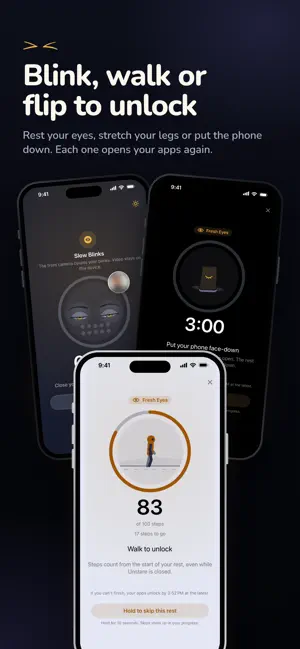
Scrolled for an hour without blinking? Unstare locks the apps that pull you in after a set stretch of use, then unlocks them once you've actually rested: eyes closed, slow blinks, a look into the distance, a short walk, or a phone flipped face down. No account. No ads. Nothing uploaded. How it works Pick the apps that pull you in: social, video, news, games. Up to 15 apps or categories. Scroll for 15, 20, 30 or 45 minutes, then rest. 20 minutes is the recommended start. One shared timer counts your combined time across every chosen app, so hopping between feeds doesn't reset it. Time's up: every chosen app locks at once, with a heads-up first. Take your break. Your apps unlock and the timer starts fresh. Step away from your chosen apps for 5, 10 or 15 minutes and the timer resets on its own. Eyes that show the strain A pair of eyes on Home grows tired, red and heavy as your timer runs, then looks fresh again after your break. If you allow it, they follow your own eyes through the front camera. Three levels Basic: a 20-second eye break every 20 minutes, then your apps unlock. The best place to start. Medium: the eye break, then 3 minutes with your phone face down. Hard: an eye break every 15 minutes, then a 200-step walk. Binge again and the next walk doubles. Start with Basic and move up if you still scroll too long. Choose how you rest Each eye break picks an exercise at random, or choose one: Close Eyes (the front camera checks they stay shut), Slow Blinks (to re-wet dry eyes) or Look Away (the classic 20-20-20 break). Then pick how your apps unlock: right away, after a short walk, with the phone face down, after a few more minutes, or Surprise, one at random. No camera? Timed Rest is a plain countdown. Modes and schedules Use the built-in modes or build your own. Schedules run modes automatically: Night Shield, Focus Hours and Rise & Walk are ready to go. Why Unstare It locks only what you choose. Messages, maps and work apps stay open unless you add them. A reminder is easy to swipe away; a locked feed waits until you rest. Short by design: on Basic, about one second of rest for every minute you scroll. An emergency pass when you truly need an app: wait a minute, give a reason, get 5 minutes, once a day. Progress shows your rest streak, eye breaks, rest minutes and steps, from today to all time. Live Activity and a Lock Screen widget show where the timer stands. Works with Focus Filters and Shortcuts. iPhone and iPad, light and dark mode, VoiceOver and large text. Private by design No account, no sign-in. No ads, analytics or tracking. Your app choices and Screen Time data stay on your device, handled by Apple's Screen Time framework. The camera runs only during an eye break, the onboarding blink demo and, if you allow it, while Home is open so the eyes can follow yours. It's processed on your device in real time and never recorded, saved or uploaded. You can turn the Home eyes off anytime. Unstare Premium Unstare requires a subscription. Choose Premium Monthly or Premium Yearly. Premium Yearly includes a 7-day free trial for new subscribers, with a reminder before it ends. Payment is charged to your Apple Account when you confirm the purchase. Your subscription renews automatically unless you cancel at least 24 hours before the end of the current period, and renewal is charged within the 24 hours before the period ends. Manage or cancel in your Apple Account settings. Any unused part of a free trial ends when you buy a subscription. Unstare is a wellness app that helps you build a habit of resting your eyes while you scroll. It isn't a medical device and doesn't provide medical advice. If you have concerns about your eyes, talk to an eye care professional. Terms of Use: https://www.apple.com/legal/internet-services/itunes/dev/stdeula/ Privacy Policy: https://unstare.com/privacy Questions or ideas: [email protected]
What’s new
Version 2.1 · Updated November 19, 2026
Improvements • Unstare now speaks Japanese, Arabic, German, French, Korean, Dutch, Spanish, Brazilian Portuguese and Simplified Chinese. Fixes • Small fixes and stability improvements.
App privacy
The developer, Umair Hassan, reported these privacy practices to Apple.
Data Not Collected
The developer does not collect any data from this app.
Alternatives to Unstare: Eye Break App Lock
Looking for apps like Unstare: Eye Break App Lock? Here are 6 similar apps on the App Store.
-
 BlinkBear
-
 HealSync
-
 DKL - Phlebotomists & Riders
-
 Look20: 20-20-20 Eye Break
-
 Hitokokyu: Pause Before Apps
-
 ねるぽん - ミニチュアレジンと寝る前スマホ防止
| App | Rating | Price | Last updated | Compare |
|---|---|---|---|---|
| Unstare: Eye Break App Lock | – | Free | November 19, 2026 | |
| BlinkBear | – | Free | Sep 21, 2026 | Compare |
| HealSync | – | Free | Oct 31, 2025 | Compare |
| DKL - Phlebotomists & Riders | – | Free | Jul 15, 2026 | Compare |
| Look20: 20-20-20 Eye Break | – | Free | Nov 21, 2026 | Compare |
| Hitokokyu: Pause Before Apps | – | Free | Oct 8, 2026 | Compare |
| ねるぽん - ミニチュアレジンと寝る前スマホ防止 | – | Free | Nov 20, 2026 | Compare |