

Guitar Chart Maker: Chords TAB
Kenichi Ando Music iPhoneiPadiPod touch
Guitar Chart Maker: Chords TAB is a free Music app for iPhone and iPad by Kenichi Ando. Requires iOS 15.0. Updated September 30, 2026.
- Price
- Free
- on the App Store
- Size
- 34 MB
- Age 4+
- Updated
- Sep 30
- 2026 · v1.0
Screenshots


About Guitar Chart Maker: Chords TAB
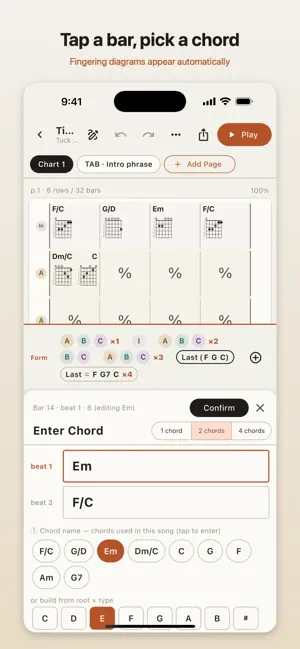
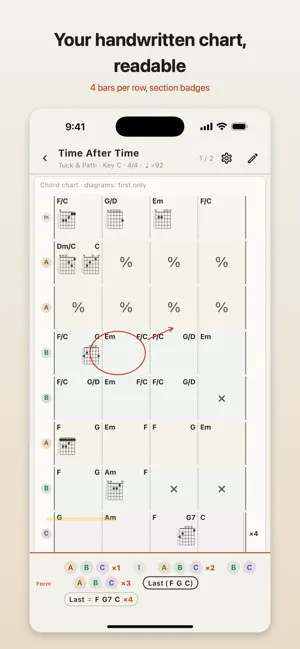
Guitar Chart Maker turns the chord charts guitarists scribble on paper into clean, readable charts on iPhone and iPad. WHO IT IS FOR - Band members who bring their own chord charts to rehearsals and gigs - Singer-songwriters who want to keep every song with its key and fingerings - Anyone who has been drawing chord grids in a notebook and wants them on a screen - Players who need the song form (A - B - Chorus x2 ...) on the same page as the chords THE SAME LAYOUT YOU WRITE BY HAND One row is 4 bars, one page is 8 rows. That is the shape guitarists have always used on paper, and it is the only shape this app draws. Tap a bar and pick a chord name: root, type (maj, m, 7, m7, maj7, dim, sus4, add9 and more) and an optional bass note. Fingering candidates come from a built-in dictionary of about 2,000 positions, ordered from the lowest position, so one more tap confirms the chord. Two chords in a bar sit left and right; three or four are laid out by beat. "%" (same as the previous bar) and "x" (rest) are one tap each. After confirming, the cursor moves to the next bar, so an 8-bar section takes seconds. DIAGRAMS YOU CAN ACTUALLY READ - Fret numbers on the left (1-5 for open position, the real fret for higher positions) - Finger numbers inside the dots, a bar for barre chords - x and o marks above the nut If the dictionary does not have the fingering you use, draw your own on a large 6-string, 5-fret grid and save it for the song. SECTIONS AND SONG FORM Mark bars as Intro, A, B, Chorus, Solo or your own label. Each row gets a round section badge on the left and a light color band. The strip at the bottom holds the song form (A B C x2 -> Last (F G C) and so on), entered with a dedicated keyboard. Long forms wrap onto two or three lines, so nothing is cut off while you play. TAB PAGES IN THE SAME SONG Add 6-line TAB pages for the intro lick or the solo. Tap a line, type the fret number on the keypad, and add h, p, s, b or ~ marks for hammer-ons, pull-offs, slides and bends. PLAY MODE - The screen never locks - iPad in landscape shows two pages side by side: 64 bars without turning a page - Diagrams: all, none, or first appearance only - Text size S, M, L; dark (inverted) display; section colors on or off - Turn pages by tapping the edge, swiping, or with a Bluetooth foot switch (PageUp, PageDown, arrow keys) - Build a setlist and swipe up or down to move to the next song SAVE AND SHARE Each song is one file (.gccm) stored on the device. Send it to bandmates with AirDrop or mail from the share sheet; they open it in the same app. Songs moved to the trash can be restored for 30 days. LIGHT AND DARK Follows the system setting: paper tones in the light, inverted for dark stages. PREMIUM (ONE-TIME PURCHASE) - Removes all ads - PDF export (A4 or Letter), AirPrint printing and PNG image export - My Chords: reuse your own fingerings in every song, with export and import The free version has no song limit. Charts, TAB, play mode and sharing are all included. REQUIREMENTS iPhone and iPad, iOS 15 or later. English and Japanese. SUPPORT Questions, requests and bug reports: https://tenmais.jp/contact/
App privacy
The developer, Kenichi Ando, reported these privacy practices to Apple.
Data Used to Track You
The following data may be used to track you across apps and websites owned by other companies:
- Location: Coarse Location
- Identifiers: Device ID
Data Linked to You
The following data, which may be collected and linked to your identity, may be used for the following purposes:
- Location: Coarse Location
- Identifiers: Device ID
Used for: Third-Party Advertising, Analytics
Alternatives to Guitar Chart Maker: Chords TAB
Looking for apps like Guitar Chart Maker: Chords TAB? Here are 6 similar apps on the App Store. The highest rated is dia - Guitar Chord Diagram (5.0/5), and all 6 are free to download.
-
 Scalewise
-
 BEST TAKES - Practice Albums
-
 Guitar Chord Editor: ChordGrid
-
 GuitarDiagram
-
 dia - Guitar Chord Diagram
5.0
dia - Guitar Chord Diagram
5.0
-
 Banjo Licks
5.0
Banjo Licks
5.0
| App | Rating | Price | Last updated | Compare |
|---|---|---|---|---|
| Guitar Chart Maker: Chords TAB | – | Free | September 30, 2026 | |
| Scalewise | – | Free | Jun 25, 2026 | Compare |
| BEST TAKES - Practice Albums | – | Free | Jun 22, 2026 | Compare |
| Guitar Chord Editor: ChordGrid | – | Free | Sep 21, 2026 | Compare |
| GuitarDiagram | – | Free | Jul 31, 2026 | Compare |
| dia - Guitar Chord Diagram | 5.0 / 5 (1) | Free | Aug 15, 2026 | Compare |
| Banjo Licks | 5.0 / 5 (4) | Free | Sep 15, 2026 | Compare |