

Compass Triangulation
Videre Research, LLC Navigation iPhoneiPadiPod touch
Compass Triangulation is a free Navigation app for iPhone and iPad by Videre Research, LLC. Requires iOS 17.6. Updated October 6, 2026.
- Price
- Free
- on the App Store
- Size
- 6 MB
- Age 4+
- Updated
- Oct 6
- 2026 · v1.3
Screenshots
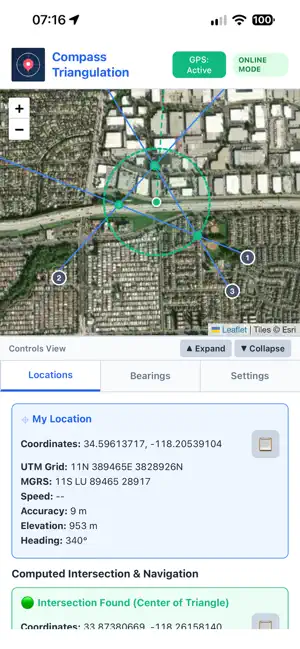
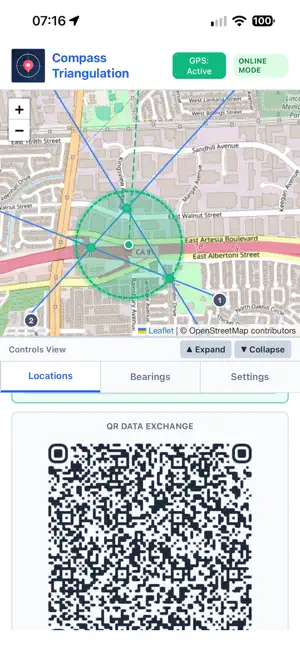
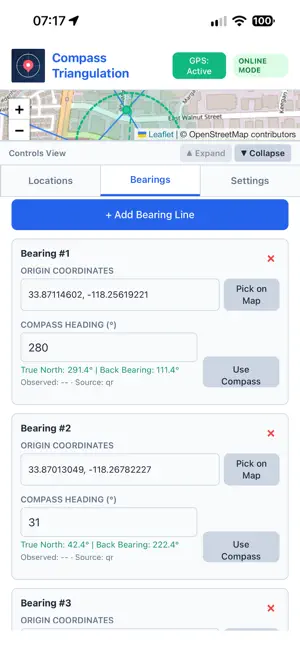
About Compass Triangulation
The Problem It Solves You can see something — smoke on a Ridgeline, a distress flare, a downed aircraft, an animal, a suspicious vehicle — but you can't reach it, and "somewhere over that way" isn't a location anyone can act on. If you and a teammate (or you, moving between two spots) can each take a compass bearing toward the same thing, the point where those bearings cross is its location. This is classical resection, the same technique search-and-rescue teams, surveyors, and foresters have used for decades — Compass Triangulation just does the trigonometry, the mapping, and the reporting for you, in the field, on your phone. Getting Started 1. Set Your Magnetic Declination Your compass points to *magnetic* north; maps and GPS coordinates use *true* north. The gap between them — declination — varies by location and drifts over time, and it has to be corrected for or your bearings will be off. Enter it manually under Settings, or, with Pro, let the app fetch the current value automatically from your GPS position. 2. Understand the Two Numbers Per Bearing Every bearing you add shows both the raw compass heading (magnetic) and the true-north-corrected heading — the app does this conversion for you so you never have to do it by hand under pressure. --- Adding Bearings You have three ways to add a bearing, and you can mix all three in the same session: 1. Live capture. With GPS on, point your phone in the direction of the object and tap to record your current location and the device compass's heading in one action. 2. Manual entry. Type in an origin location and a heading directly — useful for entering a bearing someone radioed in to you. 3. import via QR or link. If a teammate shares a bearing from their device, scan their QR code or open their link to add it to your session instantly. Add at least two bearings from different locations, aimed at the same object, for the app to compute anything. More bearings, and bearings taken from more different angles to each other, produce a tighter, more reliable result — two bearings that cross at a shallow angle leave more room for error than two that cross close to perpendicular. --- Reading the Result Once you have two or more non-parallel bearings, the app automatically shows: - The intersection point — the computed real-world location, as latitude/longitude, UTM, and MGRS - Triangulation Confidence (Good / Fair / Poor) — based on how sharply your bearings cross; the app tells you outright when your geometry is shaky, rather than just handing you a number - Estimated Uncertainty — a radius, shown as a dashed circle on the map, representing how much real-world error to expect around the computed point - Nearest address, when available The map shows every bearing as a line from its origin, your computed intersection as a marker, and the uncertainty circle around it. --- Sharing and Exporting - QR code or link, from the Share screen — this includes your declination setting, so whoever opens it gets the same real-world point regardless of what declination *their* device has set. - JSON export/import — your full bearing set, for backup or moving to another device. - GPX export *(Pro)* — for loading directly into Garmin devices, Gaia GPS, CalTopo, QGIS, or whatever mapping tool your team already uses.
What’s new
Version 1.3 · Updated October 6, 2026
Links shared now open the App.
App privacy
The developer, Videre Research, LLC, reported these privacy practices to Apple.
Data Not Collected
The developer does not collect any data from this app.
Alternatives to Compass Triangulation
Looking for apps like Compass Triangulation? Here are 6 similar apps on the App Store. The highest rated is SeaPeople: Boat Tracker (4.9/5), and all 6 are free to download.
-
 GPS Utility
3.7
GPS Utility
3.7
-
 kmaps.co - Navigate Offline
4.5
kmaps.co - Navigate Offline
4.5
-
 GPS Data – Coordinates & Speed
4.4
GPS Data – Coordinates & Speed
4.4
-
 CalConvert: Currency Converter
4.6
CalConvert: Currency Converter
4.6
-
 Madrid Metro - Map and Routes
4.7
Madrid Metro - Map and Routes
4.7
-
 SeaPeople: Boat Tracker
4.9
SeaPeople: Boat Tracker
4.9
| App | Rating | Price | Last updated | Compare |
|---|---|---|---|---|
| Compass Triangulation | – | Free | October 6, 2026 | |
| GPS Utility | 3.7 / 5 (3) | Free | Mar 7, 2025 | Compare |
| kmaps.co - Navigate Offline | 4.5 / 5 (259) | Free | Aug 4, 2025 | Compare |
| GPS Data – Coordinates & Speed | 4.4 / 5 (458) | Free | Apr 11, 2026 | Compare |
| CalConvert: Currency Converter | 4.6 / 5 (6,450) | Free | Oct 21, 2025 | Compare |
| Madrid Metro - Map and Routes | 4.7 / 5 (1,168) | Free | Apr 5, 2026 | Compare |
| SeaPeople: Boat Tracker | 4.9 / 5 (1,149) | Free | Aug 27, 2026 | Compare |