

PDF to Word Offline OCR
Aksana Aheika Productivity iPhoneiPadiPod touch
PDF to Word Offline OCR is a free Productivity app for iPhone and iPad by Aksana Aheika. Requires iOS 17.0. Updated November 11, 2026.
- Price
- Free
- on the App Store
- Size
- 3 MB
- Age 4+
- Updated
- Nov 11
- 2026 · v1.0.2
Screenshots
Save to Pinterest


About PDF to Word Offline OCR
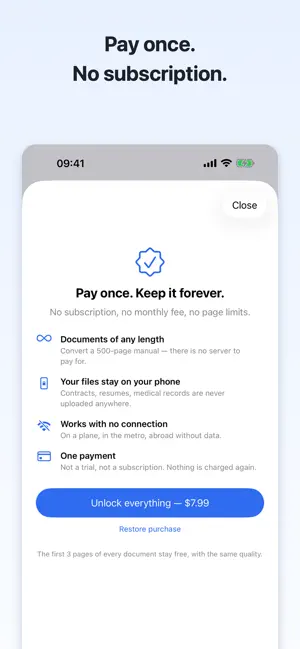
Convert a PDF into an editable Word document — entirely on your iPhone. No servers, no sign-up, no subscription. Other converters upload your file to their servers. That is why they charge every month, cap you at 20 pages, and stop working without a connection. This one does the whole job on your device, so none of that applies. WHAT YOU GET • A standard .docx that opens in Word, Pages, Google Docs and LibreOffice • Headings, paragraphs, lists, bold and italic, text colour, tables and images — kept, not flattened into plain text • Scanned pages recognised on the device • Documents of any length: a 500-page manual works like a one-page letter • Everything offline — on a plane, in the metro, abroad with no data YOUR FILES STAY YOURS Contracts, resumes, tax forms, medical records. Nothing is uploaded, there is no account, and the app collects no data at all. Airplane mode is a fair test. TRY BEFORE YOU PAY The first 3 pages of any document convert for free, at full quality — the real result, not a blurred preview. Unlock the rest with a single purchase. No subscription, no trial that charges you later. HONEST ABOUT LIMITS Text documents — contracts, resumes, letters, articles, reports — come out close to the original. Magazine-style multi-column layouts, deeply nested tables and text wrapped around images come out simplified: the text is all there, the arrangement is not. We would rather say so here than take your money and let you find out. HOW IT WORKS 1. Pick a PDF, or share one from Mail, Safari or Files 2. Watch it convert, page by page 3. Preview the result and send it wherever you need Privacy Policy: https://pdfconverter.slumbiapp.com/privacy/ Support: https://pdfconverter.slumbiapp.com/support/
What’s new
Version 1.0.2 · Updated November 11, 2026
Small improvements and fixes. If a purchase or restore does not go through, the app now reports an anonymous reason (such as a network error) so we can fix it faster. Details are in the Privacy Policy.
App privacy
The developer, Aksana Aheika, reported these privacy practices to Apple.
Data Not Linked to You
The following data, which may be collected but is not linked to your identity, may be used for the following purposes:
- Usage Data: Product Interaction
Used for: Analytics
Alternatives to PDF to Word Offline OCR
Looking for apps like PDF to Word Offline OCR? Here are 6 similar apps on the App Store. The highest rated is PDF to Word: Converter & OCR (4.0/5), and all 6 are free to download.
-
 MyDayfocus - Time Blocking
-
 Nooktide: AI Calendar Planner
-
 SlideCrop: Slide Scanner & PDF
-
 PDF to Word: Converter & OCR
4.0
-
 VisualGPT - Offline AI
-
 Convert PDF to PowerPoint
3.0
| App | Rating | Price | Last updated | Compare |
|---|---|---|---|---|
| PDF to Word Offline OCR | – | Free | November 11, 2026 | |
| MyDayfocus - Time Blocking | – | Free | Nov 24, 2026 | Compare |
| Nooktide: AI Calendar Planner | – | Free | Oct 29, 2026 | Compare |
| SlideCrop: Slide Scanner & PDF | – | Free | Nov 23, 2026 | Compare |
| PDF to Word: Converter & OCR | 4.0 / 5 (1) | Free | Nov 13, 2026 | Compare |
| VisualGPT - Offline AI | – | Free | Oct 1, 2025 | Compare |
| Convert PDF to PowerPoint | 3.0 / 5 (2) | Free | Jan 10, 2024 | Compare |