

LumoraMagic
Francois Guilleme Photo & Video iPhoneiPadiPod touch
LumoraMagic is a free Photo & Video app for iPhone and iPad by Francois Guilleme. Requires iOS 18.0. Updated October 16, 2026.
- Price
- Free
- on the App Store
- Size
- 148 MB
- Age 4+
- Updated
- Oct 16
- 2026 · v1.3
Screenshots
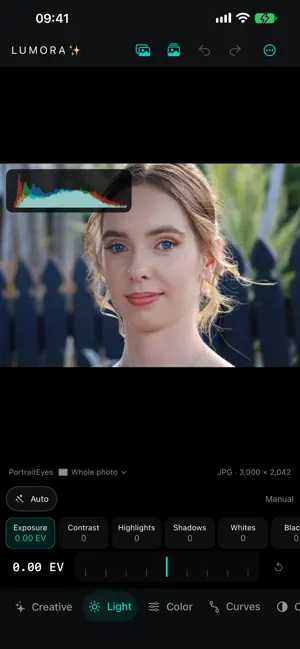


About LumoraMagic
Lumora is a complete photo editor built for precise adjustments in a clear, responsive interface that keeps your image at the center. Develop RAW files, fine-tune light and color, then apply adjustments to the entire photo or specific areas using flexible masking tools. Complete photographic controls - Exposure, contrast, highlights, and shadows - White balance and color adjustments - RGB, Red, Green, and Blue curves - Creative effects and photographic emulations - Sharpening, detail, and noise reduction - Crop, straighten, and perspective correction Advanced creative tools - Depth Lens for photographic depth-of-field effects - Directional Lighting with direct source and target positioning - Beauty retouching for portraits - Assisted Magic Selection - Brush, linear, and radial masks - Add or subtract areas within the same mask An interface designed around your photo Parameters are arranged in compact rows and adjusted with a precise graduated dial. Your photo keeps as much screen space as possible on both iPhone and iPad, in portrait or landscape orientation. Curves appear directly over the image in a translucent panel. Interactive tools such as Lighting, masks, and depth of field can be positioned directly on the photo. Presets and organization - Create and manage Lumora presets - Import XMP presets - Import images and RAW files directly from other apps - Access your Lumora library in Documents - Optional iCloud Drive synchronization Lumora brings RAW development, local adjustments, and creative tools together in one consistent workspace for both quick corrections and detailed photo editing.
What’s new
Version 1.3 · Updated October 16, 2026
What’s New in Lumora 1.3 - More room for your photos: compact tabs with icons and labels, collapsible adjustment panels, and clearer navigation. - Pinch and drag to crop, with a translucent area outside the crop and clearly named Instagram and TikTok formats. - Smoother curve editing and a more transparent overlay. The histogram stays subtle at rest and becomes more visible while dragging a control point. - New color similarity selection within an adjustable influence area: select a connected region or all similar pixels. - Smoother Magic Selection edges and corrected mask alignment after geometry transformations. - Expanded Lighting controls for surface detail, portrait shading, shadows, and the original light, with reduced edge halos. - Corrected white balance interpretation for imported Adobe XMP presets. - Animated loading messages and easier access to Help.
App privacy
The developer, Francois Guilleme, reported these privacy practices to Apple.
Data Not Collected
The developer does not collect any data from this app.
Alternatives to LumoraMagic
Looking for apps like LumoraMagic? Here are 6 similar apps on the App Store. The highest rated is Maple: Raw Photo Editor (5.0/5), and all 6 are free to download.
-
 Maple: Raw Photo Editor
5.0
-
 Cloudless Photo
-
 Lambda Photo
5.0
-
 PicForge - Photo Editor
-
 Raw Clinic
-
 FlowRec: Web & Screen Recorder
3.2
| App | Rating | Price | Last updated | Compare |
|---|---|---|---|---|
| LumoraMagic | – | Free | October 16, 2026 | |
| Maple: Raw Photo Editor | 5.0 / 5 (2) | Free | Oct 21, 2026 | Compare |
| Cloudless Photo | – | Free | Mar 17, 2026 | Compare |
| Lambda Photo | 5.0 / 5 (3) | Free | Oct 25, 2026 | Compare |
| PicForge - Photo Editor | – | Free | Sep 29, 2026 | Compare |
| Raw Clinic | – | Free | Jan 29, 2026 | Compare |
| FlowRec: Web & Screen Recorder | 3.3 / 5 (16) | Free | Oct 11, 2026 | Compare |
Compare LumoraMagic with the top alternatives: ratings, updates, ASO score and keyword gaps →