

Neaten: Organize Screenshots
HASAN BEKTAS Productivity iPhoneiPadiPod touch
Neaten: Organize Screenshots is a free Productivity app for iPhone and iPad by HASAN BEKTAS. Requires iOS 15.5. Updated November 2, 2026.
- Price
- Free
- on the App Store
- Size
- 32 MB
- Age 4+
- Updated
- Nov 2
- 2026 · v1.0.1
Screenshots
Save to Pinterest


About Neaten: Organize Screenshots
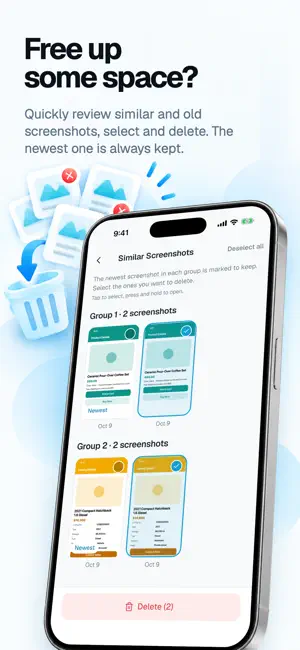
Hundreds of screenshots piling up in your camera roll? Neaten turns them into an organized, searchable library, automatically and privately on your iPhone. Neaten finds your screenshots, reads the text in each one and sorts it into the right category. That product you wanted, the flight you booked or the recipe you saved: find it in seconds instead of scrolling for minutes. SMART CATEGORIES Shopping, Travel, Places, Recipes, Finance, Documents, Conversations, Events, Listings, Health, Education, Jobs, Movies & Music and more. Every screenshot lands in the right place on its own, no folders to manage. On Home, each category shows a preview of the screenshots inside, so you can see what's where at a glance. SEARCH THE TEXT IN YOUR SCREENSHOTS Search sits right at the top of Home. Every word in every screenshot is searchable. Type "London flight", "black dress" or part of an address and it shows up right away, with your words highlighted. Not sure what to look for? Example searches give you ideas. TURN INFORMATION INTO ACTION - Prices, dates, flight and booking codes, addresses, phone numbers and links are picked out for you - Copy the text from any screenshot with one tap - Open links, share, or save screenshots you want to keep - Set a reminder so you never forget the deal, the ticket or the appointment CLEAN UP AND FREE UP STORAGE See similar and old screenshots side by side and delete the ones you no longer need in one go. When new screenshots pile up, scan them with a single tap and see what can go. Screenshots you saved are never suggested for deletion, and nothing is removed without your confirmation. SMARTER WITH APPLE INTELLIGENCE On iPhones that support Apple Intelligence, Neaten also writes a short title and summary for each screenshot. On iOS 27 it looks at the screenshot itself too: a landscape, a dish or a café photo with no text still lands in the right category with a meaningful title. All of it runs on your device. PRIVATE BY DESIGN Text recognition, sorting and AI analysis all happen on your device. Your screenshots are never uploaded to a server. No account, no sign-up, no ads. WORKS IN 8 LANGUAGES English, Turkish, Spanish, French, Portuguese, Indonesian, Russian and Arabic. Download Neaten and give your screenshots a home. Privacy Policy: https://hasanbektas1.github.io/neaten-web/privacy Terms of Use: https://hasanbektas1.github.io/neaten-web/terms
What’s new
Version 1.0.1 · Updated November 2, 2026
• Refreshed Home: categories now show a preview of the screenshots inside. • Search now lives on Home, with example searches to help you find things faster. • Scan new screenshots with a single tap from the Clean Up screen. • On iOS 27, Apple Intelligence also looks at the screenshot itself, so even photos without text land in the right category. Everything still stays on your device. • iOS 27 support, performance improvements and bug fixes.
App privacy
The developer, HASAN BEKTAS, reported these privacy practices to Apple.
Data Not Collected
The developer does not collect any data from this app.
Alternatives to Neaten: Organize Screenshots
Looking for apps like Neaten: Organize Screenshots? Here are 6 similar apps on the App Store. The highest rated is Voice Blogger (5.0/5), and all 6 are free to download.
-
 Voice Blogger
5.0
-
 Tray: Screenshots, Sorted.
-
 SimulTalk
-
 The Family Core
4.9
-
 Dayble - Habits & Routines
4.5
-
 ViewDo - Lock Screen To-Do
4.7
| App | Rating | Price | Last updated | Compare |
|---|---|---|---|---|
| Neaten: Organize Screenshots | – | Free | November 2, 2026 | |
| Voice Blogger | 5.0 / 5 (4) | Free | Nov 2, 2026 | Compare |
| Tray: Screenshots, Sorted. | – | Free | Aug 20, 2026 | Compare |
| SimulTalk | – | Free | Jan 8, 2025 | Compare |
| The Family Core | 4.9 / 5 (30) | Free | Nov 12, 2026 | Compare |
| Dayble - Habits & Routines | 4.5 / 5 (6) | Free | Nov 4, 2026 | Compare |
| ViewDo - Lock Screen To-Do | 4.7 / 5 (12) | Free | Sep 19, 2026 | Compare |