

Omakase: Meal Planner
VIBRA K.K. Food & Drink iPhoneiPadiPod touch
Omakase: Meal Planner is a free Food & Drink app for iPhone and iPad by VIBRA K.K. Requires iOS 16.4. Updated October 26, 2026.
- Price
- Free
- on the App Store
- Size
- 83 MB
- Age 4+
- Updated
- Oct 26
- 2026 · v1.0.7
Screenshots


About Omakase: Meal Planner
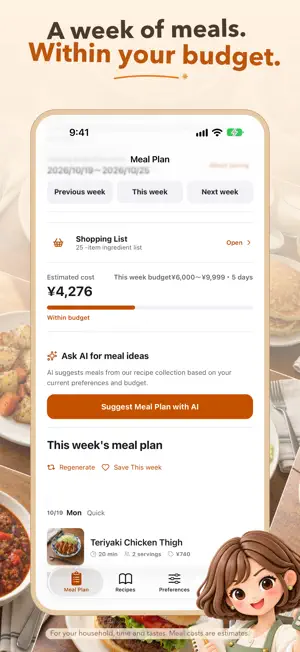
Plan a week of meals and keep your shopping list in one place. You can get started without creating an account; the weekly plan, recipes and shopping list require an auto-renewing subscription (weekly or annual). MAKE A PLAN THAT FITS YOUR WEEK Choose your cooking time, household size, preferences, and budget to get a weekly meal plan. Swap dishes and move them to the days that work for you. SHOP FROM YOUR PLAN Gather the ingredients you need into a shopping list. Check quantities for your household, mark items as purchased, add your own items, and share the list. KEEP RECIPES CLOSE Browse recipes by cuisine or ingredient, save favorites, and follow ingredients and steps while you cook. You can also ask AI for meal ideas. You review its suggestions before adding them to your plan. Partner sharing and cloud backup are available with an account; basic planning and AI suggestions do not require sign-in. The app displays no ads. The weekly plan, recipes and shopping list are available with an auto-renewing subscription (weekly or annual), purchasable and restorable in the app. Install advertising is measured only with tracking permission. The app shows what information is sent to AI when you use it. See our privacy policy for details. Terms of Use: https://vibra.jp/terms Cost and nutrition values are estimates. Dietary and allergy preferences do not guarantee safety; always check product labels and information from the provider. The app interface and recipe collection support 11 languages. Choose a language in Settings. End User License Agreement (EULA): https://www.apple.com/legal/internet-services/itunes/dev/stdeula/
What’s new
Version 1.0.7 · Updated October 26, 2026
Discover 100 classic recipes with new cookbook-style food photography. The welcome screen, recipe covers and onboarding recommendations now feature dishes from this collection. The onboarding companion now reacts to your answers with changing expressions and playful thought icons. Navigation headers have also been improved.