

TV Remote Control & Casting
洁 蒋 Utilities iPhoneiPadiPod touch
TV Remote Control & Casting is a free Utilities app for iPhone and iPad by 洁 蒋. Requires iOS 15.0. Updated October 7, 2026.
- Price
- Free
- on the App Store
- Size
- 25 MB
- Age 4+
- Updated
- Oct 7
- 2026 · v1.0.0
Screenshots


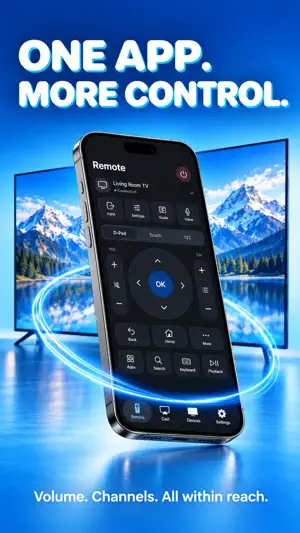

About TV Remote Control & Casting
Turn your iPhone or iPad into a remote for compatible smart TVs, and bring selected photos and videos to the big screen. Connect on the same Wi-Fi network, pair with your TV and keep everyday controls close at hand. ► EVERYDAY TV CONTROLS Navigate with a directional pad, touchpad or number pad. Adjust volume, mute sound, change channels and control playback where your TV supports them. ► KEYBOARD & VOICE INPUT Type with your device's keyboard or dictate text, review it and send it to a compatible TV text field. Text entry and voice typing depend on your TV and permissions. ► PHOTOS & VIDEOS ON TV Choose media from your library and send it to a compatible receiver. Control playback and enjoy your selected moments on a larger display. ► APP SHORTCUTS & INPUTS Access supported TV apps and switch inputs where available. The controls shown depend on your television's capabilities. ► CONNECT & PERSONALIZE Discover TVs on your local network or add an address manually. Save devices, adjust touch and haptic preferences, and use connection diagnostics when you need help. ► SCREEN MIRRORING GUIDE Follow the guide to start screen mirroring using the built-in AirPlay controls on your iPhone or iPad. An AirPlay-compatible receiver is required. Compatibility depends on TV model, firmware, network settings and enabled services. Your device and receiver must be on the same local network. PRO SUBSCRIPTION A Pro subscription is required for remote control and photo/video casting. Weekly, monthly and annual plans are offered. A free trial may be available to eligible accounts on selected plans; the purchase screen shows the current offer and price. Payment is charged to your Apple Account. Subscriptions renew automatically unless canceled at least 24 hours before the current period ends. Manage or cancel in your Apple Account subscription settings. Privacy Policy: https://clearwarejj.netlify.app/privacy_policy Terms of Use (EULA): https://clearwarejj.netlify.app/terms_of_service
App privacy
The developer, 洁 蒋, reported these privacy practices to Apple.
Data Not Collected
The developer does not collect any data from this app.
Alternatives to TV Remote Control & Casting
Looking for apps like TV Remote Control & Casting? Here are 6 similar apps on the App Store. The highest rated is Smart TV Remote & IPTV Player (5.0/5), and all 6 are free to download.
-
 TV Remote: Smart TV
-
 NoStrings: TV Remote Control
-
 Universal TV Remote: All TVs
4.5
-
 Smart TV Remote & IPTV Player
5.0
-
 AnyTV | Universal TV Remote
3.5
-
 Giga Plus
3.0
| App | Rating | Price | Last updated | Compare |
|---|---|---|---|---|
| TV Remote Control & Casting | – | Free | October 7, 2026 | |
| TV Remote: Smart TV | – | Free | Oct 15, 2026 | Compare |
| NoStrings: TV Remote Control | – | Free | Oct 26, 2026 | Compare |
| Universal TV Remote: All TVs | 4.5 / 5 (2) | Free | Oct 16, 2026 | Compare |
| Smart TV Remote & IPTV Player | 5.0 / 5 (7) | Free | Oct 23, 2026 | Compare |
| AnyTV | Universal TV Remote | 3.5 / 5 (2) | Free | Oct 23, 2026 | Compare |
| Giga Plus | 3.0 / 5 (1) | Free | Oct 12, 2026 | Compare |