

NotchPrompter: Teleprompter
Magnus Ramm Productivity iPhoneiPadiPod touchMac
NotchPrompter: Teleprompter is a free Productivity app for iPhone and iPad by Magnus Ramm. Requires iOS 18.0. Updated November 14, 2026.
- Price
- Free
- on the App Store
- Size
- 12 MB
- Age 4+
- Updated
- Nov 14
- 2026 · v1.1.1
Screenshots
Save to Pinterest
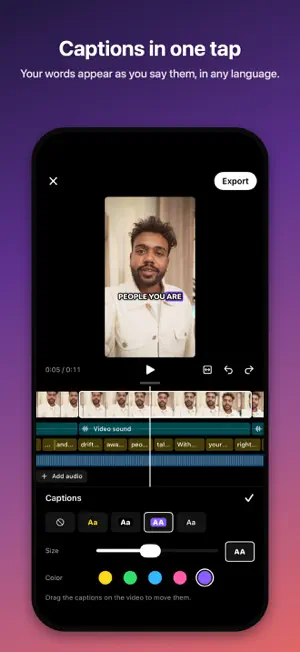


About NotchPrompter: Teleprompter
The official NotchPrompter app for iPhone, from the maker of NotchPrompter for Mac. Film yourself reading a script while you look straight into the camera. Then add captions, cut the pauses and share, all in one app. NotchPrompter shows your script at the top of your iPhone screen, right under the front camera. You read, and to the people watching it looks like you are talking straight to them. The editor then turns the take into a video that is ready for TikTok, Reels, Shorts and YouTube. No script? The editor works on any video from Photos too. CUT THE PAUSES IN ONE TAP Cut Pauses takes out the silent gaps between your sentences, so the video keeps moving. Clean up your voice too: less rumble and room noise, and loud and quiet parts evened out. (Pro) FOLLOWS YOUR VOICE, IN ANY LANGUAGE Press the microphone and just talk. NotchPrompter listens as you read and moves the text with you, so the next words are always right under the camera. Words you have said fade out. It sees which language your script is in and listens for it: English, Norwegian, German, Spanish, Japanese and dozens more. Nothing to set up. KEEPS UP WHEN YOU SKIP Skip a sentence, change a word, say "uh". NotchPrompter finds where you are and jumps ahead with you. Pause, take a breath: it waits. RECORD YOURSELF Press record to film yourself with the front camera while the script follows your voice. A countdown gives you time to get ready, and the recording can stop by itself at the end of the script. Use the iPhone microphone, AirPods, a headset or a USB microphone. CAPTIONS AND EDITING, FOR ANY VIDEO • Captions appear word by word as you speak, made on your iPhone • Trim, split and remove the parts you don't want • Add music, a voiceover you record, and text on the video (Pro) • Pick a format for TikTok, Reels, Shorts or YouTube (Pro) • Export to Photos and share MAKE IT YOURS Pick the font, the text size, the line spacing and a colour for the next word to say. Set how dark it is behind the text. Mirror the text or turn it upside down for a glass teleprompter rig. Choose from ten app icons. OR SCROLL AT YOUR OWN PACE Prefer a steady pace? Switch to Scroll, and set the speed and the text size. YOUR SCRIPTS Write and edit your scripts in the app, or import text, Markdown, RTF and HTML files from Files. Everything saves automatically and syncs with the Mac app through your iCloud. See the word count and about how long each script takes to read. FREE TO USE, PRO TO GO FURTHER Free, with no limit and no watermark: the prompter, voice-follow, scroll mode, recording, trimming, splitting, classic captions and export in 720p. Pro adds: • Export in 1080p and 4K, and film in 4K at 60 fps • Several videos in one: add clips from Photos and drag parts into a new order • Music and sound, and a voiceover you record over the video • Text on the video, more caption styles, and fixes to caption words • Cut pauses, clearer voice, speed and volume for each part • Format for TikTok, Reels, YouTube and more, and the look of the picture Get Pro by the month, by the year, or once for good. The prices are launch prices for now, and the one-time lifetime plan is only for sale through 2026. No ads, no account. Try Pro free for a week with the yearly plan. PRIVATE Speech is recognised on your iPhone. No account, no tracking. Your videos stay on your iPhone until you export them. Voice-follow never saves audio. ALSO ON THE MAC NotchPrompter for Mac is free and open source. It puts your script under the MacBook camera, for video calls and presentations. ABOUT PRO The monthly and yearly plans renew automatically until you cancel. You pay through your Apple Account when you confirm the purchase. Cancel at any time in your Apple Account settings, at least 24 hours before the plan renews. The lifetime plan is one payment. Terms of Use: https://www.apple.com/legal/internet-services/itunes/dev/stdeula/ Privacy Policy: https://magnram.github.io/notchprompter/privacy.html
What’s new
Version 1.1.1 · Updated November 14, 2026
Takes from the front camera on iPhone 17 models now save. If a take can't be saved, the message now says why.
App privacy
The developer, Magnus Ramm, reported these privacy practices to Apple.
Data Not Collected
The developer does not collect any data from this app.
Alternatives to NotchPrompter: Teleprompter
Looking for apps like NotchPrompter: Teleprompter? Here are 6 similar apps on the App Store. The highest rated is Top Notch Teleprompter (5.0/5), and all 6 are free to download.
-
 Orbi: To Do List & Reminders
-
 Top Notch Teleprompter
5.0
-
 EZ Outliner
3.7
-
 Teleprompter Video Prompter
-
 XSpeak: Live Meeting AI
4.5
-
 Hjarni Notes & Memory
5.0
| App | Rating | Price | Last updated | Compare |
|---|---|---|---|---|
| NotchPrompter: Teleprompter | – | Free | November 14, 2026 | |
| Orbi: To Do List & Reminders | – | Free | Nov 25, 2026 | Compare |
| Top Notch Teleprompter | 5.0 / 5 (1) | Free | Sep 4, 2026 | Compare |
| EZ Outliner | 3.7 / 5 (3) | Free | Aug 8, 2026 | Compare |
| Teleprompter Video Prompter | – | Free | Nov 3, 2026 | Compare |
| XSpeak: Live Meeting AI | 4.5 / 5 (2) | Free | Nov 22, 2026 | Compare |
| Hjarni Notes & Memory | 5.0 / 5 (1) | Free | Nov 25, 2026 | Compare |