

Ai Cal - Calorie Tracker
Jack Taylor Health & Fitness iPhoneiPadiPod touch
Ai Cal - Calorie Tracker is a free Health & Fitness app for iPhone and iPad by Jack Taylor. Requires iOS 15.0. Updated October 8, 2026.
- Price
- Free
- on the App Store
- Size
- 34 MB
- Age 4+
- Updated
- Oct 8
- 2026 · v1.0
Screenshots

About Ai Cal - Calorie Tracker
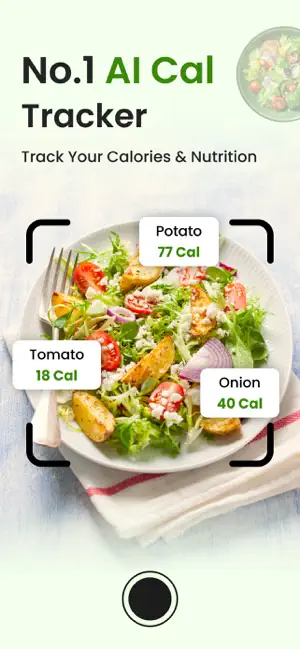
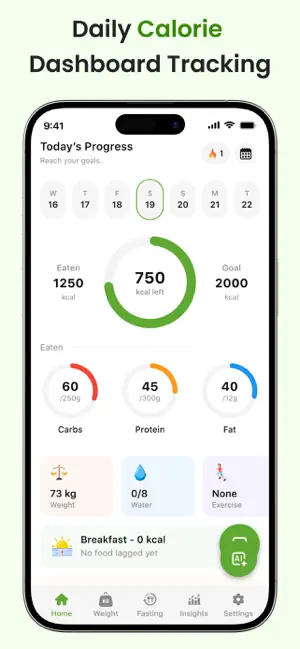
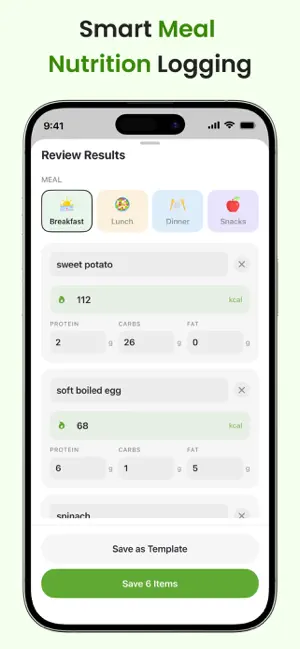
Make tracking your daily nutrition easier with AI Cal – Calorie Tracker. Whether you want to understand your eating habits, monitor your calorie intake, track your weight, or stay consistent with your daily wellness routine, AI Cal brings everything together in one convenient app. Simply capture a food photo, describe your meal, scan a barcode, or enter food details manually. AI-powered food recognition helps turn your meals into structured nutrition entries, making food tracking simple and convenient. # Smart Food Diary * Track Breakfast, Lunch, Dinner, and Snacks. * View daily calorie intake. * Monitor protein, carbohydrates, and fat. * Navigate between dates to view or update previous food entries. * Keep all your food records organized in one place. # AI-Powered Food Recognition * Take a picture of your meal and analyze its food items. * Describe your food using natural language. * Convert food descriptions into structured food entries. * Review recognized food items and nutrition information. * Save recognized meals as reusable meal templates. # Meal Templates & Quick Logging * Create custom meal templates. * Select meal names and meal types. * Save meals directly from AI recognition results. * Log an entire saved meal with one tap. * Reuse your frequently consumed meals whenever needed. # Recent Foods & Food Memory * Automatically organize recently used foods. * Search and filter your food history. * View how frequently you have logged each food. * Quickly add previous food entries. * Reuse saved food details without entering everything again. # Weight Tracking * Record your weight in kilograms or pounds. * Edit existing weight entries. * Automatically update your profile with your latest recorded weight. * Review your weight records over time. # Daily Water Intake * Track water intake using a simple glass counter. * Set your daily water target. * Start with a default target of 8 glasses. * Monitor your progress with a visual progress bar. * Record water intake for previous dates. # Exercise & Calories Burned * Add exercise names. * Record calories burned. * View your daily exercise calorie total. * Maintain timestamped exercise records. # Custom Intake Tracking Track more than just water. * Record coffee, tea, juice, and other beverages. * Set daily intake limits. * Monitor progress with color-coded indicators. * Use quick preset options for faster logging. * Review your intake by date. # Why Choose AI Cal? * AI-assisted food recognition. * Multiple food logging methods. * Organized daily food diary. * Calorie and macronutrient tracking. * Barcode and nutrition label scanning. * Custom meal templates. * Recent food shortcuts. * Weight and water tracking. * Exercise and custom intake tracking. * Personalized daily reminders. # Important Information AI Cal is intended for general nutrition and wellness tracking purposes only. Food recognition and nutritional estimates may not always be accurate. Always review and verify nutrition information before relying on it. The app is not intended to diagnose, treat, cure, or prevent any medical condition and should not replace professional medical advice. # Subscription Terms AI Cal offers auto-renewable subscriptions that provide access to premium features. Available subscription options: * Weekly Subscription: Renews every week. * Monthly Subscription: Renews every month. * Yearly Subscription: Renews every year. For more information: Privacy Policy: https://jacktaylor846413.blogspot.com/2026/09/privacy-policy.html Terms & Conditions: https://jacktaylor846413.blogspot.com/2026/09/terms-conditions.html End User License Agreement: https://jacktaylor846413.blogspot.com/2026/09/terms-conditions.html
App privacy
The developer, Jack Taylor, reported these privacy practices to Apple.
Data Used to Track You
The following data may be used to track you across apps and websites owned by other companies:
- Location: Coarse Location
- Identifiers: Device ID
- Usage Data: Product Interaction, Advertising Data
- Diagnostics: Crash Data, Performance Data
Data Linked to You
The following data, which may be collected and linked to your identity, may be used for the following purposes:
- Location: Coarse Location
- Identifiers: Device ID
- Usage Data: Product Interaction, Advertising Data
- Diagnostics: Performance Data
Used for: Third-Party Advertising, Analytics
Data Not Linked to You
The following data, which may be collected but is not linked to your identity, may be used for the following purposes:
- Diagnostics: Crash Data
Used for: Third-Party Advertising, Analytics
Alternatives to Ai Cal - Calorie Tracker
Looking for apps like Ai Cal - Calorie Tracker? Here are 6 similar apps on the App Store. The highest rated is Foda: AI Photo Calorie Counter (5.0/5), and all 6 are free to download.
-
 Chomp AI: Calorie Counter
-
 AI Calorie Counter-Cal Tracker
-
 Foda: AI Photo Calorie Counter
5.0
Foda: AI Photo Calorie Counter
5.0
-
 Cal Counter: AI Food Tracker
5.0
Cal Counter: AI Food Tracker
5.0
-
 CalRay - Calorie Tracking App
-
 Food Scanner Good or Bad
| App | Rating | Price | Last updated | Compare |
|---|---|---|---|---|
| Ai Cal - Calorie Tracker | – | Free | October 8, 2026 | |
| Chomp AI: Calorie Counter | – | Free | Oct 24, 2026 | Compare |
| AI Calorie Counter-Cal Tracker | – | Free | Jun 4, 2026 | Compare |
| Foda: AI Photo Calorie Counter | 5.0 / 5 (1) | Free | Oct 13, 2026 | Compare |
| Cal Counter: AI Food Tracker | 5.0 / 5 (3) | Free | Oct 20, 2026 | Compare |
| CalRay - Calorie Tracking App | – | Free | Oct 29, 2026 | Compare |
| Food Scanner Good or Bad | – | Free | Sep 30, 2026 | Compare |