

Easymail: Mail as a Chat
LORENZO MONTOLI Productivity iPhoneiPadiPod touch
Easymail: Mail as a Chat is a free Productivity app for iPhone and iPad by LORENZO MONTOLI. Rated 5.0/5 from 1 ratings. Requires iOS 18.0.
- Rating
- 5.0
- 1 ratings
- Price
- Free
- on the App Store
- Size
- 38 MB
- Age 4+
- Updated
- Nov 25
- 2026 · v0.1.29
Screenshots
Save to Pinterest


About Easymail: Mail as a Chat
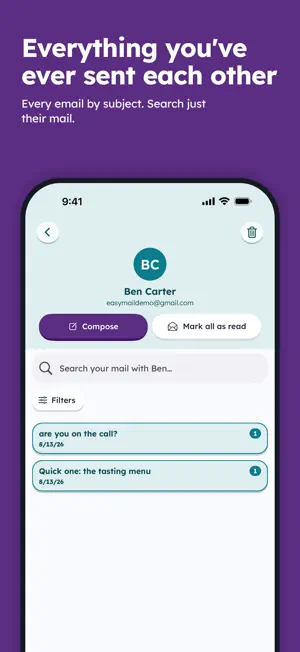
Your email now looks like a chat in an ordinary messaging app. Easymail shows the email you already have like the chats you read every day. Quoted text and signatures fold away on their own, leaving just the messages, one after the other, as in any messaging app. USE THE MAILBOX YOU ALREADY HAVE Easymail works with Gmail, Outlook, Hotmail, Yahoo, iCloud, and almost any other email provider. You keep your email address, and there's no Easymail account to create. Just sign in, and your mail is there. Got more than one mailbox? You can see them all together in one list, or one at a time. FREE, WITH NO ADS Easymail is free and shows no ads. Usage statistics tell us where the app gets stuck, but they never include anything from your mail. They're only sent if you agree, and you can turn them off in Settings. EVERY PERSON, ONE ROW Easymail gathers all of a person's emails into one row, like a chat list. Tap a name to find all your emails with them, listed by subject, and search just those. Emails you exchange with several people at once become a group, with one row for all of them. Prefer one row per conversation, like a boring old email app? Choose it in Settings. PEOPLE FIRST "People" shows only the people who really write to you. Newsletters, receipts, and automated messages stay in "All mail". When you open a newsletter, Easymail asks if you want to unsubscribe. One tap opens the sender's page so you can confirm. MAKE IT YOURS Choose from fourteen colors for your bubbles, and put a photo of your own behind your chats, even a different one for each person. Text comes in five sizes. When your iPhone is in Dark Mode, so is Easymail, and you can always change the theme in Settings. WHEN YOU WRITE Easymail has its own Contacts screen, where you add people and create groups. Yes, you read that right: email finally has an address book. Decide once and for all who goes in To, who in Cc, and who in Bcc, then add the group to a message with one tap. Attach photos straight from your photo library. EVERYTHING IN ITS PLACE Swipe right to archive a conversation, or left to move it to the trash. Press and hold to select more than one. Search your whole mailbox or filter it to show unread emails, favorites, messages with attachments, conversations you've written in, or a date range. Tap the subject at the top of a conversation for its summary: who wrote, the first and the last message, and every attachment. Finally, new mail shows up in your notifications. YOUR MAIL STAYS YOURS Nobody at Easymail ever reads your mail. The app talks directly to Google, Microsoft, or your email provider, always over an encrypted connection. Your mail travels between your phone and your provider without passing through any Easymail server. The only copy the app keeps is on your phone, and it's deleted when you sign out.
What’s new
Version 0.1.29 · Updated November 25, 2026
Easymail now has a tutorial and a new look for the subject and Chat info.
App privacy
The developer, LORENZO MONTOLI, reported these privacy practices to Apple.
Data Linked to You
The following data, which may be collected and linked to your identity, may be used for the following purposes:
- Usage Data: Advertising Data, Product Interaction
- Location: Coarse Location
- Identifiers: Device ID, User ID
- Diagnostics: Other Diagnostic Data, Crash Data
- Contact Info: Email Address, Name, Other User Contact Info
- User Content: Customer Support
Used for: Developer’s Advertising or Marketing, Analytics, App Functionality
Data Not Linked to You
The following data, which may be collected but is not linked to your identity, may be used for the following purposes:
- Location: Coarse Location
- Identifiers: Device ID
- Usage Data: Product Interaction
- Contact Info: Phone Number
Used for: Developer’s Advertising or Marketing, App Functionality
Alternatives to Easymail: Mail as a Chat
Looking for apps like Easymail: Mail as a Chat? Here are 6 similar apps on the App Store. The highest rated is MailToChat: Email to Text (5.0/5), and all 6 are free to download.
-
 BurdMail
-
 MailToChat: Email to Text
5.0
-
 WideMail Connect
-
 Saymail: AI Email Client
-
 EVRA AI
-
 Penvia: Email Messenger
5.0
| App | Rating | Price | Last updated | Compare |
|---|---|---|---|---|
| Easymail: Mail as a Chat | 5.0 / 5 (1 rating) | Free | November 25, 2026 | |
| BurdMail | – | Free | Nov 20, 2026 | Compare |
| MailToChat: Email to Text | 5.0 / 5 (1) | Free | Nov 21, 2026 | Compare |
| WideMail Connect | – | Free | Nov 20, 2026 | Compare |
| Saymail: AI Email Client | – | Free | Nov 1, 2026 | Compare |
| EVRA AI | – | Free | Oct 13, 2026 | Compare |
| Penvia: Email Messenger | 5.0 / 5 (1) | Free | Nov 24, 2026 | Compare |