

Lecture Recorder: Transcribe
Tiep Nguyen Productivity iPhoneiPadiPod touch
Lecture Recorder: Transcribe is a free Productivity app for iPhone and iPad by Tiep Nguyen. Requires iOS 26.0. Updated November 19, 2026.
- Price
- Free
- on the App Store
- Size
- 10 MB
- Age 4+
- Updated
- Nov 19
- 2026 · v1.1
Screenshots
Save to Pinterest


About Lecture Recorder: Transcribe
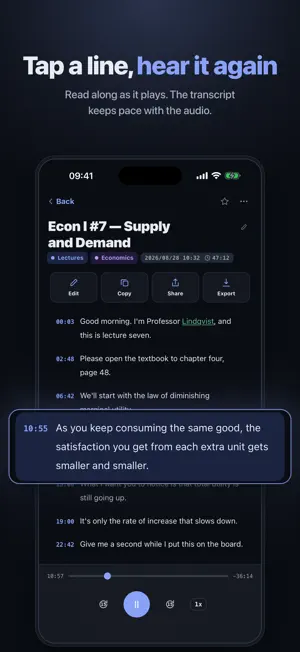
Record a lecture, a meeting or an interview, and read it back as text. Koedori turns speech into text on your iPhone itself, even offline, so it is free for as many hours and as many times as you like, with no account. Your audio never leaves the device. RECORD, THEN READ • Stop recording and transcription starts right away • Want words to appear as you speak? Choose While recording • Pause and resume as often as you like • Keeps recording with the screen locked. The Lock Screen and the Dynamic Island show the elapsed time, with Pause and Stop right there • A phone call pauses the recording, and it carries on afterwards • Recordings longer than three hours are split automatically, so nothing is lost • Titles are written for you from what was said, and you can rename them • If the app closes mid-recording, what was recorded up to then can be recovered VOICE MEMOS AND FILES TO TEXT • Transcribe a voice memo: in Voice Memos, tap Share and choose Koedori • Turn audio or video from the Files app, or videos from Photos, into text • Or share a recording from another app and choose Koedori LISTEN BACK • Tap any line of the transcript to play from there • The playing line stays in view as the audio runs; read elsewhere and "Back to playback" brings you home • Back 15 s, forward 15 s, and playback speed • Choose the text size, and show or hide timestamps • Edit mode lets you retype any line in place TEACH IT THE HARD WORDS • Add a correction ("heard as" and "should be") and Koedori rewrites your earlier notes, and fixes new ones the same way • Fix a word in a transcript and it is offered to your Dictionary to review; adding it is one tap REDO IT AS OFTEN AS YOU LIKE • Re-transcribe any note, in the language you pick, as many times as you want • When the Dictionary changes, notes it can fix say so, and one tap applies it FIND AND ORGANIZE • Search looks inside every transcript, not just the titles • Color tags for Lectures, Meetings, Interviews, Memos and Exam prep, plus your own; a note can carry several • Star, sort, and select many notes at once to tag or delete • Filter the list by tag, or show only starred notes EXPORT AND SHARE • Copy, share, or export as plain text, SubRip (SRT) or WebVTT subtitles, or Markdown • Choose whether the export carries timestamps, right in the sheet • Save the recording itself to Files • No limit on exports either • Delete a note's audio and keep its transcript YOUR AUDIO STAYS ON YOUR IPHONE • Recording and transcription both finish on the device. There is no code path that uploads audio • Each language's speech model is downloaded once, by iOS, from Settings. After that, recording and transcription work offline, even in Airplane Mode • Apart from iOS downloading a speech model, the app goes online only to show ads and send usage statistics, and neither ever carries your audio or your text. Usage statistics can be turned off FREE, WITH A FEW ADS • Transcription stays free and unlimited; short ads help keep it that way • A full-screen ad only ever comes after you finish something, such as leaving a note or sharing it, never while you record • Watch one short video and ads are off for 24 hours • Remove ads is a one-time purchase that turns every ad off LANGUAGES On-device speech recognition for about ten languages, including Japanese, English, Chinese, Korean, Spanish, French, German, Italian and Portuguese. Each language's speech model is a one-time download. Record before it is there and the note shows Waiting to transcribe, then is transcribed once the model is in.
What’s new
Version 1.1 · Updated November 19, 2026
• Clearer, more accurate explanations on the Dictionary, Re-transcribe and Export screens
App privacy
The developer, Tiep Nguyen, reported these privacy practices to Apple.
Data Used to Track You
The following data may be used to track you across apps and websites owned by other companies:
- Identifiers: Device ID
- Usage Data: Product Interaction, Advertising Data
Data Linked to You
The following data, which may be collected and linked to your identity, may be used for the following purposes:
- Location: Coarse Location
- Identifiers: Device ID
- Usage Data: Product Interaction, Advertising Data
- Purchases: Purchase History
Used for: Third-Party Advertising, Developer’s Advertising or Marketing, Analytics
Data Not Linked to You
The following data, which may be collected but is not linked to your identity, may be used for the following purposes:
- Diagnostics: Performance Data, Other Diagnostic Data, Crash Data
Used for: Third-Party Advertising, Developer’s Advertising or Marketing, Analytics
Alternatives to Lecture Recorder: Transcribe
Looking for apps like Lecture Recorder: Transcribe? Here are 6 similar apps on the App Store. The highest rated is Scanat (5.0/5), and all 6 are free to download.
-
 KeepScribe: Transcribe Audio
-
 Voispace: AI Voice Recorder
1.0
-
 Earshot Live Transcription
4.2
-
 Japanese Calendar Converter
4.5
-
 文字起こしアプリ
-
 Scanat
5.0
| App | Rating | Price | Last updated | Compare |
|---|---|---|---|---|
| Lecture Recorder: Transcribe | – | Free | November 19, 2026 | |
| KeepScribe: Transcribe Audio | – | Free | Nov 21, 2026 | Compare |
| Voispace: AI Voice Recorder | 1.0 / 5 (1) | Free | Nov 2, 2026 | Compare |
| Earshot Live Transcription | 4.2 / 5 (5) | Free | Oct 3, 2026 | Compare |
| Japanese Calendar Converter | 4.5 / 5 (2) | Free | Jul 7, 2026 | Compare |
| 文字起こしアプリ | – | Free | Nov 15, 2024 | Compare |
| Scanat | 5.0 / 5 (1) | Free | Nov 5, 2026 | Compare |