

Teleprompter: Float & Record
Yusuf Suhair Photo & Video iPhoneiPadiPod touch
Teleprompter: Float & Record is a free Photo & Video app for iPhone and iPad by Yusuf Suhair. Requires iOS 17.0. Updated October 12, 2026.
- Price
- Free
- on the App Store
- Size
- 1 MB
- Age 4+
- Updated
- Oct 12
- 2026 · v1.1.2
Screenshots

About Teleprompter: Float & Record
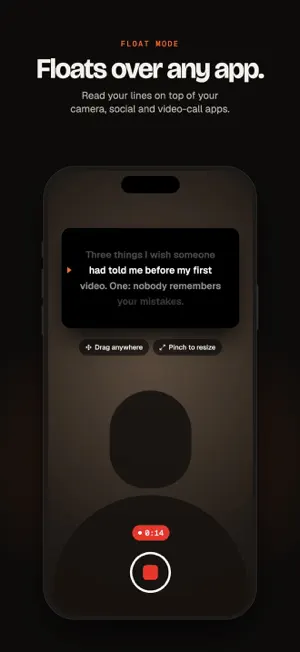
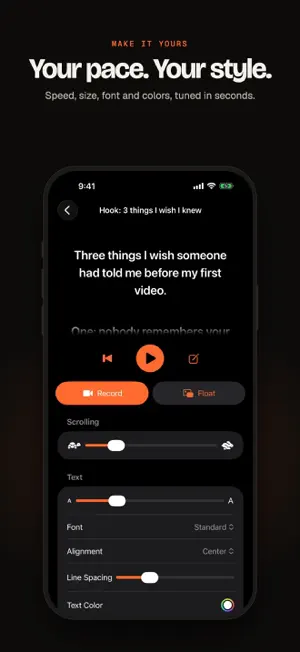
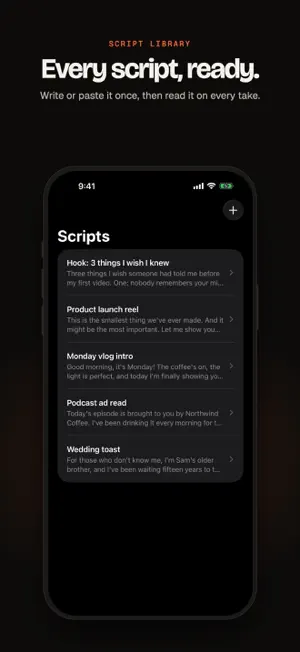
Teleprompter keeps your script right where your eyes are, so you can talk to the camera without looking away. FLOAT OVER ANY APP Tap Float, or just swipe home, and your script keeps scrolling in a small window on top of whatever you open: your camera, social and video-call apps. Drag it anywhere, pinch to resize, flick it to the edge to tuck it away, and play or pause right from the window. RECORD WITH IT BUILT IN Tap Record and the camera fills the screen with your script right under the lens. Drag, resize or edit the text box, count down 3-2-1, then watch each take back and choose Retake, Share or Save. FOLLOWS YOUR VOICE Turn on Follow My Voice and the script scrolls as you read aloud, and waits when you pause. No more fighting the speed slider. MAKE IT YOURS • A reading guide that marks the line to read • See how long each script takes to read at your speed • Scroll speed and text size, adjustable mid-take • Font, alignment, line spacing, text and background colors • A see-through background over the camera • Mirror mode for glass teleprompter rigs PRO CAMERA CONTROLS • 720p, 1080p or 4K at up to 60 fps, depending on your iPhone • HEVC or H.264, with stabilization • Grid, tap to focus and AE/AF lock • Front or back camera, and mirrored selfie video • Built-in, wired, USB or Bluetooth mics, with a live level meter • Apple's Background, Portrait and Studio Light effects, on iPhones that support them • Keyboard and presentation clicker control; the volume buttons or a Bluetooth shutter remote start and stop a take PRIVATE BY DESIGN No account, no ads, no tracking. Your scripts sync through your own iCloud and your recordings go to your Photos library.
What’s new
Version 1.1.2 · Updated October 12, 2026
• Follow My Voice now includes a language picker and a listening indicator. • Improved voice following after interruptions and when returning from the floating window. While floating, your script uses timed scrolling so other apps can use the microphone. • Added confirmation before deleting a script or discarding a take. • Camera resolution and frame-rate preferences are preserved when switching cameras. • Clearer camera controls and an Open Settings shortcut when camera access is denied.
App privacy
The developer, Yusuf Suhair, reported these privacy practices to Apple.
Data Not Collected
The developer does not collect any data from this app.
Alternatives to Teleprompter: Float & Record
Looking for apps like Teleprompter: Float & Record? Here are 6 similar apps on the App Store. The highest rated is Wispim Teleprompter (5.0/5), and all 6 are free to download.
-
 Koda Reads - Teleprompter
-
 Teleprompter: Script for Video
-
 telomo: Teleprompter for Video
-
 OHOO DICA: Retro Camera
-
 Wispim Teleprompter
5.0
Wispim Teleprompter
5.0
-
 Teleprompter: Read & Record
| App | Rating | Price | Last updated | Compare |
|---|---|---|---|---|
| Teleprompter: Float & Record | – | Free | October 12, 2026 | |
| Koda Reads - Teleprompter | – | Free | Jul 11, 2026 | Compare |
| Teleprompter: Script for Video | – | Free | May 12, 2026 | Compare |
| telomo: Teleprompter for Video | – | Free | Oct 26, 2026 | Compare |
| OHOO DICA: Retro Camera | – | Free | Sep 30, 2026 | Compare |
| Wispim Teleprompter | 5.0 / 5 (3) | Free | Oct 14, 2026 | Compare |
| Teleprompter: Read & Record | – | Free | Jul 7, 2026 | Compare |