

KomaRep: Pomodoro Day Planner
YUICODE, LIMITED LIABILITY COMPANY Productivity iPhoneiPadiPod touch
KomaRep: Pomodoro Day Planner is a free Productivity app for iPhone and iPad by YUICODE, LIMITED LIABILITY COMPANY. Requires iOS 26.0.
- Price
- Free
- on the App Store
- Size
- 10 MB
- Age 4+
- Updated
- Oct 19
- 2026 · v1.1
Screenshots
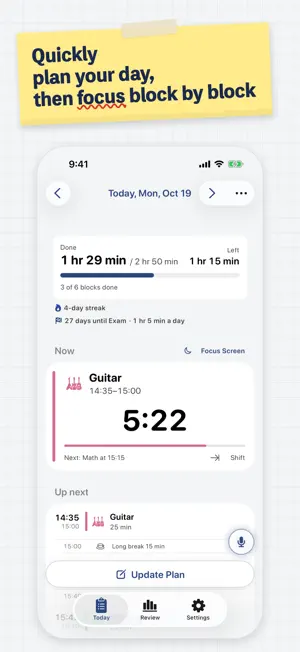


About KomaRep: Pomodoro Day Planner
Plan your whole day in Pomodoro blocks with just a few taps. Finished blocks are recorded automatically, so you can review your day, week and month. AI helps you plan and gives you feedback. ■ Plan your day in Pomodoro blocks — fast • Tap a task and a 25-minute block, break included, lands in your plan • Blocks are placed around your calendar events automatically, and your saved plan can be written to your calendar • Running behind? "Change Start Time" → "From now" re-plans the rest of your day instantly • Fixed-time events with "Fixed Time", and your usual day with weekday routines • Just say "Study for 25 minutes from now" to add it to today's plan — or use Siri with "Add to KomaRep" • Focus screen: set your iPhone on the desk and see only the current block and the time left, with a sound and vibration when it ends • Adjust block length, breaks and the long-break interval as you like ■ Record and review • You're notified when a block ends. Finished blocks are recorded automatically — edit one only when it didn't go as planned • Time left in the current block on the Lock Screen and in the Dynamic Island — and in the Apple Watch Smart Stack • Time done and blocks by day, week and month, your day on a 24-hour clock, and an activity grid of everything so far • Turn your time into a summary image and share it to Instagram or X • Set weekly and monthly goals per task and track them with rings • Sub-tasks like Study → Math → Algebra let you track time by subject • Streaks show your rhythm as you keep going ■ Turn your work into a Vlog (optional, new in 1.1) • Keep the Focus screen open while you work and it films one second every 5 minutes. At the end of the day, turn it into one time-lapse with time and task captions • Record the moments you want to keep yourself, like guitar practice, and blur faces if you like • Save your Vlog to Photos and share it. The app never sends your footage anywhere ■ AI that helps • AI Input: write "workout and study in the morning, 2 hours of math after lunch" and AI lays it out in blocks • AI review: looks at your week or month and your goal notes, then gives an assessment and your next step • On iPhones with Apple Intelligence (iPhone 15 Pro or later), on-device AI is free and works offline. On other iPhones, cloud AI is free up to 10 times a month • Advanced users can use their own API key for Claude, ChatGPT or Gemini ■ KomaRep Plus (monthly subscription) • Cloud AI up to 100 times a month • No ads ■ More • Home Screen and Lock Screen widgets show the current block and the time left • A weekly summary on Sunday night, with an image ready to share • Automatically saved to iCloud — your plans and records come back after you switch iPhones or reinstall the app • 6 color themes and dark mode • English and Japanese Ads appear only at the bottom of the Today and Review screens, never in the planner, and can be removed with a one-time purchase. Terms of Use: https://www.apple.com/legal/internet-services/itunes/dev/stdeula/ Privacy Policy: https://app.notion.com/p/toshizabeth/3e489452412f8061bb23cee2524af0bc
What’s new
Version 1.1 · Updated October 19, 2026
- Vlog (optional): the Focus screen films one second every 5 minutes while you work and turns your day into a time-lapse with time and task captions. Save it or share it. Record the parts you want to keep yourself, like guitar practice, and blur faces if you like - Countdowns: days left to an exam or deadline, with a daily target, a widget and an AI plan - Plans slipped? Shift or restart from now, and move around new calendar events - Tap a block on Today to extend, shorten, change or delete it - Break ideas: tips, meditation, and a nap timer for breaks of 15+ minutes - Block notes and a day reflection, which can also go to ImaMemo - Task categories (Study, Hobby, …) with reviews by category - AI reviews shown as easy-to-read cards - Control Center and Action Button: start a task or add by voice - Focus screen settings: bar or ring, landscape, brightness, sound and vibration - A year-in-review share image, and weekday and month labels on the grass - A visual guide to planning, and a choice of chip order
App privacy
The developer, YUICODE, LIMITED LIABILITY COMPANY, reported these privacy practices to Apple.
Data Used to Track You
The following data may be used to track you across apps and websites owned by other companies:
- Identifiers: Device ID
Data Linked to You
The following data, which may be collected and linked to your identity, may be used for the following purposes:
- Location: Coarse Location
- Identifiers: Device ID
- Usage Data: Product Interaction, Advertising Data
Used for: Third-Party Advertising, Developer’s Advertising or Marketing, Analytics
Data Not Linked to You
The following data, which may be collected but is not linked to your identity, may be used for the following purposes:
- Diagnostics: Performance Data, Crash Data, Other Diagnostic Data
- Purchases: Purchase History
- User Content: Other User Content
Used for: Third-Party Advertising, Developer’s Advertising or Marketing, Analytics, App Functionality
Alternatives to KomaRep: Pomodoro Day Planner
Looking for apps like KomaRep: Pomodoro Day Planner? Here are 6 similar apps on the App Store. The highest rated is Tappy AI: Ask With a Tap (5.0/5), and all 6 are free to download.
-
 Atode - スクショをAIで自動整理
-
 ToSche - AI Planner & Calendar
-
 poitto: Screenshot to To-Do AI
-
 Taska: Focus & AI Task Manager
-
 Tappy AI: Ask With a Tap
5.0
-
 Atode: Focus on today's tasks
| App | Rating | Price | Last updated | Compare |
|---|---|---|---|---|
| KomaRep: Pomodoro Day Planner | – | Free | October 19, 2026 | |
| Atode - スクショをAIで自動整理 | – | Free | Oct 24, 2026 | Compare |
| ToSche - AI Planner & Calendar | – | Free | Oct 29, 2026 | Compare |
| poitto: Screenshot to To-Do AI | – | Free | Oct 13, 2026 | Compare |
| Taska: Focus & AI Task Manager | – | Free | Apr 8, 2026 | Compare |
| Tappy AI: Ask With a Tap | 5.0 / 5 (1) | Free | Oct 15, 2026 | Compare |
| Atode: Focus on today's tasks | – | Free | Jul 21, 2026 | Compare |