

IBlock - App Blocker
Brm Studios Productivity iPhoneiPadiPod touch
IBlock - App Blocker is a free Productivity app for iPhone and iPad by Brm Studios. Requires iOS 26.0. Updated October 5, 2026.
- Price
- Free
- on the App Store
- Size
- 10 MB
- Age 4+
- Updated
- Oct 5
- 2026 · v1.0.1
Screenshots


About IBlock - App Blocker
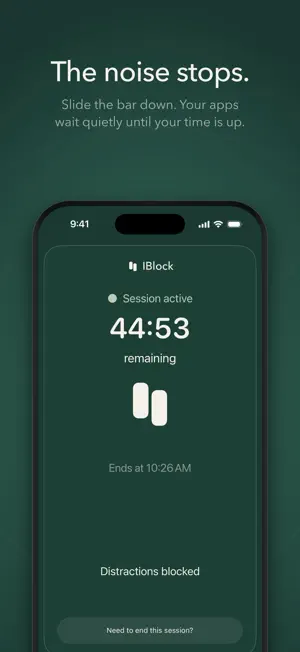
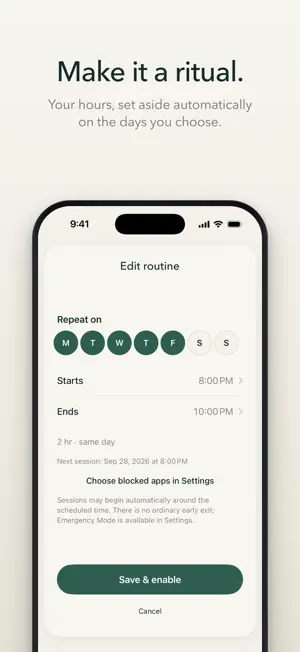
IBlock is a moment of calm for your phone. Choose the apps that can wait, slide the bar down, and the noise stops. Work, read, or do what you came to do. Choose the apps you want to block. Set how long. Slide the right bar down and your session starts. Those apps stay locked until the time is up. UNINTERRUPTED There is no stop button, so a pause stays a pause. If something truly can't wait, Emergency Mode ends a session early, twice in any seven days. YOUR CHOICE OF APPS You pick exactly what gets blocked with Apple's Screen Time app picker. Everything else, like calls and messages, stays available. ROUTINE Block the same apps on the days and hours you choose, automatically. REPORTS See the focused time you completed over the last seven days. PRIVATE BY DESIGN Your choices and history stay on your iPhone. IBlock has no account. IBlock uses Apple's Screen Time. You'll be asked to allow it once. IBLOCK PREMIUM IBlock Premium is the full IBlock experience: the snap and focus sessions whenever you like, your Routine and your Reports. Monthly, yearly with a 3-day free trial, or lifetime. Payment is charged to your Apple Account. Subscriptions renew automatically unless cancelled at least 24 hours before the end of the current period. Manage or cancel them in your Apple Account settings. Terms of Use: https://iblock-brm.web.app/terms/ Privacy Policy: https://iblock-brm.web.app/privacy/
What’s new
Version 1.0.1 · Updated October 5, 2026
A calmer way in. IBlock now opens on its logo while it checks your session, then settles into place. When a session is running, the green spreads in to meet you. On first open, a hand now shows you how to slide the bar.
App privacy
The developer, Brm Studios, reported these privacy practices to Apple.
Data Used to Track You
The following data may be used to track you across apps and websites owned by other companies:
- Purchases: Purchase History
- Identifiers: Device ID
- Usage Data: Product Interaction
Data Linked to You
The following data, which may be collected and linked to your identity, may be used for the following purposes:
- Purchases: Purchase History
- Identifiers: Device ID
- Usage Data: Product Interaction
Used for: Third-Party Advertising, Analytics, App Functionality
Alternatives to IBlock - App Blocker
Looking for apps like IBlock - App Blocker? Here are 6 similar apps on the App Store. The highest rated is BujoFlow - Bullet Journal (4.1/5), and all 6 are free to download.
-
 Silk: App Blocker, Screen Time
-
 Braino: Screen Time Control
-
 ListSense - AI ToDo
-
 BujoFlow - Bullet Journal
4.1
BujoFlow - Bullet Journal
4.1
-
 PocketSave: Grocery List
3.0
PocketSave: Grocery List
3.0
-
 Routinsie: Daily Planner
3.9
Routinsie: Daily Planner
3.9
| App | Rating | Price | Last updated | Compare |
|---|---|---|---|---|
| IBlock - App Blocker | – | Free | October 5, 2026 | |
| Silk: App Blocker, Screen Time | – | Free | Sep 25, 2026 | Compare |
| Braino: Screen Time Control | – | Free | Jun 4, 2026 | Compare |
| ListSense - AI ToDo | – | Free | Aug 27, 2026 | Compare |
| BujoFlow - Bullet Journal | 4.1 / 5 (14) | Free | Oct 19, 2026 | Compare |
| PocketSave: Grocery List | 3.0 / 5 (2) | Free | Jul 14, 2026 | Compare |
| Routinsie: Daily Planner | 3.9 / 5 (166) | Free | Oct 15, 2026 | Compare |