

Seamly: Long Screenshot Maker
雪柳 沈 Productivity iPhoneiPadiPod touch
Seamly: Long Screenshot Maker is a free Productivity app for iPhone and iPad by 雪柳 沈. Rated 5.0/5 from 1 ratings. Requires iOS 27.0.
- Rating
- 5.0
- 1 ratings
- Price
- Free
- on the App Store
- Size
- 10 MB
- Age 4+
- Updated
- Oct 17
- 2026 · v1.5.0
Screenshots


About Seamly: Long Screenshot Maker
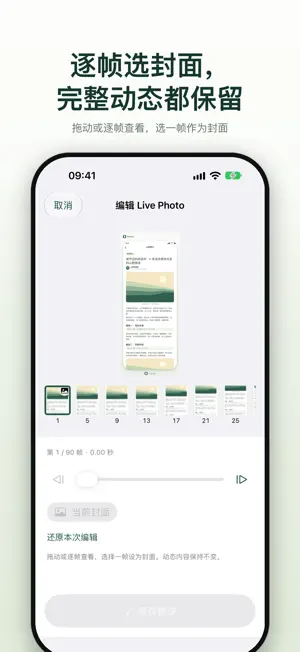
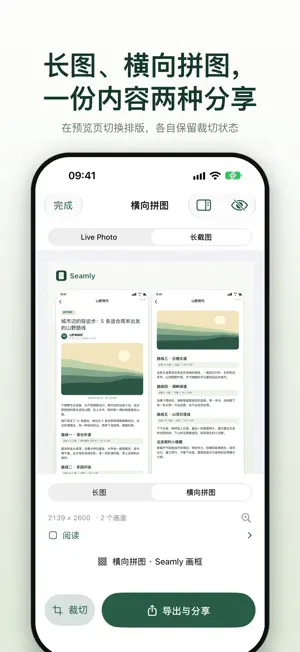
Keep more than one screen. Seamly turns scrolling conversations, articles, orders and travel plans into a long screenshot and a silent Live Photo — from a single capture. All image processing happens on your device, with no account required. ONE CAPTURE, TWO RESULTS • Tap Start Capture, allow screen sharing, open the app you want to capture and scroll slowly with overlap. • Finish with Done in the Dynamic Island, by running the shortcut again, or by returning to Seamly. Pausing never ends capture. • Each work holds both a Live Photo and a long screenshot. Switch between them at the top; each keeps its own edits. • Seamly aligns overlapping frames and detects fixed top and bottom bars to reduce repetition. • Open a detail page from a list and come back: the detail page is inserted as a full screen between the cards, and the list continues where you left off without repeating content. EDIT LIVE PHOTOS • Play, pause and browse frames by dragging or using the progress slider. Collapse the tools for a larger preview, then press and hold to play or swipe to browse. • Browse frame by frame and choose a cover while preserving every video frame and the full duration. • Editing preserves the original resources. Save the Live Photo to Photos exactly as previewed. CHOOSE YOUR LAYOUT • Switch the long screenshot between a long image and a collage in the preview, with separate crop settings for each layout. Detail pages get their own collage page. • Every export uses the Seamly paper frame and rounded screen corners, without covering your content. Originals stay unchanged. • Export as JPEG, HEIF or paginated PDF, or share the original files as a ZIP. • Older collages without the original long image can still be viewed and exported, but cannot switch back. START AND FINISH WITH EASE • Start from Seamly Live Photo in Control Center, or assign the built-in Start/Stop Live Photo shortcut to the Action button. • Dynamic Island and Lock Screen Live Activities show capture status, guidance and a finish control. ORGANIZE YOUR LIBRARY • Combine capture-type and source-app filters. Seamly attempts to recognize some source apps from their screen content; you can also categorize items manually. • On iPad and wide windows, the home screen shows your recent captures side by side, with adaptive preview and editing layouts and Dark Mode support. • Learn with chapter-based screen demonstrations and a built-in stitching example. KEEP CONTENT PRIVATE • Capture and editing do not upload your screen content or record audio. Your work stays on your device until you choose to export or share it. • Hide private items behind Face ID, Touch ID or your device passcode. The hidden library locks again when you leave the app. Exported and shared copies are not protected. • Saving to Photos requires permission to add items. BEFORE YOU CAPTURE • Requires iOS or iPadOS 27.0 or later. Each live capture requires your approval for system screen sharing. • Seamly does not scroll other apps for you. Every capture is finished manually. • Fast scrolling, zooming, overlays, repeated content and video may affect stitching accuracy. Frames that cannot be aligned are kept as separate segments with a notice, and nearby content may repeat or be missing. • Saving both results uses more storage than a single image. • Protected content may not be captured. System interruptions, orientation changes and capacity limits may end capture early. • Dynamic Island bar removal is a Beta feature for long images. It may fail or leave visible repairs and does not apply to Live Photos. Only save content you have the right to save.
What’s new
Version 1.5.0 · Updated October 17, 2026
Seamly 1.5.0: one capture, two results. • Long screenshots and Live Photos together: tap Start Capture and every work now includes both a Live Photo and a long screenshot. Switch between them at the top; each keeps its own edits. • Lists and detail pages stitched separately: open a post and come back, and the detail page is inserted as a full screen between the cards while the list continues without repeating content. • Smoother and steadier: noticeably higher Live Photo frame rates, fewer breaks when scrolling quickly, and faster stopping when you open Notification Center or the Home Screen, keeping system screens out of your work. • A larger Live Photo preview with collapsible tools: press and hold to play, or swipe to browse frames. Cover editing preserves the full video; saving no longer stalls when choosing a later frame. • Share original files as a ZIP, so full-quality images survive apps that compress photos. • Recent captures side by side on wide screens, and simpler Settings. Changes: every capture now finishes manually; frames and screen corners are always applied; screenshot and screen-recording import and Optimized/Uniform playback have been removed; Live Photo editing now focuses on cover selection. The Control Center control and shortcut are now Seamly Live Photo and Start/Stop Live Photo — if you assigned the Action button before, please check it again.
App privacy
The developer, 雪柳 沈, reported these privacy practices to Apple.
Data Not Collected
The developer does not collect any data from this app.
Alternatives to Seamly: Long Screenshot Maker
Looking for apps like Seamly: Long Screenshot Maker? Here are 6 similar apps on the App Store. The highest rated is Daymark Habits (5.0/5), and all 6 are free to download.
-
 Tola: Quiet Tasks
-
 Daymark Habits
5.0
Daymark Habits
5.0
-
 叨叨记 - 语音处理待办清单·AI响应一切操作
-
 芦苇 - 发现好内容
5.0
芦苇 - 发现好内容
5.0
-
 Scribe: AI Voice Notes
4.6
Scribe: AI Voice Notes
4.6
-
 Open Minis
4.8
Open Minis
4.8
| App | Rating | Price | Last updated | Compare |
|---|---|---|---|---|
| Seamly: Long Screenshot Maker | 5.0 / 5 (1 rating) | Free | October 17, 2026 | |
| Tola: Quiet Tasks | – | Free | Oct 10, 2026 | Compare |
| Daymark Habits | 5.0 / 5 (1) | Free | Sep 8, 2026 | Compare |
| 叨叨记 - 语音处理待办清单·AI响应一切操作 | – | Free | Jul 18, 2026 | Compare |
| 芦苇 - 发现好内容 | 5.0 / 5 (2) | Free | Oct 18, 2026 | Compare |
| Scribe: AI Voice Notes | 4.6 / 5 (110) | Free | Oct 21, 2026 | Compare |
| Open Minis | 4.8 / 5 (95) | Free | Oct 11, 2026 | Compare |