

Daily Tasks Notebook
ODERA Formations Productivity iPhoneiPadiPod touch
Daily Tasks Notebook is a free Productivity app for iPhone and iPad by ODERA Formations. Requires iOS 16.4. Updated October 19, 2026.
- Price
- Free
- on the App Store
- Size
- 33 MB
- Age 4+
- Updated
- Oct 19
- 2026 · v1.6.0
Screenshots


About Daily Tasks Notebook
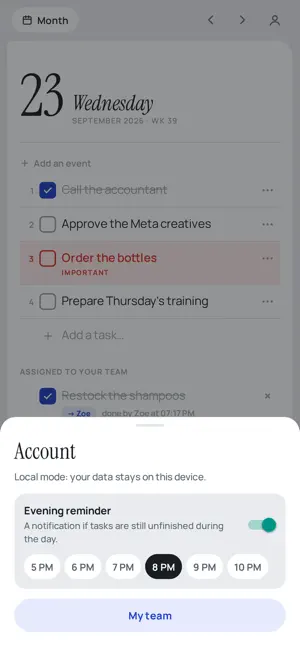
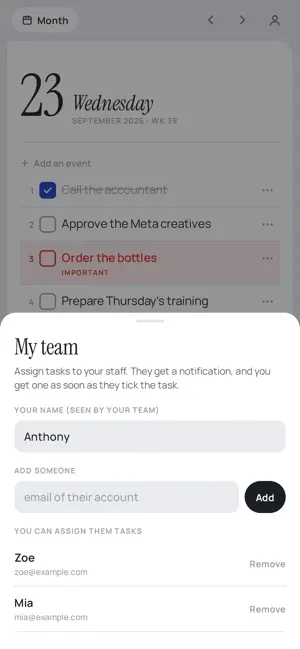
Daily Tasks replaces the paper notebook where you write today's date, then the day's tasks. Every day gets a blank page. You write your tasks and tick them off. No hours, no columns, no complicated settings. ONE PAGE PER DAY - Pick the date and the page opens - Write your tasks one after another, tick them with one finger - Mark a task "Important": it turns red - Order your tasks from 1 to 10 or more, however suits you - Unfinished tasks from the day before move over with one button MULTI-DAY EVENTS - A trip from the 13th to the 15th, a three-day assessment: a name, two dates and a colour - The event shows above your tasks on each day it covers - The month view shows events as coloured bars, and how many tasks are left each day EVENING REMINDER - At the time you choose, a notification tells you what is still unfinished - Tap it and the day's page opens TASKS ASSIGNED TO YOUR TEAM - Assign a task to a colleague: they get a notification - As soon as they tick it, you are told - Everyone keeps their own notebook; you only see the shared tasks ON ALL YOUR DEVICES - Your pages sync between your phone and your other devices - Offline, everything is kept on the phone and sent when the connection returns - The app follows your phone's language No ads, no tracking. You can delete your account and all your data from inside the app, in two taps.
What’s new
Version 1.6.0 · Updated October 19, 2026
- Fixes an issue where tasks carried over to the next day could disappear - Move a task to any date you like, with a calendar - A carried-over task can come back: “Undo the move” in its menu - Horizons: what matters for your year, your month, your week - Tasks you write now appear at the top of the list
App privacy
The developer, ODERA Formations, reported these privacy practices to Apple.
Data Linked to You
The following data, which may be collected and linked to your identity, may be used for the following purposes:
- Contact Info: Email Address, Name
- User Content: Other User Content
- Identifiers: User ID, Device ID
Used for: App Functionality
Alternatives to Daily Tasks Notebook
Looking for apps like Daily Tasks Notebook? Here are 6 similar apps on the App Store. The highest rated is Daily Page: Journal & Planner (5.0/5), and all 6 are free to download.
-
 Win3
Win3
-
 Visondo
-
 Daily Page: Journal & Planner
5.0
Daily Page: Journal & Planner
5.0
-
 Daily Planner : Ai Matrix
-
 Speech Analysis AI
5.0
Speech Analysis AI
5.0
-
 Hiflow Mobile
| App | Rating | Price | Last updated | Compare |
|---|---|---|---|---|
| Daily Tasks Notebook | – | Free | October 19, 2026 | |
| Win3 | – | Free | Jun 24, 2026 | Compare |
| Visondo | – | Free | Apr 2, 2026 | Compare |
| Daily Page: Journal & Planner | 5.0 / 5 (1) | Free | Sep 21, 2026 | Compare |
| Daily Planner : Ai Matrix | – | Free | Sep 17, 2026 | Compare |
| Speech Analysis AI | 5.0 / 5 (2) | Free | Oct 16, 2026 | Compare |
| Hiflow Mobile | – | Free | Oct 19, 2026 | Compare |