

Beffore: To-Do & Screen Time
Marcel Cruz Productivity iPhoneiPadiPod touch
Beffore: To-Do & Screen Time is a free Productivity app for iPhone and iPad by Marcel Cruz. Requires iOS 18.0. Updated October 9, 2026.
- Price
- Free
- on the App Store
- Size
- 31 MB
- Age 4+
- Updated
- Oct 9
- 2026 · v1.0.1
Screenshots


About Beffore: To-Do & Screen Time
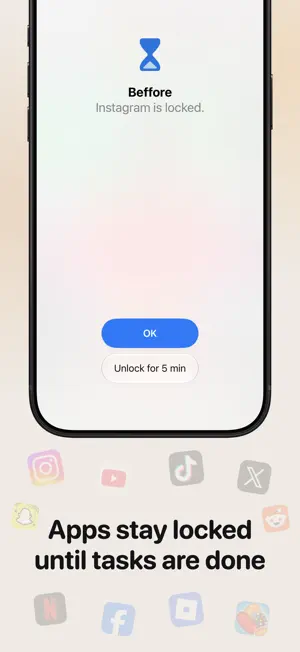
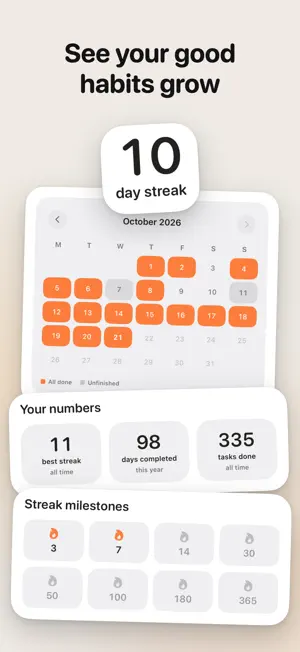
Beffore puts your tasks before your screen time. Choose the apps you want to keep in check, set a daily limit, and Screen Time keeps them locked until you've finished your tasks. Get the things that matter done first, then enjoy your apps. How it works 1. Add your tasks for the day. 2. Choose the apps to lock and how much time you want each day. 3. Finish your tasks and unlock your screen time. Your time, earned Beffore doesn't ask you to give up the apps you enjoy. It gives you a reason to do what matters first. Beffore keeps you on track without trapping you. When you really need an app, unlock it for 5 minutes right where it's locked, or open the whole limit until midnight. No lectures, no guilt. Build days you're proud of Watch every finished day light up your month, keep a streak going, and see how your habits change week by week. Nothing planned? That's okay. On days with no tasks, your apps stay open. Beffore rewards you for doing what you planned, not for always being productive. Private by design No account required. Your tasks and Screen Time data stay on your iPhone. Anonymous usage stats and crash reports help us improve Beffore, and you can turn them off in the app. Subscription Beffore requires a subscription after setup: yearly, with a 3-day free trial, or weekly, with no trial. Payment is charged to your Apple Account when you confirm the purchase, or when the free trial ends. A subscription renews automatically unless it is cancelled at least 24 hours before the end of the current period. You can manage or cancel it at any time in your Apple Account settings. Terms of Use: https://www.beffore.app/terms Privacy Policy: https://www.beffore.app/privacy
What’s new
Version 1.0.1 · Updated October 9, 2026
What's new • Fixed a freeze when you named a limit and then chose its apps. • Repeating tasks now start on their first scheduled day, and finished tasks are simpler to manage. • A locked app now offers "Unlock for 5 min" when you need a moment. • Tap anywhere on a limit's apps to change them. • How it works now explains when time on your iPad or Mac can count. • Plus smaller fixes and polish.
App privacy
The developer, Marcel Cruz, reported these privacy practices to Apple.
Data Not Linked to You
The following data, which may be collected but is not linked to your identity, may be used for the following purposes:
- Purchases: Purchase History
- Identifiers: User ID, Device ID
- Usage Data: Product Interaction, Other Usage Data
- Diagnostics: Crash Data, Other Diagnostic Data
Used for: Analytics, App Functionality
Alternatives to Beffore: To-Do & Screen Time
Looking for apps like Beffore: To-Do & Screen Time? Here are 6 similar apps on the App Store. The highest rated is Collected Notes (4.7/5), and all 6 are free to download.
-
 Timbre: Read Aloud
-
 YeaVoice PBX
-
 Doer: simple goal planner
-
 Collected Notes
4.7
Collected Notes
4.7
-
 Delay: Study before you scroll
4.7
Delay: Study before you scroll
4.7
-
 Goal Tracker: Track Progress
4.7
Goal Tracker: Track Progress
4.7
| App | Rating | Price | Last updated | Compare |
|---|---|---|---|---|
| Beffore: To-Do & Screen Time | – | Free | October 9, 2026 | |
| Timbre: Read Aloud | – | Free | Sep 9, 2026 | Compare |
| YeaVoice PBX | – | Free | Feb 2, 2026 | Compare |
| Doer: simple goal planner | – | Free | Jan 28, 2025 | Compare |
| Collected Notes | 4.7 / 5 (43) | Free | Jul 14, 2025 | Compare |
| Delay: Study before you scroll | 4.7 / 5 (106) | Free | Oct 23, 2026 | Compare |
| Goal Tracker: Track Progress | 4.7 / 5 (30) | Free | Sep 12, 2025 | Compare |