

RawMask Studio
Besarion Turmanauli Photo & Video iPhoneiPadiPod touchMac
RawMask Studio is a free Photo & Video app for iPhone and iPad by Besarion Turmanauli. Requires iOS 17.0. Updated October 7, 2026.
- Price
- Free
- on the App Store
- Size
- 227 MB
- Age 4+
- Updated
- Oct 7
- 2026 · v1.3.0
Screenshots
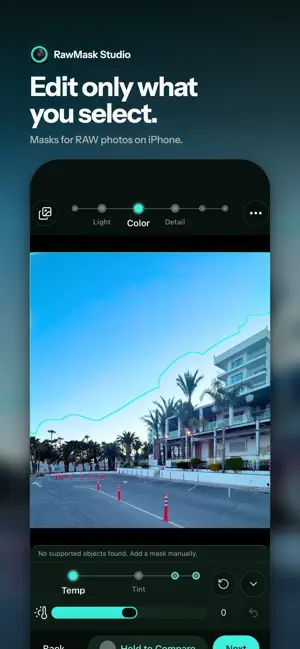
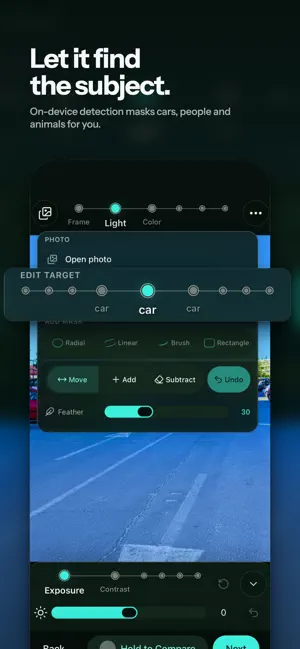


About RawMask Studio
Edit only the part of the photo you choose. RawMask Studio is a RAW photo editor built around masks: pick a detected subject or draw your own mask, then change the light, color, detail and focus of just that area while the rest of the image stays untouched. It opens RAW and ProRAW files as well as everyday JPEG and HEIC photos, and every edit happens right on your iPhone. MASKS FOR SELECTIVE EDITS - Automatic masks: on-device detection finds subjects such as people, cars and animals and turns them into ready-to-edit masks - Manual masks: radial, linear (gradient), brush and rectangle - Refine any mask with the Add and Subtract brushes - Soften the edge with Feather for smooth, natural transitions - Give every mask its own light, color, detail and focus adjustments RAW, PRORAW, JPEG AND HEIC - Pick photos straight from your Photos library with the system picker - Edit RAW and ProRAW captures with the same tools as regular photos A CLEAR, STEP-BY-STEP WORKFLOW - Frame: crop, straighten, rotate, aspect ratios and zoom - Light: exposure, contrast, highlights, shadows, whites and blacks - Color: temperature, tint, vibrance and saturation - Detail: texture, clarity, dehaze, sharpness and noise reduction - Focus: background blur with strength, range, feather and bokeh - Effects: vignette, grain and fade - Reorder or hide steps in Editor options to match the way you work COMPARE AND REUSE - Hold to Compare to check before and after at any moment - Save whole-photo adjustments as a Preset and apply it to another photo SAVE WITHOUT LOSING THE ORIGINAL - Save edit to Photos is non-destructive: the original stays intact and you can revert the edit in Photos anytime - Save a copy to Photos to keep the edited version as a new photo - Export as JPEG, HEIF or TIFF through the share sheet PRIVATE BY DESIGN - No account, no sign-in and no ads - Editing and subject detection run entirely on device, so your photos are never uploaded - Free, with no in-app purchases Open a photo, pick a mask and make one part of it shine.
What’s new
Version 1.3.0 · Updated October 7, 2026
New in 1.3.0: - Shape light and color with editable master and RGB curves. - Use selective control points to adjust areas that match nearby brightness and color. - Paint or outline objects with the AI object brush, then refine the selection with Include and Exclude. - Revisit edits with History, Undo and Redo. - Improved preview and export consistency, selection outlines, iPad controls and editing reliability.
App privacy
The developer, Besarion Turmanauli, reported these privacy practices to Apple.
Data Not Collected
The developer does not collect any data from this app.
Alternatives to RawMask Studio
Looking for apps like RawMask Studio? Here are 6 similar apps on the App Store. The highest rated is Premium Collage: AI Dumps (5.0/5), and all 6 are free to download.
-
 Premium Collage: AI Dumps
5.0
Premium Collage: AI Dumps
5.0
-
 NeoPixel Photo Editor
-
 FAULTCAM: Faulty CCD Camera
-
 Keystone Photo Lab
5.0
Keystone Photo Lab
5.0
-
 Chromaform
-
 Tonefold
5.0
Tonefold
5.0
| App | Rating | Price | Last updated | Compare |
|---|---|---|---|---|
| RawMask Studio | – | Free | October 7, 2026 | |
| Premium Collage: AI Dumps | 5.0 / 5 (5) | Free | Jun 14, 2026 | Compare |
| NeoPixel Photo Editor | – | Free | Oct 17, 2026 | Compare |
| FAULTCAM: Faulty CCD Camera | – | Free | Sep 23, 2026 | Compare |
| Keystone Photo Lab | 5.0 / 5 (2) | Free | Oct 19, 2026 | Compare |
| Chromaform | – | Free | Jun 30, 2026 | Compare |
| Tonefold | 5.0 / 5 (1) | Free | Oct 10, 2026 | Compare |
Compare RawMask Studio with the top alternatives: ratings, updates, ASO score and keyword gaps →