

OneTwo Scanner
Christian Drapatz Productivity iPhoneiPadiPod touch
OneTwo Scanner is a paid Productivity app for iPhone and iPad by Christian Drapatz. Requires iOS 18.0. Updated November 3, 2026.
- Price
- 1.99 USD
- on the App Store
- Size
- 12 MB
- Age 4+
- Updated
- Nov 3
- 2026 · v1.0
Screenshots
Save to Pinterest


About OneTwo Scanner
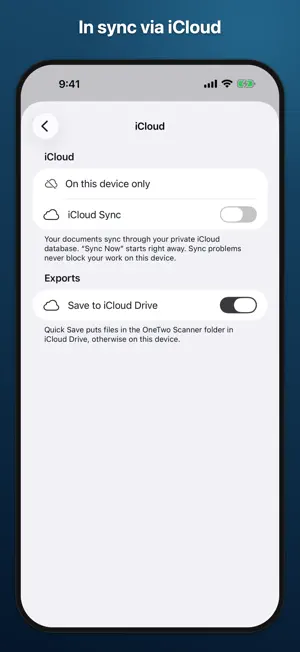
Turn a stack of paper into one clean, searchable PDF in seconds. OneTwo Scanner captures multiple pages in one go, lays them out as tiles and lets you arrange, edit, sign and share them. No subscription, no account, no ads. SCAN AND ADD • Scan multiple pages at once with the Apple scanner or the built-in scanner with burst capture and adjustable sensitivity • Take photos, import images, files and PDFs, or paste from the clipboard • Add blank pages and sketches with your finger or Apple Pencil • Combine ID Card: select front and back and get both at true size on a single page • Get a hint when a page is too dark or the lens looks smudged (lens hint on iOS 26) ARRANGE LIKE ON YOUR DESK • Every page as a tile – drag & drop to reorder or select several at once • Duplicate, hide, delete, copy or move pages to other documents • Every change can be undone EDIT AND SIGN • Crop, straighten, rotate, mirror, apply filters and adjust colors • No Shadows filter for evenly white paper • Apply filters to many pages at once, or copy the edits of one page and paste them onto others • Before view: one tap shows the page without filters to compare • Save your signature once and place it anywhere • True redaction: the text under the black box is gone from every file, including the recognized text • The original is always kept, every change is a separate layer RECOGNIZE AND USE TEXT • Text recognition (OCR) in the background, searchable PDFs with an invisible text layer • Tap phone numbers, addresses, emails and links directly • Live scanner for QR codes, barcodes and text • Translate menus, signs and text live • Translator camera right from the Lock Screen: snap a photo now, read the translation after unlocking • Explain makes labels easy to understand and names possible allergens (Apple Intelligence, iOS 26) • Save business cards as contacts, share tables as CSV (tables on iOS 26) • Apple Intelligence suggests titles and summarizes content on supported devices • Everything runs on your device EXPORT AND SHARE • PDF, JPEG, PNG, HEIC or plain text • Paper sizes A1 to A5, US Letter and US Legal • Set a maximum file size for web portals and email • PDF with password, view-only protection, watermark and page numbers • Share, save to Files, mail, print or save to Photos • Default folder: Quick Save puts the file right there with one tap FIND EVERYTHING • Search, sorting, color tags and a trash that keeps documents and single pages for 30 days • Optional iCloud sync between iPhone and iPad, in your private iCloud • Conflicts are shown to you, never silently overwritten YOUR DATA STAYS YOURS • No server, no tracking, no account • App Lock and protected documents with Face ID, Touch ID or passcode • Privacy screen in the app switcher ALWAYS AT HAND Widgets for Home and Lock Screen, such as "Document & Scan" with your latest document, controls for Control Center and the Action button, Shortcuts, Spotlight and a share extension that brings files from other apps straight in. Multiple color themes, light and dark mode, in English and German. Runs on iPhone and iPad. Buy once, use forever. No subscription, no ads.
App privacy
The developer, Christian Drapatz, reported these privacy practices to Apple.
Data Not Collected
The developer does not collect any data from this app.
Alternatives to OneTwo Scanner
Looking for apps like OneTwo Scanner? Here are 6 similar apps on the App Store. The highest rated is Thingly – Home Inventory (5.0/5), and 5 of the 6 are free to download.
-
 SeeDis Media Browser
-
 Thingly – Home Inventory
5.0
-
 Archivist
-
 Storage Organizer Buddy
-
 Converter: all unit converter
-
 Calendar Widget !
3.0
| App | Rating | Price | Last updated | Compare |
|---|---|---|---|---|
| OneTwo Scanner | – | 1.99 USD | November 3, 2026 | |
| SeeDis Media Browser | – | 9.99 USD | Oct 28, 2026 | Compare |
| Thingly – Home Inventory | 5.0 / 5 (1) | Free | Nov 20, 2026 | Compare |
| Archivist | – | Free | Nov 8, 2026 | Compare |
| Storage Organizer Buddy | – | Free | Jun 22, 2026 | Compare |
| Converter: all unit converter | – | Free | Jun 19, 2025 | Compare |
| Calendar Widget ! | 3.0 / 5 (2) | Free | Nov 15, 2026 | Compare |
Compare OneTwo Scanner with the top alternatives: ratings, updates, ASO score and keyword gaps →