

Seylo: Project Workspace
Jakub Radziejewski Productivity iPhoneiPadiPod touch
Seylo: Project Workspace is a free Productivity app for iPhone and iPad by Jakub Radziejewski. Requires iOS 17.0. Updated October 12, 2026.
- Price
- Free
- on the App Store
- Size
- 3 MB
- Age 4+
- Updated
- Oct 12
- 2026 · v1.2.0
Screenshots



About Seylo: Project Workspace
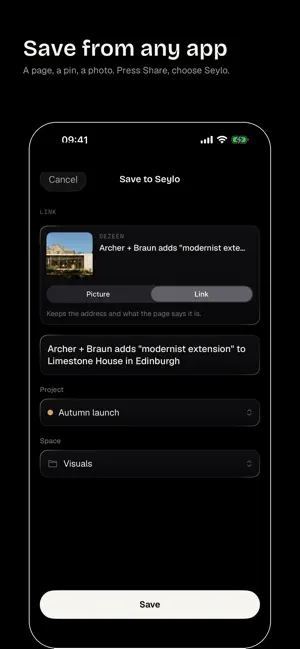
Seylo is a workspace for everything a project gathers: the pictures and pages you found, the notes and prompts you wrote, the files, and what was decided. Open a project on your phone and keep working on it. SAVE FROM ANY APP Press Share and choose Seylo. A page in Safari, a pin, a video, a photo, a passage you selected: it goes into the project you pick. A page keeps its address, so you can open it again. TAKE IT OR WRITE IT Take a photo, choose some from Photos, paste a link or write a note, straight into a project or one of its spaces. KEEP WORKING ON IT Rewrite a note, approve a draft, move things between spaces, add pictures to a note, and save any picture to Photos. A LIBRARY OF WHAT WORKED Keep the references you reuse across projects in one Library, grouped by theme, and mark which ones worked and which did not. EVERYTHING REMEMBERS WHERE IT CAME FROM The prompt behind the picture, the brief behind the prompt. Seylo keeps the line between them, so a project explains itself later. THE SAME PROJECTS ON YOUR COMPUTER On seylo.co each project is a map you can lay out and share. Seylo works with a Seylo account.
What’s new
Version 1.2.0 · Updated October 12, 2026
Organise from your phone. The Add button in a project now makes a new space, a folder inside a space (up to five levels deep) or a new island in your Library. Adding photos is faster and more reliable. Pictures from Photos load a few at a time, the Add button counts them in, and the save form no longer gets stuck loading after you pick a photo. Notes and scripts read better. Headings show as headings, and highlighted lines show without their marks.
App privacy
The developer, Jakub Radziejewski, reported these privacy practices to Apple.
Data Linked to You
The following data, which may be collected and linked to your identity, may be used for the following purposes:
- Contact Info: Email Address
- User Content: Photos or Videos, Other User Content
Used for: App Functionality
Alternatives to Seylo: Project Workspace
Looking for apps like Seylo: Project Workspace? Here are 6 similar apps on the App Store. The highest rated is Progress - Productivity App (5.0/5), and all 6 are free to download.
-
 My Folio Assistant
-
 PomoGarden: Pomodoro Timer
-
 Progress - Productivity App
5.0
-
 Markdown Vault
-
 Cadence: Track Recurring Tasks
5.0
-
 Campfire — Team Hub
5.0
| App | Rating | Price | Last updated | Compare |
|---|---|---|---|---|
| Seylo: Project Workspace | – | Free | October 12, 2026 | |
| My Folio Assistant | – | Free | May 31, 2026 | Compare |
| PomoGarden: Pomodoro Timer | – | Free | Oct 18, 2026 | Compare |
| Progress - Productivity App | 5.0 / 5 (1) | Free | Jul 16, 2026 | Compare |
| Markdown Vault | – | Free | May 22, 2026 | Compare |
| Cadence: Track Recurring Tasks | 5.0 / 5 (1) | Free | Aug 11, 2026 | Compare |
| Campfire — Team Hub | 5.0 / 5 (5) | Free | Sep 29, 2026 | Compare |