

Carbiter: OBD2 Fuel & Health
Kirils Krivojs Utilities iPhoneiPadiPod touch
Carbiter: OBD2 Fuel & Health is a free Utilities app for iPhone and iPad by Kirils Krivojs. Requires iOS 18.0. Updated November 2, 2026.
- Price
- Free
- on the App Store
- Size
- 39 MB
- Age 4+
- Updated
- Nov 2
- 2026 · v1.1
Screenshots
Save to Pinterest


About Carbiter: OBD2 Fuel & Health
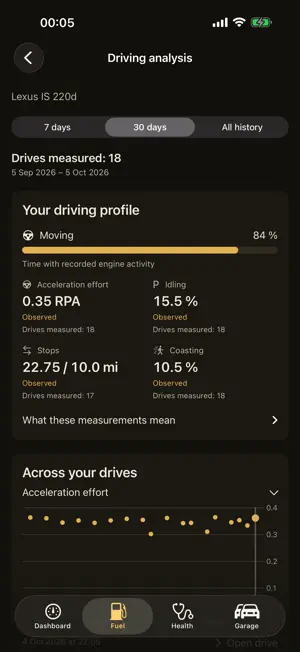
Carbiter reads your car through a small Bluetooth adapter and records every drive by itself. It works out how much fuel each drive used, explains what the car is reporting, and tells you how far to trust every number. PLUG IN ONCE, THEN JUST DRIVE Leave an ELM327-compatible Bluetooth LE OBD-II adapter in the port. When your iPhone sees it, Carbiter starts recording in the background: route, distance, time, speed trace and fuel. No button to press, nothing to forget. FUEL, DRIVE BY DRIVE • Litres and L/100 km or mpg for every drive, day and month • A month calendar of fuel, distance and economy • Log your fill-ups and the estimate becomes a figure calibrated to your car • Every fuel figure says whether it is estimated or calibrated WHAT YOUR CAR IS SAYING • Stored, pending and permanent fault codes, explained in plain words • Ask the other controllers too: gearbox, brakes, stability • Health findings that compare the car with its own history and say when something changes • Diagnostic snapshots to keep and compare ONE ADAPTER, EVERY CAR Move the adapter to another car and Carbiter recognises it by its VIN, or by the sensors it answers. Each car keeps its own drives and history. ON THE LOCK SCREEN A Live Activity shows economy and distance while you drive. Ask Siri about your last drive or this month's driving. READ-ONLY AND PRIVATE Carbiter only reads. It never writes to your car, never changes settings and never clears codes. There is no account and no Carbiter server: drives, routes, fault codes and the VIN stay on your iPhone. CARBITER LITE AND PRO Lite covers everyday use and shows one small banner ad. Carbiter Pro is a single in-app purchase, not a subscription. It adds: • Live fuel consumption while you drive • Where the fuel went: moving, braking, standing still • Your driving profile, and the best speeds and gears for your car • Comparisons of drives and periods • Health history charts and snapshot comparison • Every reading the car reports, charts you choose, and Mode 06 self-test values and limits • 0–100 km/h, 0–60 mph and quarter-mile runs • Several active cars and your own dashboard • No advertising WHAT YOU NEED An iPhone with iOS 18 or later, a car with an OBD-II port and an ELM327-compatible Bluetooth LE adapter. Classic Bluetooth and Wi-Fi adapters do not work with Carbiter. Most petrol cars from 2001 and diesels from 2004 in the EU, and cars from 1996 in the US, have OBD-II. Want to look around first? Demo Mode plays back a drive recorded on a real car, no adapter needed. Questions: [email protected]
What’s new
Version 1.1 · Updated November 2, 2026
• Every engine run is recorded and costed — even a drive under 500 m, and the engine idling while parked (shown in L/h). • Fill-up cycle: tap a fill-up to see the pump against the app's own figure, the distance, the correction and every drive in between. • New Pro analysis: consumption by trip length, what cold starts and standing still cost, and the engine's temperature at speed. • Warm-up findings now understand diesels and cold weather. • Made for iPhone Duo: two columns on the inner display. • Advertising in the free version loads reliably; a reconnect loop is fixed.
App privacy
The developer, Kirils Krivojs, reported these privacy practices to Apple.
Data Linked to You
The following data, which may be collected and linked to your identity, may be used for the following purposes:
- Location: Coarse Location
- Identifiers: Device ID
- Usage Data: Product Interaction, Advertising Data
Used for: Third-Party Advertising, Developer’s Advertising or Marketing, Analytics, App Functionality
Data Not Linked to You
The following data, which may be collected but is not linked to your identity, may be used for the following purposes:
- Diagnostics: Performance Data, Other Diagnostic Data, Crash Data
Used for: Third-Party Advertising, Developer’s Advertising or Marketing, Analytics, App Functionality
Alternatives to Carbiter: OBD2 Fuel & Health
Looking for apps like Carbiter: OBD2 Fuel & Health? Here are 6 similar apps on the App Store. The highest rated is Axlyne: AI OBD2 Car Scanner (5.0/5), and all 6 are free to download.
-
 Oktano: OBD2 Car Scanner
-
 AI ELM: OBD2 Car Scanner
-
 Cardi - AI OBD2 Car Scanner
-
 Axlyne: AI OBD2 Car Scanner
5.0
-
 AOS Agent
-
 GarageKeep: Car Maintenance
| App | Rating | Price | Last updated | Compare |
|---|---|---|---|---|
| Carbiter: OBD2 Fuel & Health | – | Free | November 2, 2026 | |
| Oktano: OBD2 Car Scanner | – | Free | Nov 23, 2026 | Compare |
| AI ELM: OBD2 Car Scanner | – | Free | Nov 24, 2026 | Compare |
| Cardi - AI OBD2 Car Scanner | – | Free | Jun 24, 2026 | Compare |
| Axlyne: AI OBD2 Car Scanner | 5.0 / 5 (2) | Free | Nov 18, 2026 | Compare |
| AOS Agent | – | Free | Nov 23, 2026 | Compare |
| GarageKeep: Car Maintenance | – | Free | Oct 10, 2026 | Compare |