

DocVault: Docs & Reminders
Andrei Augustin Ardelean Productivity iPhoneiPadiPod touch
DocVault: Docs & Reminders is a free Productivity app for iPhone and iPad by Andrei Augustin Ardelean. Requires iOS 18.0. Updated November 19, 2026.
- Price
- Free
- on the App Store
- Size
- 23 MB
- Age 4+
- Updated
- Nov 19
- 2026 · v1.1
Screenshots
Save to Pinterest


About DocVault: Docs & Reminders
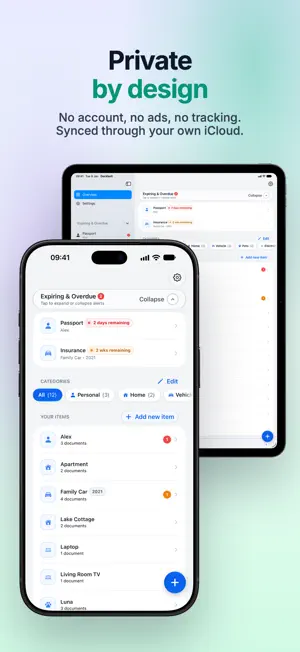
Car insurance that lapsed, a passport that expires the month of your trip, a warranty that ran out last week. DocVault keeps every date that matters and reminds you before it's too late. REMINDERS ON YOUR SCHEDULE Decide when you want to hear about an expiration: a month before, a week before, on the day, or after it. Set it once for everything, then add extra reminders for the documents that need more notice. Not ready to renew yet? Put a reminder off right from the notification, or mute a document entirely. SEE WHAT NEEDS ATTENTION Every document shows its status at a glance (valid, expiring soon or expired) with a countdown. The Expiring & Overdue list puts the most urgent first. EVERYTHING IN ITS PLACE Group documents by category and item: Vehicle → your car → insurance, registration, inspection. Home, Health, Pets or anything else, each with the fields you need. EVERY RENEWAL, KEPT Renewing adds the new dates instead of replacing the old ones, so the whole history stays searchable. Already recorded the renewal? DocVault knows you're covered, and tells you if there's a gap between the old and the new. THE PAPERWORK, ATTACHED Attach scans, photos and PDFs to each document and preview them right in the app. ALWAYS AT HAND • Home Screen and Lock Screen widgets for what's expiring next, or a countdown for one document • Ask Siri when your passport expires, or find any document from Spotlight • iPhone and iPad, in sync through your own iCloud, with Handoff between them PRIVATE BY DESIGN No account, no ads, no tracking, no analytics. Your documents stay on your devices and in your own iCloud. FOR EVERYTHING THAT EXPIRES Passports and ID cards, driver's licenses, visas and residence permits, car insurance and inspections, home insurance and rental agreements, pet vaccinations, warranties, memberships and more. Terms of Use: https://www.apple.com/legal/internet-services/itunes/dev/stdeula/
What’s new
Version 1.1 · Updated November 19, 2026
Back up and restore everything, scan and drag in files, and see what iCloud is doing. • Backup: export all your documents and files to one backup file, with an optional password, and import it on another device or after a reinstall. When importing, choose to keep what you have, fill in the gaps, use the backup's version, or replace everything. Before a replace, a safety backup is saved on your device. • Scan documents with the camera and attach them as a photo or a PDF. • Paste photos and files into a document with the Paste button, or with ⌘V on a keyboard. • Drag photos and files from other apps into a record, or drag an attachment out to Files, Mail or Messages. • Rename attachments to whatever you like. • iCloud: Settings shows whether sync is up to date, and Home tells you when iCloud needs attention (signed out, restricted or storage full). • Easier to read at large text sizes, with fixes and polish throughout.
App privacy
The developer, Andrei Augustin Ardelean, reported these privacy practices to Apple.
Data Not Collected
The developer does not collect any data from this app.
Alternatives to DocVault: Docs & Reminders
Looking for apps like DocVault: Docs & Reminders? Here are 6 similar apps on the App Store. The highest rated is Upkeep: Due Date Tracker (5.0/5), and all 6 are free to download.
-
 ChartBriefs Scribe
-
 RemindMe Ai+
-
 Upkeep: Due Date Tracker
5.0
-
 MySeaLife - Seafarer Tracker
-
 Mariner CV
-
 尚书阁-藏书看书阅读记录神器
| App | Rating | Price | Last updated | Compare |
|---|---|---|---|---|
| DocVault: Docs & Reminders | – | Free | November 19, 2026 | |
| ChartBriefs Scribe | – | Free | Oct 23, 2026 | Compare |
| RemindMe Ai+ | – | Free | Jul 20, 2026 | Compare |
| Upkeep: Due Date Tracker | 5.0 / 5 (1) | Free | Nov 16, 2026 | Compare |
| MySeaLife - Seafarer Tracker | – | Free | Jun 3, 2026 | Compare |
| Mariner CV | – | Free | Oct 22, 2026 | Compare |
| 尚书阁-藏书看书阅读记录神器 | – | Free | Nov 8, 2026 | Compare |