

Astrowetter
Frank Deubert Photo & Video iPhoneiPadiPod touch
Astrowetter is a paid Photo & Video app for iPhone and iPad by Frank Deubert. Requires iOS 26.5. Updated October 28, 2026.
- Price
- 2.99 USD
- on the App Store
- Size
- 9 MB
- Age 4+
- Updated
- Oct 28
- 2026 · v1.2
Screenshots



About Astrowetter
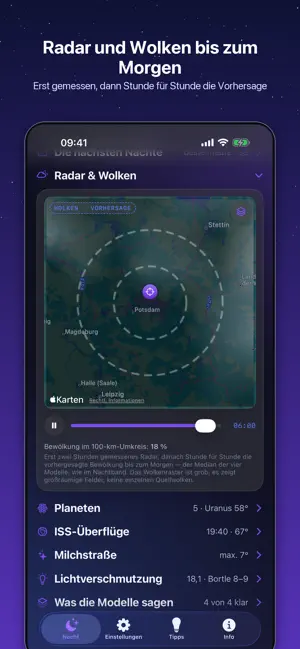
Is tonight worth setting up for – and from when to when? Astrowetter answers exactly that question. With a score, a time window and an honest statement of how certain it is. ONE APP INSTEAD OF FOUR OR FIVE Until now, finding out whether a night was any good meant keeping several apps and websites open: one for rain radar, one for cloud layers and dew point, one for seeing, one for an overall score – and often a spreadsheet to compare the hourly values. The reason for all the switching: each of these tools shows a single weather model and hides the fact that the others say something different. Astrowetter runs up to four weather models at once (DWD ICON-D2 and ICON-EU, NOAA GFS, ECMWF) and shows how far apart they are. If all four say clear, set up. If they disagree, you see it immediately – instead of finding out at the telescope. MORE THAN WEATHER Astrowetter does not judge cloud cover alone. Transparency, fog risk, wind speed and moonlight go into the score as well. So you see at a glance whether the night suits galaxies, emission nebulae, the Milky Way, or the moon and planets. The recommendation sits right under the verdict and the time window. THE NIGHT BAND The whole night from dusk to dawn in one picture: cloud cover as the median of the models with their spread behind it, and below it low, mid and high cloud, seeing and the moon. The observing window is marked in green. WHAT'S INSIDE • Verdict with score, time window and confidence ("4 of 4 models say clear") • Seven nights at a glance • Radar film of the last two hours with 50 and 100 km rings, then the forecast cloud cover hour by hour until morning • Seeing in arcseconds, estimated from the jet stream and air layering • Dew point spread, fog risk and wind – so your optics stay clear and nothing shakes • Moon times: phase, rise and set with their compass direction, countdown to new moon and full moon • Sun times: sunset and sunrise with their direction, plus the start and end of astronomical darkness • Light pollution on a zoomable map, in mag/arcsec² and as a Bortle class, plus the way to the nearest darker sky • Planets with altitude, best time and direction • A compass for moon, sun, planets and the Milky Way: turn the phone until the symbol turns green — then you are facing exactly right • Favourites for several observing sites: switch at the top with a swipe • ISS passes with the track on a world map – green where it is visible from your location • Milky Way: when and how high the galactic centre stands • Reminders for good nights, optionally only for "good" or "very good" • Widgets for the Home and Lock Screen • Shooting tips for the Milky Way, ISS, planets, moon, star trails, galaxies and nebulae • Exposure calculator using the NPF rule, so your stars stay round HONEST, NOT PRETTIED UP Seeing is estimated, not measured. The Bortle class is derived from satellite data. Forecasts beyond two or three days are uncertain – the model spread usually shows that by itself. The two high-resolution DWD models cover Central Europe and Europe respectively; elsewhere the app works with the remaining models and says so. YOUR DATA No account, no ads, no tracking, no subscription. Your location is only requested when you tap "Current location". Sun, moon, planets, Milky Way and ISS are calculated on the device. Maps and place search come from Apple Maps, weather data from Open-Meteo. All sources are listed in the app under "Info". English, German and Spanish. For iPhone and iPad.
What’s new
Version 1.2 · Updated October 28, 2026
Easier to read The app now follows the text size set in iOS, including the details on the home screen. Secondary text and accent colours are brighter with more contrast. Reminders for all favourites The reminder for good nights can now cover all your saved places. It is still only one alert per night, best sites first. The Settings tab says plainly which places it applies to. Colour scale for light pollution Below the map there is now a colour scale with the Bortle classes; an arrow marks the zone of your site. The colours on the map, in the list and in the scale now match. More apps The Info tab has a new "More apps" card with Fotografenwetter, Fotoarchiv and Astrotarget.
App privacy
The developer, Frank Deubert, reported these privacy practices to Apple.
Data Not Collected
The developer does not collect any data from this app.
Alternatives to Astrowetter
Looking for apps like Astrowetter? Here are 6 similar apps on the App Store. The highest rated is AstroFileViewer (5.0/5), and 4 of the 6 are free to download.
-
 ScopeLog: Imaging Go/No-Go
-
 Unofficial Z8 Pro Guide
4.8
Unofficial Z8 Pro Guide
4.8
-
 StrikeLog: Lightning Camera
1.0
StrikeLog: Lightning Camera
1.0
-
 AstroFileViewer
5.0
AstroFileViewer
5.0
-
 eZy Watermark Videos Classic
4.8
eZy Watermark Videos Classic
4.8
-
 Fotospots: Find Photo Spots
| App | Rating | Price | Last updated | Compare |
|---|---|---|---|---|
| Astrowetter | – | 2.99 USD | October 28, 2026 | |
| ScopeLog: Imaging Go/No-Go | – | Free | Jun 17, 2026 | Compare |
| Unofficial Z8 Pro Guide | 4.8 / 5 (24) | 14.99 USD | May 20, 2026 | Compare |
| StrikeLog: Lightning Camera | 1.0 / 5 (2) | Free | Sep 10, 2026 | Compare |
| AstroFileViewer | 5.0 / 5 (2) | Free | May 3, 2026 | Compare |
| eZy Watermark Videos Classic | 4.8 / 5 (1,664) | 5.99 USD | Oct 22, 2026 | Compare |
| Fotospots: Find Photo Spots | – | Free | Oct 10, 2026 | Compare |
Compare Astrowetter with the top alternatives: ratings, updates, ASO score and keyword gaps →