

Book Scanner - Scan to Text
Layerz Corp. Productivity iPhoneiPadiPod touch
Book Scanner - Scan to Text is a free Productivity app for iPhone and iPad by Layerz Corp. Requires iOS 18.0. Updated October 22, 2026.
- Price
- Free
- on the App Store
- Size
- 5 MB
- Age 4+
- Updated
- Oct 22
- 2026 · v1.3.0
Screenshots


About Book Scanner - Scan to Text
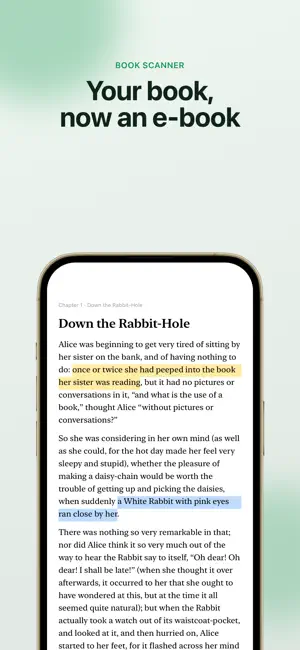
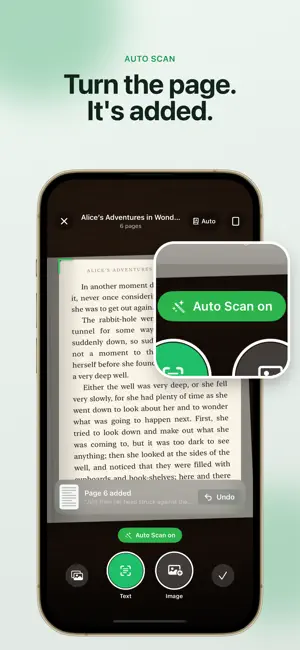
Book Scanner turns the pages of a printed book into text you can read on your phone. Point the camera at a page: the words are recognized on the device and added to a book in your library. Pages flow together into chapters, so what you scanned reads like an e-book, not a stack of photos. SCAN THE WAY YOU READ • A guide frame shows what will be captured; text and image capture on the same screen • Recognition runs on the device; nothing is uploaded • Headers, footers and page numbers are removed; paragraphs that continue on the next page are joined • Choose the recognition language per book • Photograph the cover and the title is picked up from it • The screen stays on while you scan READ, DON'T SQUINT • Page-turn reader with adjustable text size, serif or sans-serif type, line spacing, and light, sepia and dark themes • Search the whole book: every match with its chapter and context, marked on the page • Text follows your Dynamic Type setting • Two-page spread on iPad • Your place in every book is remembered KEEP EVERYTHING TOGETHER • Library with list and grid views, search by title and author, sort by recently added or recently read • Reading progress on every book • iCloud sync between your iPhone and iPad (optional) • Highlight sentences and add notes; find them again in the book's index • See any book as a PDF, highlights included BOOK SCANNER PRO Pro unlocks unlimited OCR with no page limit, Auto Scan that adds pages as you turn them, PDF export with your highlights, and editing of recognized text. Available as a yearly or monthly subscription or a one-time Lifetime purchase; one purchase covers iPhone and iPad. PRIVACY Your scans stay on your device and, if you turn on sync, in your own iCloud. Book Scanner has no accounts, no ads and no tracking. Subscriptions renew automatically unless cancelled at least 24 hours before the end of the current period. Payment is charged to your Apple Account; manage or cancel your subscription in your App Store account settings. Terms of Use: https://www.apple.com/legal/internet-services/itunes/dev/stdeula/ Privacy Policy: https://layerz.app/bookscanner/privacy
What’s new
Version 1.3.0 · Updated October 22, 2026
• Auto Scan shows every page it adds, with Undo.
App privacy
The developer, Layerz Corp., reported these privacy practices to Apple.
Data Not Linked to You
The following data, which may be collected but is not linked to your identity, may be used for the following purposes:
- Location: Coarse Location
- Identifiers: Device ID
- Usage Data: Product Interaction
- Diagnostics: Other Diagnostic Data
Used for: Analytics
Alternatives to Book Scanner - Scan to Text
Looking for apps like Book Scanner - Scan to Text? Here are 6 similar apps on the App Store. The highest rated is Excess Elite CRM (5.0/5), and all 6 are free to download.
-
 DocFind: Search Inside PDFs
-
 Linno LYNC V3
-
 Routine: Daily Planner & ToDo
4.0
Routine: Daily Planner & ToDo
4.0
-
 Excess Elite CRM
5.0
Excess Elite CRM
5.0
-
 Counsel - AI Lawyer Assistant
-
 반팜
반팜
| App | Rating | Price | Last updated | Compare |
|---|---|---|---|---|
| Book Scanner - Scan to Text | – | Free | October 22, 2026 | |
| DocFind: Search Inside PDFs | – | Free | Oct 24, 2026 | Compare |
| Linno LYNC V3 | – | Free | Jun 19, 2026 | Compare |
| Routine: Daily Planner & ToDo | 4.0 / 5 (6) | Free | Oct 22, 2026 | Compare |
| Excess Elite CRM | 5.0 / 5 (5) | Free | Mar 10, 2026 | Compare |
| Counsel - AI Lawyer Assistant | – | Free | Oct 16, 2026 | Compare |
| 반팜 | – | Free | Oct 20, 2026 | Compare |