

Unibud: Study Planner
Ali Yasser Education iPhoneiPadiPod touch
Unibud: Study Planner is a free Education app for iPhone and iPad by Ali Yasser. Rated 5.0/5 from 1 ratings. Requires iOS 16.4. Updated October 13, 2026.
- Rating
- 5.0
- 1 ratings
- Price
- Free
- on the App Store
- Size
- 41 MB
- Age 4+
- Updated
- Oct 13
- 2026 · v1.0.1
Screenshots


About Unibud: Study Planner
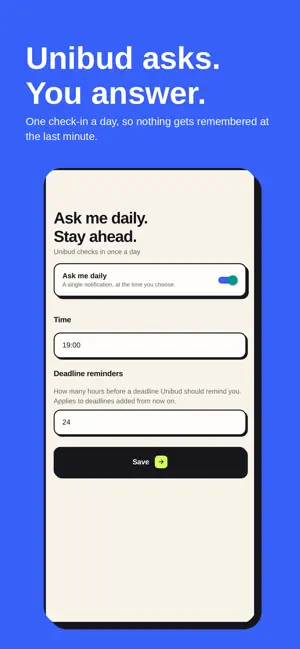
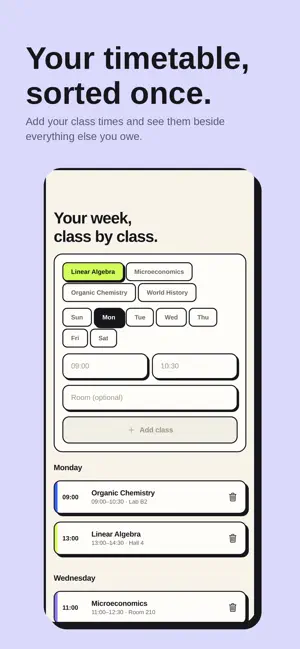
Every subject in one place. Unibud keeps your coursework the way you actually think about it — one folder per subject, with the deadlines, tasks and notes for that subject inside it. Then it does the part you forget: it asks. Once a day, at a time you choose, Unibud checks in so an assignment set three weeks ago does not become tomorrow's problem. SUBJECTS AS FOLDERS Add the subjects you are taking this term. Everything else — documents, tasks, deadlines — lives in the folder it belongs to, not in one endless list. DEADLINES YOU CAN SEE COMING Add assignments, quizzes and exams with the date they are due. Unibud sorts them by what comes first, flags anything overdue, and reminds you a set number of hours ahead. YOUR WEEK, CLASS BY CLASS Put your timetable in once. Class times sit beside everything else you owe, so your week is one picture instead of three apps. TASKS THAT KNOW THEIR SUBJECT Add a task to a subject and it shows up both places: on the subject and in one combined list when you want to see the lot. A DAILY CHECK-IN One notification a day, at a time you set. Answer it in a few seconds and nothing gets remembered at the last minute. YOUR FILES, FILED Attach lecture notes and slides to the subject they belong to, and keep a list of the chapters you are revising against each one. NO ACCOUNT. NOTHING LEAVES YOUR PHONE. There is no sign-up, because there is nothing to sign up to. Unibud stores everything in a database on your device. No cloud, no servers, no analytics, no ads, no tracking. Nothing is uploaded, because there is nowhere to upload it to. It works with the plane mode on. Built for students who want their term organised, not gamified.
What’s new
Version 1.0.1 · Updated October 13, 2026
A walkthrough on first launch, so the app explains itself instead of opening empty. You can replay it any time from Settings. Any deadline or reminder can now be added to your iPhone's Calendar or Reminders with one tap. It hands over one copy when you ask it to — nothing is exported on its own, and nothing is sent anywhere else. Home has moved to the left of the tab bar, where your thumb already is. Margins are even throughout, and the tab bar no longer shifts under your finger when you tap it. Still no account, still no sync, still nothing leaving your device unless you add it to your calendar yourself.
App privacy
The developer, Ali Yasser, reported these privacy practices to Apple.
Data Not Collected
The developer does not collect any data from this app.
Alternatives to Unibud: Study Planner
Looking for apps like Unibud: Study Planner? Here are 6 similar apps on the App Store. The highest rated is Studiary: Study Timer (5.0/5), and all 6 are free to download.
-
 FocusLeaf: Study Timer
-
 Studiary: Study Timer
5.0
-
 My AUC
-
 myGUNI
4.3
-
 Yaqeen Institute
4.8
-
 Learn German (Beginners)
4.7
| App | Rating | Price | Last updated | Compare |
|---|---|---|---|---|
| Unibud: Study Planner | 5.0 / 5 (1 rating) | Free | October 13, 2026 | |
| FocusLeaf: Study Timer | – | Free | Oct 12, 2026 | Compare |
| Studiary: Study Timer | 5.0 / 5 (5) | Free | Nov 9, 2026 | Compare |
| My AUC | – | Free | Dec 18, 2025 | Compare |
| myGUNI | 4.3 / 5 (6) | Free | Nov 13, 2026 | Compare |
| Yaqeen Institute | 4.8 / 5 (235) | Free | Nov 11, 2026 | Compare |
| Learn German (Beginners) | 4.7 / 5 (98) | Free | Nov 13, 2026 | Compare |