

Nazoru: Read Japanese
GYOU GI Education iPhoneiPadiPod touch
Nazoru: Read Japanese is a free Education app for iPhone and iPad by GYOU GI. Requires iOS 18.0. Updated October 18, 2026.
- Price
- Free
- on the App Store
- Size
- 34 MB
- Age 4+
- Updated
- Oct 18
- 2026 · v1.8
Screenshots



About Nazoru: Read Japanese
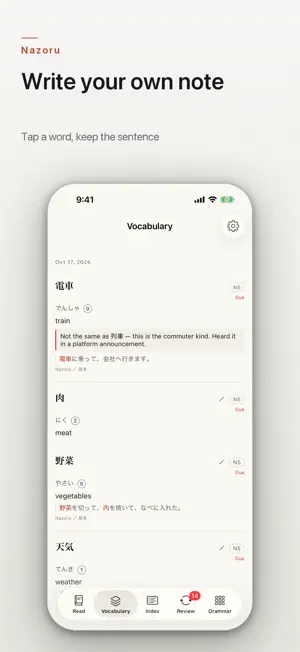
Nazoru is a reading tool, not a dictionary. Tap any word in the text and its reading, pitch accent and meaning come up. Save it, and the sentence you were reading comes with it — that sentence is what you see again at review. A WORD WITHOUT ITS SENTENCE IS A WORD YOU WILL LOOK UP AGAIN Nazoru keeps the form the word appeared in, the reading of that form, the sentence around it and where you read it. At review the sentence comes back with the word blanked out, so the context helps and the answer does not. THE PARTICLE IS PART OF THE WORD 橋 and 端 look the same until the particle after them. Nazoru's pitch lines always include the particle, so the difference is something you can see. READ WHAT YOU WANT TO READ • 30 short pieces, six for each level from N5 to N1 • Paste your own Japanese text, or send selected text from another app through the share sheet. Each text shows what share of its words have meanings • In Safari, turn on tracing and any Japanese page becomes tappable the same way EACH LANGUAGE IS WRITTEN SEPARATELY, NOT TRANSLATED Choose English, Simplified Chinese, Traditional Chinese, Korean, Vietnamese or Nepali. They are not translations of each other: English notes cover how a word is used and its register, and point out words that sound the same; Chinese notes warn where familiar-looking characters mean something else; Korean and Vietnamese notes give the Sino-Korean and Sino-Vietnamese reading, so words you already know show up at once. GRAMMAR AS PAIRS Grammar points and contrasts at every level from N5 to N1 — the two forms you actually mix up, side by side, with the one question that settles which to use. REVIEW Scheduling with FSRS-5, computed on the phone. One reminder a day at an hour you choose, only on days something is due (delivery is up to iOS). NONE OF IT COMES TO US The dictionary is inside the app, so reading, looking up and review work with no network at all. There is no account to make, no server of ours, no analytics and no advertising. What you read and what you save are never sent to the developer. THE SAME LIST ON A SECOND DEVICE, IF YOU WANT IT After the purchase you can turn on iCloud sync, and your vocabulary list, the grammar you put into review, and your review progress are kept in your own iCloud — a second device then shows the same list. It is off until you turn it on. Settings, the appearance you chose and texts you added yourself are not copied, and the developer cannot read any of it. PRICING All features are open for 7 days from the first time you open the app. After that the reader, vocabulary list, review, grammar and Safari extension keep working, with meanings for N5 and N4. Meanings and grammar for N3–N1 (6,439 more words) open either with a one-time purchase or a monthly subscription. Readings and pitch accent are free for every word. JLPT levels are unofficial: the JLPT has published no word list since 2010. Readings and pitch accent come from the Open JTalk dictionary (modified BSD); levels from Jonathan Waller's compilation (tanos.co.uk). iPhone and iPad, iOS 18 or later. Terms of Use: https://nazoru.glspace.co.jp/terms.html Privacy Policy: https://nazoru.glspace.co.jp/privacy.html
What’s new
Version 1.8 · Updated October 18, 2026
Some words are not in the dictionary at all — a name, a company, a piece of jargon, a word from an article you pasted in yourself. Until now they were simply greyed out and did nothing when you tapped them. Now you can write them yourself. Tap the greyed word; if the split landed in the middle of what you wanted, adjust how much of it to take; then type the reading in kana and what it means in your own words. The reading is optional — if you only know the meaning, write only the meaning. What you write goes into the vocabulary book, marked as yours, and comes back at review like any other word. It does not get a pitch line: you typed a reading, not an accent, and the app will not invent one for you. In the text the word stays greyed out, because the dictionary still does not have it — but tapping it again brings up what you wrote. A word can also be in the dictionary, with a reading, but with no meaning written yet. That card used to end there. It now has a way through to a note of your own, and it saves the word first so there is somewhere to write. Fixed: with the sakura skin on a device set to dark mode, text you were typing could be drawn in a colour that left it invisible — on the screen where you paste an article, in the note editor, and in several other panels.
App privacy
The developer, GYOU GI, reported these privacy practices to Apple.
Data Not Collected
The developer does not collect any data from this app.
Alternatives to Nazoru: Read Japanese
Looking for apps like Nazoru: Read Japanese? Here are 6 similar apps on the App Store. The highest rated is 惜墨日语: Learn Japanese (5.0/5), and all 6 are free to download.


| App | Rating | Price | Last updated | Compare |
|---|---|---|---|---|
| Nazoru: Read Japanese | – | Free | October 18, 2026 | |
| 根记日语-视觉画面记单词 | – | Free | Oct 19, 2026 | Compare |
| 惜墨日语: Learn Japanese | 5.0 / 5 (2) | Free | Oct 14, 2026 | Compare |
| 一口日语短文 | – | Free | Oct 19, 2026 | Compare |
| Rakuo | – | Free | Sep 17, 2026 | Compare |
| Echotter - 播客学瑞典语日语英语韩语 | – | Free | Oct 22, 2026 | Compare |
| 无痛日语 - AI背单词、查词典、JLPT考级 | – | Free | Oct 23, 2026 | Compare |