

Product Photo AI: Catalog PDF
Mustafa Ali Dikcinar Graphics & Design iPhoneiPadiPod touch
Product Photo AI: Catalog PDF is a free Graphics & Design app for iPhone and iPad by Mustafa Ali Dikcinar. Requires iOS 15.0. Updated October 14, 2026.
- Price
- Free
- on the App Store
- Size
- 61 MB
- Age 4+
- Updated
- Oct 14
- 2026 · v1.0.2
Screenshots



About Product Photo AI: Catalog PDF
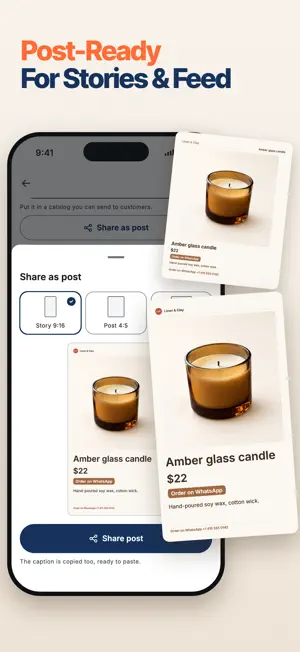
Turn your products into a catalog customers can order from, then make the photos to fill it. Add each product with its photos and price, pick the ones you want, and get a multi-page PDF or post-sized page images with an "Order on WhatsApp" link on every item. When a product needs a better picture, shoot it on your kitchen table and get back sales-ready studio shots, lifestyle scenes, model shots and clean cutouts. No photographer, no designer. Your product library stays on your phone. CATALOGS THAT TAKE ORDERS A catalog maker built on your own products: • A multi-page PDF to send or print, or post-sized page images for a carousel • Six layouts: one product per page, grids of 2, 4, 6 or 9, and a price list • Five themes and three formats: A4, 4:5 portrait and square • A cover page and a "how to order" page with your phone, WhatsApp, Instagram, website, email and address • An "Order on WhatsApp" link on every product • Stock badges (sold out, few left, pre-order), "price on request" and a "prices valid until" date Change a price, add a product, export again. Catalogs are built on your phone; only the photos of a shoot are uploaded to make the images. EVERY PRODUCT, ONE LIBRARY Each product keeps its photos, name, price, "was" price, product code, category, description, details and stock status. Add the main photo plus up to three more angles (back, side, close-up, label) and every shot of that product is built from all of them, so the result stays closer to the real item. SEVEN AI TOOLS • Studio shot: clean light on a plain backdrop • Lifestyle scene: the product on a counter, a table or a shelf • Clear the background: a clean cutout on white • On a model: worn or held, for clothing, shoes, bags, jewelry and cosmetics • A set of variations: several angles of one product in one go • Close-up detail: material, texture, stitching or finish • Collection shot: 2 to 4 of your products in one scene, for covers and campaigns SCENES AND CATEGORIES 12 scenes, from studio white and marble to kitchen counter, beach sunlight and flat lay. Use one scene for every product and your pages match. 15 categories: clothing, jewelry, cosmetics, skincare, food, drinks, home decor, furniture, electronics, toys, shoes, bags, stationery, pet supplies and more. KEEP IT EXACT OR GO CREATIVE Keep the product exact is the default: the model is asked to hold shape, color, logo and label text as in your photo. Switch to Creative when the scene matters more than a close match, and check the product closely. READ THIS BEFORE YOU PUBLISH The model redraws every image, so a result is a drawing of your product, not a photograph of it, and it can differ from the item a customer receives. Logos, label text, ingredient lists and small print go wrong first. Compare every result with the real product before commercial use, and do not use a generated image where a sales platform or the law requires an actual photo of the goods. MADE FOR • Small shops with no photographer • Home and handmade sellers shooting between orders • Social sellers taking orders over chat • Anyone who sends customers a price list PRICING Catalogs are free to build. Your first shoots are free to create and preview, watermarked, with one image each. A weekly or yearly subscription gives you up to four images per shoot, full images without the preview watermark, fresh credits every billing period and a priority queue. Each plan includes a set number of credits, shown on the purchase screen; a shoot's credit cost is shown before you start. Credits are granted per billing period and replaced, not added to, on renewal, so unused credits do not carry over. Price, period and renewal terms are shown before you buy, and you can restore purchases. Manage or cancel any time in your App Store account settings. Privacy Policy: https://product-studio.blwapps.com/privacy Terms of Use: https://product-studio.blwapps.com/terms Support: https://product-studio.blwapps.com/support
App privacy
The developer, Mustafa Ali Dikcinar, reported these privacy practices to Apple.
Data Linked to You
The following data, which may be collected and linked to your identity, may be used for the following purposes:
- Purchases: Purchase History
- Location: Coarse Location
- Identifiers: Device ID, User ID
- Usage Data: Product Interaction
- Contact Info: Email Address
- User Content: Photos or Videos, Customer Support
Used for: Analytics, App Functionality
Data Not Linked to You
The following data, which may be collected but is not linked to your identity, may be used for the following purposes:
- Diagnostics: Crash Data
Used for: App Functionality
Alternatives to Product Photo AI: Catalog PDF
Looking for apps like Product Photo AI: Catalog PDF? Here are 6 similar apps on the App Store. The highest rated is AI Product Ad Maker: PixelAd (5.0/5), and all 6 are free to download.
-
 BrandShots: AI Product Photos
-
 AI Product Ad Maker: PixelAd
5.0
-
 EngraveKit: Laser Engraving
-
 PaperFree: Business Card Maker
1.0
-
 AI 3D Printables : 3D Print
3.0
-
 Home Remodel AI, Room Design
5.0
| App | Rating | Price | Last updated | Compare |
|---|---|---|---|---|
| Product Photo AI: Catalog PDF | – | Free | October 14, 2026 | |
| BrandShots: AI Product Photos | – | Free | Oct 30, 2026 | Compare |
| AI Product Ad Maker: PixelAd | 5.0 / 5 (1) | Free | Oct 16, 2026 | Compare |
| EngraveKit: Laser Engraving | – | Free | Oct 29, 2026 | Compare |
| PaperFree: Business Card Maker | 1.0 / 5 (1) | Free | Sep 24, 2026 | Compare |
| AI 3D Printables : 3D Print | 3.0 / 5 (2) | Free | Oct 18, 2026 | Compare |
| Home Remodel AI, Room Design | 5.0 / 5 (1) | Free | Aug 3, 2026 | Compare |