

Motion Keyboard
Adrian Zielinski Productivity iPhoneiPadiPod touch
Motion Keyboard is a free Productivity app for iPhone and iPad by Adrian Zielinski. Requires iOS 26.0. Updated October 4, 2026.
- Price
- Free
- on the App Store
- Size
- 23 MB
- Age 4+
- Updated
- Oct 4
- 2026 · v1.2
Screenshots


About Motion Keyboard
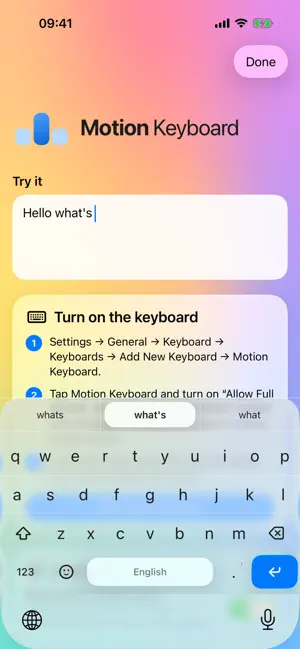
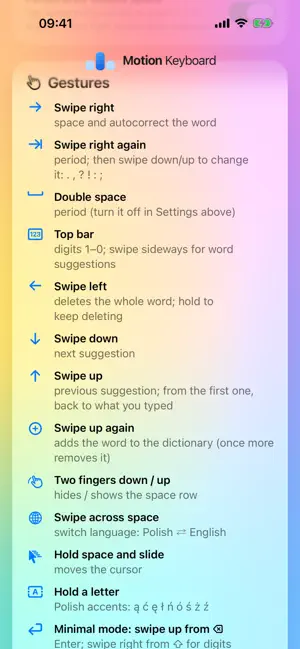
Motion Keyboard corrects words from where your fingers land. Type fast without aiming: the keyboard reads the pattern of all your taps and finds the word you meant. GESTURES • Swipe right: space and the corrected word • Swipe right again: period; swipe down or up to change the mark • Swipe down: next suggestion; up: previous, or exactly what you typed • Swipe left: delete the whole word; hold to keep deleting • Swipe up on a typed word: add it to the dictionary • Two fingers down: hide the space row and get more screen • Hold the space bar: move the cursor ENGLISH AND POLISH Suggestions take the previous word into account. Hold a letter for Polish accents. Swipe across the space bar to switch languages. LEARNS HOW YOU TYPE The keyboard remembers your words and how you hit the keys, and gets more accurate over time. LIQUID GLASS One glass pane with no gaps between keys: every point belongs to a key, so you never tap into nothing. The pressed letter pops up on a glass lens. The bar above the keys shows digits 1–0 or word suggestions; swipe sideways to switch. Emoji sit next to 123. PRIVACY The keyboard never connects to the internet and sends nothing. What it learns stays on your iPhone. It works without Full Access; Full Access adds haptics and a dictionary shared with the app.
What’s new
Version 1.2 · Updated October 4, 2026
What's new: • Quick phrases: before you start typing, the bar shows three ready phrases. Set them in the app. • Text Replacement from iOS Settings works: type the shortcut and tap space. • The 123 and #+= keyboards use Apple's symbol layout. • Emoji follow the iPhone's categories and order, with no digits above the panel. • A digit typed inside a word stays part of it: autocorrect fixes the whole word and swipe left deletes it in one go. • A quiet sound and a subtle glow after each gesture. • Accents, the comma under the period and the space-bar cursor appear right after you hold, including on edge keys. • A shorter suggestion bar, so the keyboard takes less room. • Autocorrect runs only after space. Emails and links stay as typed. • Swiping down or up while typing changes the previous word.
App privacy
The developer, Adrian Zielinski, reported these privacy practices to Apple.
Data Not Collected
The developer does not collect any data from this app.
Alternatives to Motion Keyboard
Looking for apps like Motion Keyboard? Here are 6 similar apps on the App Store. The highest rated is Polish Translator & Learn + (5.0/5), and all 6 are free to download.
-
 Roger AI Keyboard Clutch
1.0
Roger AI Keyboard Clutch
1.0
-
 QuickPaste – Snippet Keyboard
-
 Consensise
-
 WristKey : Watch Keyboard 2026
-
 NoteDock: Quick Smart AI Notes
3.8
NoteDock: Quick Smart AI Notes
3.8
-
 Polish Translator & Learn +
5.0
Polish Translator & Learn +
5.0
| App | Rating | Price | Last updated | Compare |
|---|---|---|---|---|
| Motion Keyboard | – | Free | October 4, 2026 | |
| Roger AI Keyboard Clutch | 1.0 / 5 (1) | Free | Jan 20, 2026 | Compare |
| QuickPaste – Snippet Keyboard | – | Free | Feb 14, 2026 | Compare |
| Consensise | – | Free | May 29, 2026 | Compare |
| WristKey : Watch Keyboard 2026 | – | Free | Jun 29, 2026 | Compare |
| NoteDock: Quick Smart AI Notes | 3.8 / 5 (5) | Free | Apr 29, 2026 | Compare |
| Polish Translator & Learn + | 5.0 / 5 (2) | Free | Aug 7, 2026 | Compare |
Compare Motion Keyboard with the top alternatives: ratings, updates, ASO score and keyword gaps →