

LiveKit - Live Photo Tools
东 杨 Utilities iPhoneiPadiPod touch
LiveKit - Live Photo Tools is a free Utilities app for iPhone and iPad by 东 杨. Requires iOS 17.4. Updated October 16, 2026.
- Price
- Free
- on the App Store
- Size
- 13 MB
- Age 4+
- Updated
- Oct 16
- 2026 · v1.0.2
Screenshots

About LiveKit - Live Photo Tools
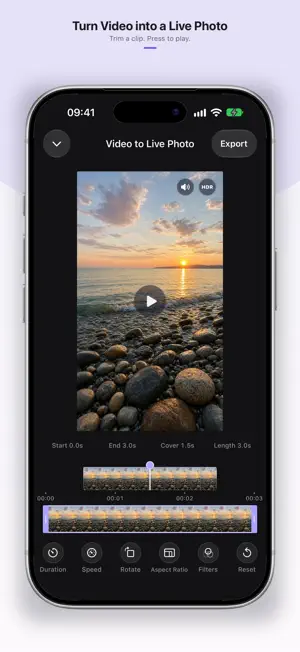
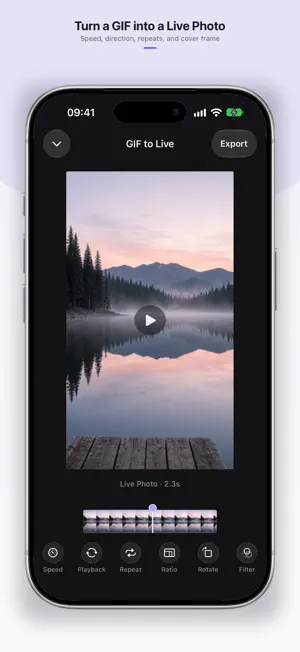
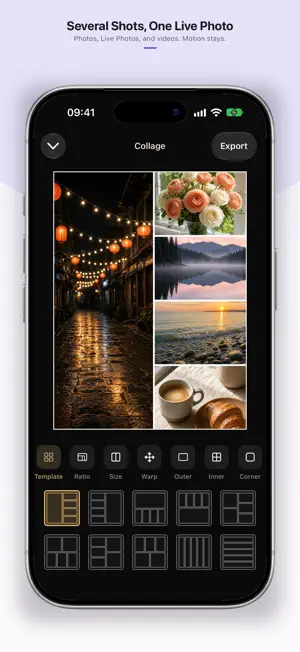
LiveKit — video to Live Photo, mute, collage, GIF, and GIF to Live Want to turn a video into a Live Photo you can press to play? LiveKit helps you convert video to Live Photo, mute Live Photo, change the cover, export to video, collage, make GIFs, and turn GIFs into Live Photos or videos—then save straight to Photos for lock screen or albums. [Video to Live Photo] Trim a clip and convert video to Live Photo in one tap. Pick a key photo cover—great for lock screen Live Photos and album covers. [Live Photo / Video Frame Capture] Scrub a video or Live Photo timeline and save the exact frame as a high-quality still. [Change Live Photo Cover] Scrub the timeline for a new key frame, or use a custom cover. The preview is the cover that will be saved. Your original stays in Photos. [Live Photo to Video] Export Live Photo motion as a video for social sharing or further editing. [Mute Live Photo] Keep the motion, remove the sound—ideal for lock screen or quiet sharing. Batch mute Live Photo supported. [Live Photo Collage] Combine photos, Live Photos, and videos in one layout. When any clip moves, the export can keep that motion. [Make Live Photo GIF] Turn Live Photos or videos into looping GIFs. Set speed, direction, and color count, then select multiple items to convert in a batch. [GIF to Live Photo] Turn a GIF into a Live Photo or a video. Set speed, direction, repeats, and the cover frame. A Live Photo keeps about 3 seconds around the cover; longer motion can export as video. Whether you need video to Live Photo, a quieter Live Photo, or formats that share more easily, LiveKit keeps the workflow short. Free to try every tool. Upgrade to Pro to remove ads, lift daily limits, and unlock upcoming features. Privacy Policy: https://live.xiaojiays.workers.dev/PrivacyPolicy/privacy-en Terms of Use: https://live.xiaojiays.workers.dev/TermsOfUse/terms-en
What’s new
Version 1.0.2 · Updated October 16, 2026
• Turn a GIF into a Live Photo or a video. Set speed, direction, repeats, and the cover frame. • GIF export now includes color count, with clearer speed and direction controls. • Set Cover previews the exact frame you will save, including a custom cover. • Clearer export options when saving Live Photos, collages, and still frames. Thanks for using LiveKit.
App privacy
The developer, 东 杨, reported these privacy practices to Apple.
Data Used to Track You
The following data may be used to track you across apps and websites owned by other companies:
- Identifiers: Device ID
Data Not Linked to You
The following data, which may be collected but is not linked to your identity, may be used for the following purposes:
- Identifiers: Device ID
Used for: Third-Party Advertising
Alternatives to LiveKit - Live Photo Tools
Looking for apps like LiveKit - Live Photo Tools? Here are 6 similar apps on the App Store. The highest rated is LiveMem - Live Photo Editor (5.0/5), and all 6 are free to download.
-
 PixelGuard | EXIF Remover
-
 FooSales for WooCommerce
3.6
-
 LiveMem - Live Photo Editor
5.0
-
 LiveFun: Video to Live Photo
3.7
-
 UMT EV Charge
-
 Video to Live Photos Wallpaper
5.0
| App | Rating | Price | Last updated | Compare |
|---|---|---|---|---|
| LiveKit - Live Photo Tools | – | Free | October 16, 2026 | |
| PixelGuard | EXIF Remover | – | Free | Oct 10, 2026 | Compare |
| FooSales for WooCommerce | 3.6 / 5 (8) | Free | Oct 23, 2026 | Compare |
| LiveMem - Live Photo Editor | 5.0 / 5 (1) | Free | Jul 14, 2026 | Compare |
| LiveFun: Video to Live Photo | 3.7 / 5 (3) | Free | Oct 11, 2026 | Compare |
| UMT EV Charge | – | Free | Jan 7, 2026 | Compare |
| Video to Live Photos Wallpaper | 5.0 / 5 (1) | Free | Nov 10, 2025 | Compare |