

ABLooplay: A-B Audio Looper
TAKAYUKI TAKEMOTO Music iPhoneiPadiPod touch
ABLooplay: A-B Audio Looper is a free Music app for iPhone and iPad by TAKAYUKI TAKEMOTO. Requires iOS 17.0. Updated October 23, 2026.
- Price
- Free
- on the App Store
- Size
- 13 MB
- Age 4+
- Updated
- Oct 23
- 2026 · v1.6.2
Screenshots


About ABLooplay: A-B Audio Looper
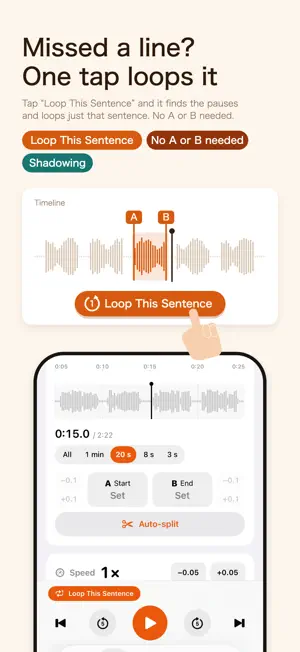
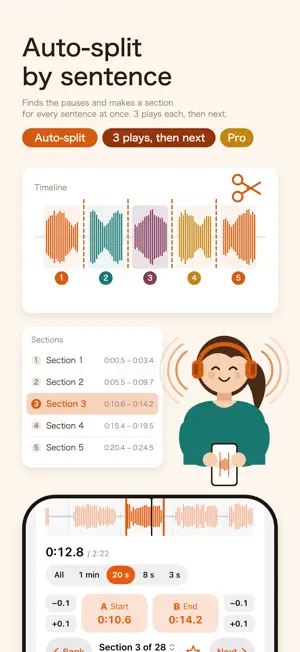
Paste a link from a video app and loop any scene from A to B, as often and in as many spots as you like. The sentence you can’t catch, the riff you can’t play yet: slow it to 0.5× at the same pitch. “Loop This Sentence” loops one sentence at a time, no A/B needed. Record yourself and compare. No ads. ■ From here to there, again and again Watch the waveform and tap A and B — only that part repeats. Pause to pick the gaps by eye, and add a pause between repeats to say it back. Missed a sentence? Tap “Loop This Sentence”: it finds the pauses around it and loops it, no A or B needed. ■ Auto-split by sentence (Pro) Auto-split › By sentence cuts wherever the sound stops for 1 second or more, making a section for every sentence at once. Set “Plays before moving on” to 3 and long lessons play through on their own. Pro also adds unlimited sections and an equalizer to bring bass, vocals, drums, guitar or piano forward. ■ Compare with your voice Record yourself with “Record Voice”, then tap “Original → You” to hear both back to back and catch differences in pronunciation and intonation. ■ Half speed, same pitch From 0.5× to 2× without changing the pitch. “Speed up a little each loop” adds 0.05× per play up to 1×, and the key shifts up to ±6 semitones to match your instrument. Zoom to 3 s and slide the waveform to land on the first word or note, or nudge A and B by ±0.1 s. ■ A–B loops for videos, too In the Videos tab, paste a video link and it plays in the app; tap “A Start” and “B End” to loop the part in between. Your own videos (MP4, MOV) from the Files app are listed by folder, with a waveform for setting sections. Play counts, pauses, speed and voice comparison work as for songs. Videos from a link have no waveform or Auto-split, and videos stop when you leave the app. ■ Practice log and favorites Each day you practice 1 minute or more in AB Repeat gets a stamp on the Log tab’s calendar (a star on goal days). Tap a day to see your time and loops, and set a practice reminder there. Tap the star next to “Section 1 of 3” to save a section to a folder, then loop it right away from “Favorite Sections”. ■ An everyday music player, too Tap a song in the Music tab and a large player slides up; swipe down to browse while it plays. ≡ gives you up next, shuffle, repeat, speed and a sleep timer, and the speech bubble shows lyrics. Search by title, artist or album, and control it from the Lock Screen. ■ Adding audio Import MP3s from the Files app, singly or by folder, or copy them in from a computer. m4a, wav, aiff, unprotected songs from your music library, podcast episodes and audio from videos in Photos work too. Tracks are sorted by editable ID3 tags (artist → album → song), and empty tags are filled from file and folder names. ■ Also • LRC scripts and subtitles (SRT, VTT) show each sentence and check your dictation • A hands-on tutorial with 8 English sentences • Two columns and keyboard control on iPad; a vertical tab strip on the foldable iPhone Duo • Speed, sections and key are saved per song • No ads. Your files and recordings stay on your device; the app only goes online for podcasts and videos from a link ■ Without Pro, and Pro Without Pro you get the basics: up to 3 sections per song or video, Loop This Sentence, ±0.1 s, speed, key, speed-up, pauses, repeat counts, voice comparison, the practice log, favorites, 2 playlists, and unlimited videos, both your own and from a link. ABLooplay Pro adds auto-split, unlimited sections, the equalizer and unlimited playlists. Choose an auto-renewing subscription or a purchase that never renews. • Payment is charged to your Apple Account when you confirm the purchase • Subscriptions renew automatically unless canceled at least 24 hours before the end of the period • Manage or cancel in Settings > [your name] > Subscriptions • Terms of Use: https://www.apple.com/legal/internet-services/itunes/dev/stdeula/ • Privacy Policy: https://tatsu456.github.io/ablooplay/privacy.html
What’s new
Version 1.6.2 · Updated October 23, 2026
■ Easier to find We refreshed the app name and description. ■ Small improvements Improved stability.
App privacy
The developer, TAKAYUKI TAKEMOTO, reported these privacy practices to Apple.
Data Not Linked to You
The following data, which may be collected but is not linked to your identity, may be used for the following purposes:
- Identifiers: Device ID
- Usage Data: Advertising Data, Product Interaction
- Diagnostics: Performance Data
Used for: Third-Party Advertising, Analytics, App Functionality
Alternatives to ABLooplay: A-B Audio Looper
Looking for apps like ABLooplay: A-B Audio Looper? Here are 6 similar apps on the App Store. The highest rated is Audio Looper - Audio Repeater (5.0/5), and all 6 are free to download.
-
 By Ear PRO: Slow Down, Notate
-
 LoopPlay
-
 Audio Looper - Audio Repeater
5.0
Audio Looper - Audio Repeater
5.0
-
 AB Looper
5.0
AB Looper
5.0
-
 Audio/Video Looper - RepeatLab
5.0
Audio/Video Looper - RepeatLab
5.0
-
 Spiral: Cloud Music Player
4.0
Spiral: Cloud Music Player
4.0
| App | Rating | Price | Last updated | Compare |
|---|---|---|---|---|
| ABLooplay: A-B Audio Looper | – | Free | October 23, 2026 | |
| By Ear PRO: Slow Down, Notate | – | Free | Sep 14, 2026 | Compare |
| LoopPlay | – | Free | Oct 7, 2026 | Compare |
| Audio Looper - Audio Repeater | 5.0 / 5 (2) | Free | Aug 27, 2025 | Compare |
| AB Looper | 5.0 / 5 (1) | Free | Oct 13, 2026 | Compare |
| Audio/Video Looper - RepeatLab | 5.0 / 5 (2) | Free | Sep 1, 2026 | Compare |
| Spiral: Cloud Music Player | 4.0 / 5 (1) | Free | Sep 14, 2026 | Compare |