

Swipe Clean Up - Light Cleaner
STIFLERST APPS Productivity iPhoneiPadiPod touch
Swipe Clean Up - Light Cleaner is a free Productivity app for iPhone and iPad by STIFLERST APPS. Requires iOS 18.0. Updated October 12, 2026.
- Price
- Free
- on the App Store
- Size
- 56 MB
- Age 17+
- Updated
- Oct 12
- 2026 · v1.0
Screenshots



About Swipe Clean Up - Light Cleaner
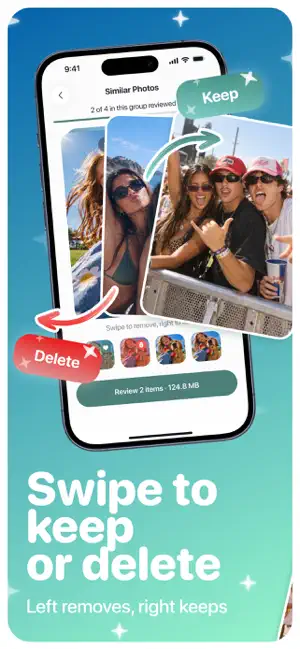
Swipe Clean Up is a photo cleaner for people whose camera roll stopped being a gallery and turned into a pile. One photo at a time, one decision at a time: swipe left to mark a shot for removal, swipe right to keep it. Nothing leaves your library while you swipe, and nothing is deleted until you have looked at your decisions and confirmed them yourself. HOW IT WORKS 1. Open a category and start swiping. Left marks a file for removal, right keeps it, Undo takes back the last decision. 2. Tap Review whenever you want to see what you have decided so far. 3. Press Delete when you are ready and confirm in the standard iOS dialog. WHAT IS INSIDE Similar Photos - burst shots and near-identical frames are grouped together, so you can go through one series at a time and choose what stays. Duplicates - exact copies of the same file, collected in one place instead of scattered across years. Screenshots - receipts, maps, chats and everything else you captured once and never opened again. Large Videos - the heaviest files in your library, so you can start where the space actually is. Review before deleting - a summary of every decision in three sets: to delete, kept and not reviewed. Tap any photo to see it again and change your mind. Cleanup by goal - pick 3 GB, 5 GB or 10 GB and get a ready list of files to look through. Favorites, photos from the past week and recent screenshots stay out of the plan. Compress - photos over 5 MB and videos over 50 MB can be saved as a smaller copy. The original stays in your library untouched unless you choose to remove it. Folder cleanup - connect a folder through the Files app and see what is taking up space in it. iCloud photos - switched off by default. Turn on Include iCloud Photos in settings to go through them as well, keeping in mind that removing them there deletes them from iCloud too. Light and dark - the interface follows the appearance you already use on your iPhone. ABOUT ACCESS AND YOUR DATA Swipe Clean Up asks for access to your photo library for one reason: that is the only way to find duplicates, similar shots, screenshots and large videos, and to remove the ones you pick. Your photos and videos are analyzed on this device. There is no account, no upload, no server. Limited access works too, and the app will simply work with the photos you selected. Folder cleanup goes through the system picker, so the app sees the one folder you connect and nothing else. Deleting is never instant here, and that is on purpose. Files you confirm are moved by iOS to Recently Deleted in the Photos app, where they stay for 30 days. Swipe Clean Up shows how much space is ready to be freed, walks you through the last step, and measures the result when you come back, so the number you see is a real one. A session can be as long as you want it to be. Two minutes on the train is enough for a group of duplicates, and your decisions are remembered, so the next time you open a category it starts where you stopped rather than at the beginning. Download Swipe Clean Up and start with one photo. SUBSCRIPTION Scanning your library, opening categories and swiping through photos are available without a subscription. Deleting files, compressing and folder cleanup are part of Swipe Clean Up Premium, and new users can start with a 3-day trial. Plans are offered for a week and for a year. Payment is charged to your Apple Account once the purchase is confirmed. A plan renews automatically at the end of every period unless automatic renewal is turned off at least 24 hours before that period ends. You can turn it off, switch plans or cancel at any time in Settings, Apple Account, Subscriptions. Current prices are always shown in the app before you confirm anything. Terms of Use: https://stiflerst.com/privacy.html Privacy Policy: https://stiflerst.com/terms.html
App privacy
The developer, STIFLERST APPS, reported these privacy practices to Apple.
Data Used to Track You
The following data may be used to track you across apps and websites owned by other companies:
- Identifiers: Device ID
- Usage Data: Product Interaction
- Diagnostics: Crash Data
Data Not Linked to You
The following data, which may be collected but is not linked to your identity, may be used for the following purposes:
- Identifiers: Device ID
- Usage Data: Product Interaction
- Diagnostics: Crash Data
Used for: Developer’s Advertising or Marketing, Analytics
Alternatives to Swipe Clean Up - Light Cleaner
Looking for apps like Swipe Clean Up - Light Cleaner? Here are 6 similar apps on the App Store. The highest rated is Constropedia Brick Calculator (5.0/5), and all 6 are free to download.
-
 Fast Cleaner: Clean Up Space
-
 Tank Volume Calculator A1 PRO
-
 Constropedia Brick Calculator
5.0
-
 Concrete Calculator All In One
4.5
-
 Privacy Defender: Focus Shield
2.5
-
 Keyboard AI
4.2
| App | Rating | Price | Last updated | Compare |
|---|---|---|---|---|
| Swipe Clean Up - Light Cleaner | – | Free | October 12, 2026 | |
| Fast Cleaner: Clean Up Space | – | Free | Jul 10, 2026 | Compare |
| Tank Volume Calculator A1 PRO | – | Free | Feb 24, 2026 | Compare |
| Constropedia Brick Calculator | 5.0 / 5 (2) | Free | Oct 1, 2026 | Compare |
| Concrete Calculator All In One | 4.5 / 5 (6) | Free | Sep 30, 2026 | Compare |
| Privacy Defender: Focus Shield | 2.5 / 5 (22) | Free | Aug 10, 2026 | Compare |
| Keyboard AI | 4.2 / 5 (348) | Free | Sep 15, 2026 | Compare |