

AlbumMosaic - Collage Maker
Takashi Hamanaka Photo & Video iPhoneiPadiPod touch
AlbumMosaic - Collage Maker is a free Photo & Video app for iPhone and iPad by Takashi Hamanaka. Requires iOS 17.0. Updated September 30, 2026.
- Price
- Free
- on the App Store
- Size
- 5 MB
- Age 4+
- Updated
- Sep 30
- 2026 · v1.0
Screenshots
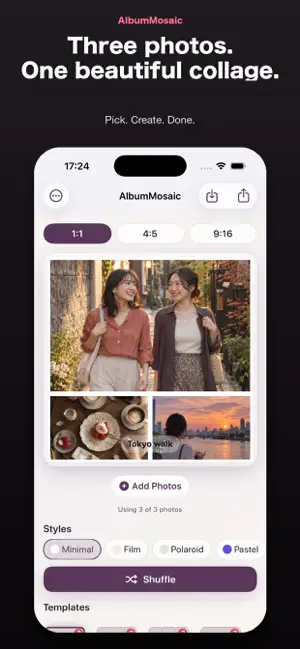


About AlbumMosaic - Collage Maker
Pick your photos and get a stylish collage in seconds. AlbumMosaic arranges 1 to 9 photos into a clean, balanced layout automatically. No hunting for templates and no fiddly alignment: just your memories on one page. PERFECT FOR • Turning a trip, a café visit, or an event into a single post • Feed posts and stories, sized and ready to share • Fan collages in your favorite color • Simple collages with no watermark AUTOMATIC LAYOUT AlbumMosaic chooses from 21 templates to fit the number of photos you pick, from a single photo with a clean border up to a 3×3 grid of nine. You can switch templates anytime. 8 STYLES, ONE TAP Minimal, Film, Polaroid, Pastel, Monochrome, Favorite Color, Magazine, and Natural. Each style changes the background, spacing, corners, and color tone together. Not sure which one to use? Tap Shuffle to try a new template and style. ADJUST WITH YOUR FINGERTIPS • Tap a photo to replace it • Pinch or drag to crop • Double-tap to reset the crop • Touch and hold, then drag to swap two photos SIZE, CAPTION & FAVORITE COLOR • Three sizes: 1:1 square, 4:5 portrait, and 9:16 for stories • Add a caption with a place, a date, or a few words. The text color adjusts automatically so it stays readable • Choose your favorite color: the Favorite Color style uses it as the background, and the Pastel style turns it into a soft gradient HIGH-RESOLUTION EXPORT What you see is what you save: 2048×2048 (1:1), 1638×2048 (4:5), or 1080×1920 (9:16) pixels. No watermark. Save to Photos, or send it to other apps from the share sheet. PRIVATE AND SIMPLE • No account needed • Photos are chosen with the iOS photo picker, so the app doesn't need access to your whole library • Saving uses add-only access to Photos • A short tutorial helps you get started, and you can reopen it anytime from Settings ADS AND PREMIUM Every collage feature is available without a purchase. A banner ad appears at the bottom of the screen. Premium, a one-time in-app purchase, removes the ads. It doesn't add any other features. Start by picking three photos.
App privacy
The developer, Takashi Hamanaka, reported these privacy practices to Apple.
Data Used to Track You
The following data may be used to track you across apps and websites owned by other companies:
- Usage Data: Advertising Data
Data Linked to You
The following data, which may be collected and linked to your identity, may be used for the following purposes:
- Usage Data: Advertising Data
Used for: Third-Party Advertising
Alternatives to AlbumMosaic - Collage Maker
Looking for apps like AlbumMosaic - Collage Maker? Here are 6 similar apps on the App Store. The highest rated is Tilea — Photo Collage Maker (4.0/5), and 5 of the 6 are free to download.
-
 Montra: Photo Collage Maker
-
 Simple Collage - No Ads
-
 Tilea — Photo Collage Maker
4.0
-
 GoCamera – PlayMemories Mobile
2.3
-
 Pictier: Snap, Share & Earn
-
 Retro Film - 8mm Video Maker
3.6
| App | Rating | Price | Last updated | Compare |
|---|---|---|---|---|
| AlbumMosaic - Collage Maker | – | Free | September 30, 2026 | |
| Montra: Photo Collage Maker | – | Free | Oct 28, 2026 | Compare |
| Simple Collage - No Ads | – | Free | Oct 19, 2026 | Compare |
| Tilea — Photo Collage Maker | 4.0 / 5 (2) | Free | Nov 3, 2026 | Compare |
| GoCamera – PlayMemories Mobile | 2.3 / 5 (340) | 14.99 USD | Nov 5, 2024 | Compare |
| Pictier: Snap, Share & Earn | – | Free | Oct 1, 2026 | Compare |
| Retro Film - 8mm Video Maker | 3.6 / 5 (41) | Free | Sep 16, 2025 | Compare |