

Doendar: To-Do List & Calendar
Koki Fujita Productivity iPhoneiPadiPod touch
Doendar: To-Do List & Calendar is a free Productivity app for iPhone and iPad by Koki Fujita. Requires iOS 26.0. Updated October 19, 2026.
- Price
- Free
- on the App Store
- Size
- 25 MB
- Age 4+
- Updated
- Oct 19
- 2026 · v1.0.3
Screenshots
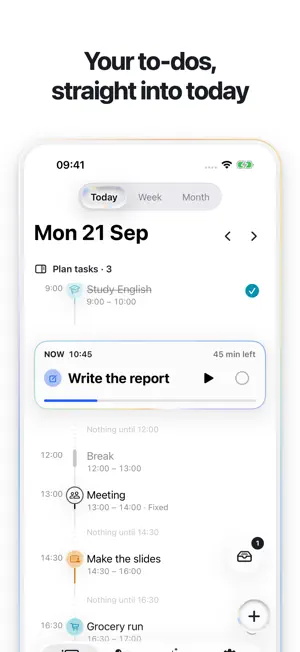

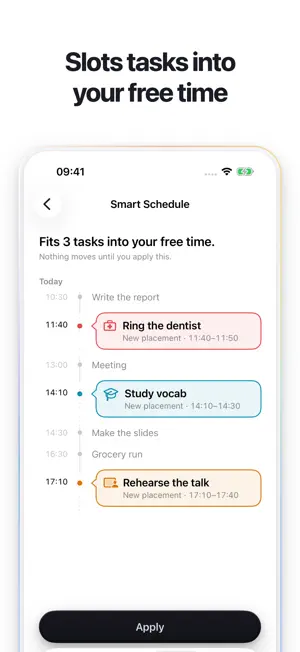

About Doendar: To-Do List & Calendar
Doendar puts your to-dos and your calendar on one screen. Office work, classes, the thing that just came up — for days that are never quite the same, the pile in your head becomes a day you can actually work through. WRITE IT DOWN, THEN GIVE IT A TIME Catch a task the moment you think of it. Put it on the day yourself, or let Doendar find the gap. Every task gets a real start time, not just a checkbox. ONE THING, RIGHT NOW Doendar shows the task that is happening now and holds the rest back. When you are finished you check it off yourself — nothing is ever completed for you. YOUR WHOLE DAY IN ONE VIEW Today, Week and Month share one timeline. Tasks and calendar events sit together, and nothing is ever drawn on top of anything else. FOCUS SESSIONS AND REMINDERS Start a session for the task in front of you — the time left stays on your Lock Screen — and keep your progress when you stop early. A notification tells you when a plan starts. ASK DOENDAR Type “Where is today free?” or “Plan my tasks” and it answers at once. Open questions are answered by Apple Intelligence on your iPhone, with no network and no fee (iPhones with Apple Intelligence only; on others you choose from set questions). FREE • Capture every task • Place tasks on your day by hand • Focus sessions • Ask Doendar • A reminder as each plan starts • One repeating task • The medium Tasks widget • Automatic planning, three times DOENDAR PRO • Automatic planning, whenever you want it • Replanning when the day slips • Earlier reminders and a morning summary • Unlimited repeating tasks • Apple and Google Calendar: your iPhone calendars inside Doendar, and Doendar's plans exported to your calendar • The large Tasks widget Signing in with Apple or Google is optional; everything works without it. Doendar has no server of its own and your tasks stay on your iPhone. Doendar never changes your calendar events by itself — you can edit one in Apple's own editor, and with Export on, Doendar only updates the copies it wrote itself. SUBSCRIPTION Doendar Pro is available as a monthly or yearly auto-renewing subscription — the yearly one starting with a 7-day free trial — or as a one-time lifetime purchase. Payment is charged to your Apple Account at confirmation of purchase. A subscription renews automatically unless auto-renew is turned off at least 24 hours before the end of the current period, and your account is charged for renewal within 24 hours before the end of that period. You can manage and cancel subscriptions in Settings on your iPhone after purchase. Terms of Use: https://doendar.pages.dev/terms/ Privacy Policy: https://doendar.pages.dev/privacy/
What’s new
Version 1.0.3 · Updated October 19, 2026
• Today: to-dos planned at the same time now sit together in one box, and ▶ starts focusing on all of them at once. • Week: tap or slide down an empty time to put down a plan you can stretch, then name it and pick a color in the bubble. Tap the selected day again to see it wide. • Smart Schedule's proposal now shows your day as a timeline: the plans it adds appear as bubbles in your free time, so you can see at a glance what will change. • On the Smart tab, the + button now sits beside the bottom row instead of the top corner. Touch and hold it to move it to the other side. • Better icons for English titles: “Book the dentist” no longer gets a book, and words like GP, hoover, bins and taxi are recognized. • Fixed a crash at launch when Doendar runs on a Mac. • Fixes and improvements.
App privacy
The developer, Koki Fujita, reported these privacy practices to Apple.
Data Linked to You
The following data, which may be collected and linked to your identity, may be used for the following purposes:
- Purchases: Purchase History
- Identifiers: User ID, Device ID
Used for: Analytics, App Functionality
Alternatives to Doendar: To-Do List & Calendar
Looking for apps like Doendar: To-Do List & Calendar? Here are 6 similar apps on the App Store. The highest rated is Donna: Clever Task Management (5.0/5), and 4 of the 6 are free to download.
-
 Donna: Clever Task Management
5.0
Donna: Clever Task Management
5.0
-
 Jotei: Your Weekly Planner
-
 Tasking - with dependency
-
 Flowmoro
-
 LinkFlow: Focus Planner
-
 FlowTimer: Productivity Waves
| App | Rating | Price | Last updated | Compare |
|---|---|---|---|---|
| Doendar: To-Do List & Calendar | – | Free | October 19, 2026 | |
| Donna: Clever Task Management | 5.0 / 5 (1) | Free | Oct 8, 2026 | Compare |
| Jotei: Your Weekly Planner | – | Free | Sep 25, 2026 | Compare |
| Tasking - with dependency | – | 1.99 USD | Sep 4, 2026 | Compare |
| Flowmoro | – | 0.99 USD | Oct 5, 2024 | Compare |
| LinkFlow: Focus Planner | – | Free | Oct 15, 2026 | Compare |
| FlowTimer: Productivity Waves | – | Free | Oct 13, 2025 | Compare |