

Timesheet: Overtime Calculator
Ali Dinc Business iPhoneiPadiPod touch
Timesheet: Overtime Calculator is a free Business app for iPhone and iPad by Ali Dinc. Requires iOS 17.0. Updated October 18, 2026.
- Price
- Free
- on the App Store
- Size
- 11 MB
- Age 4+
- Updated
- Oct 18
- 2026 · v1.0.2
Screenshots


About Timesheet: Overtime Calculator
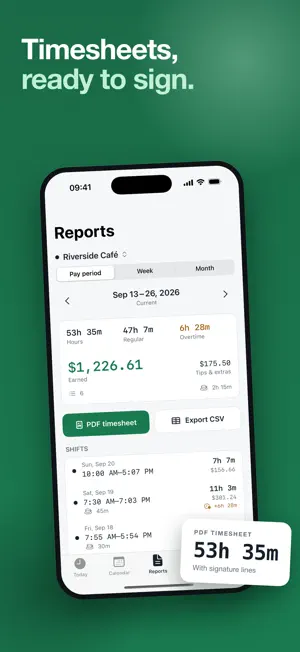
HourKeep is a work hours tracker that stays on your side: one tap starts a shift, the timer lives on your Lock Screen, and at the end of the pay period you get a clean timesheet to hand to your employer, client or accountant. ONE TAP, THEN FORGET IT • Start a shift with a single tap. The running time and your earnings so far show on the Lock Screen and in the Dynamic Island. • Take a break and come back — paid or unpaid, you decide per job. • Forgot to clock out? A reminder nudges you once you pass your usual hours, and you can fix the end time afterwards. EVERY HOUR ADDS UP • Daily, weekly and pay-period totals: hours, overtime and pay. • Calendar view with hours per day and a list of shifts for any date. • Add past shifts in a few taps; edit start, end, breaks and notes any time. TIMESHEETS PEOPLE ACCEPT • Export the pay period as CSV — free, always. • PDF timesheet with dates, start and end times, breaks, hours, overtime and totals, plus a signature line. PAY THAT MATCHES YOUR PAYSLIP • Hourly rate per job, in your currency. • Overtime rules: weekly and daily thresholds with multipliers, presets for common rules or your own. • Time rounding to 6 or 15 minutes if your employer rounds. • Tips and extra amounts per shift. WHAT'S FREE, FOREVER One job, unlimited shifts and history, the timer with Lock Screen view, the calendar, period totals and CSV export. Your hours are never locked behind a paywall. HOURKEEP PREMIUM (one-time unlock or weekly plan) • Several jobs, each with its own rate and rules • PDF timesheets • Overtime and rounding rules, tips and extras • Widgets and extra reminders HONEST BY DESIGN • No account — there is nothing to sign up for • No ads, no third-party analytics • Works fully offline; your shifts stay on your phone • Unlock Premium once and keep it forever, or take the weekly plan — both prices are shown side by side, with nothing hidden and no surprises. Built for hourly workers, shift workers, carers, students with two jobs and freelancers who bill by the hour. Terms of Use: https://hourkeep.pages.dev/terms.html Privacy Policy: https://hourkeep.pages.dev/privacy.html
What’s new
Version 1.0.2 · Updated October 18, 2026
This update improves timesheet accuracy and reliability. Overtime and rounding rules are preserved for saved shifts, pay period dates stay consistent across time zones, and exports are more reliable. We also improved error handling when saving changes.
App privacy
The developer, Ali Dinc, reported these privacy practices to Apple.
Data Not Linked to You
The following data, which may be collected but is not linked to your identity, may be used for the following purposes:
- Purchases: Purchase History
- Identifiers: User ID
Used for: App Functionality
Alternatives to Timesheet: Overtime Calculator
Looking for apps like Timesheet: Overtime Calculator? Here are 6 similar apps on the App Store. The highest rated is Work Hours Tracker: Timelog (5.0/5), and all 6 are free to download.
-
 Work Hours Tracker: Timelog
5.0
Work Hours Tracker: Timelog
5.0
-
 CoShift: Shift Calendar
-
 Widgest: Lock Screen Widgets
-
 My Saving Box
-
 GoldSense: Gold & Silver
-
 NoShift - Time tracking
| App | Rating | Price | Last updated | Compare |
|---|---|---|---|---|
| Timesheet: Overtime Calculator | – | Free | October 18, 2026 | |
| Work Hours Tracker: Timelog | 5.0 / 5 (4) | Free | Oct 28, 2026 | Compare |
| CoShift: Shift Calendar | – | Free | Oct 27, 2026 | Compare |
| Widgest: Lock Screen Widgets | – | Free | Oct 9, 2026 | Compare |
| My Saving Box | – | Free | Sep 2, 2026 | Compare |
| GoldSense: Gold & Silver | – | Free | Oct 24, 2026 | Compare |
| NoShift - Time tracking | – | Free | Aug 31, 2026 | Compare |