

Adagio: Slow Mo & Smooth
Andrei Kitenko Photo & Video iPhoneiPadiPod touchMac
Adagio: Slow Mo & Smooth is a free Photo & Video app for iPhone and iPad by Andrei Kitenko. Requires iOS 18.0. Updated October 29, 2026.
- Price
- Free
- on the App Store
- Size
- 86 MB
- Age 4+
- Updated
- Oct 29
- 2026 · v1.7.0
Screenshots



About Adagio: Slow Mo & Smooth
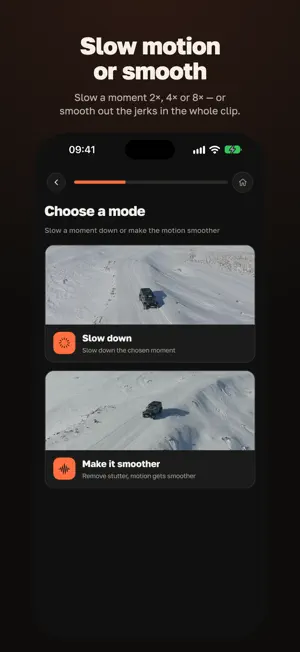
Adagio improves the motion in your videos: movement becomes continuous and a chosen moment slows down without stutter. The app builds the frames between the ones you shot, so motion flows and slow-motion stays calm. All processing happens on your device. Your video is never uploaded — neither to process it nor to store it. TWO EFFECTS • Slow motion — clean slow-mo for the whole clip or only for the moments you pick: 2×, 4× or 8×. • Smooth — continuous movement: up to 8× the frames, as far as the source frame rate allows. SEE IT, THEN DECIDE • The finished video opens at once and plays by itself; fullscreen is one tap away. • You can always watch it: once your free videos are used up, it opens in full with the Adagio mark, so you decide whether to save only once you have seen the result. IT FITS YOUR DEVICE • Two plain choices: Best quality or Faster. The app decides the rest. • An honest section on where smoothing is harder: fast motion, scene cuts, fine detail. ON YOUR DEVICE • Works without an internet connection. Your video does not leave the device. • A privacy section that states what leaves the device and what does not. IPHONE, IPAD AND MAC • One app for all three, one shared purchase. WHAT IT COSTS • One video free. After that, a single one-time purchase, no subscription. A clip that already used a free video can be re-processed as often as you like without using another. Adagio does one thing well: it improves motion by building frames. It does not denoise, sharpen, upscale or stabilize your footage.
What’s new
Version 1.7.0 · Updated October 29, 2026
• A purchase the App Store confirmed while Adagio was still checking it (Ask to Buy approval, bank payment) no longer brings back locked videos or loses Pro when you open the app offline. • On iPhone and iPad with 4 GB of memory, 1080p processing copes better with low memory: where needed, motion is computed at a smaller size and the result is marked as reduced quality. • Clips from stock libraries, editing apps and messengers where a frame repeats several times now slow down smoothly, without stutter. • If you leave the processing screen and start a new run right away, the previous one stops cleanly and a finished video is no longer lost. • Deleting a video while it is still being saved to Photos no longer loses the copy in Photos. • On Mac, dragging in a second video while the first is still copying no longer breaks the import.
App privacy
The developer, Andrei Kitenko, reported these privacy practices to Apple.
Data Not Linked to You
The following data, which may be collected but is not linked to your identity, may be used for the following purposes:
- Purchases: Purchase History
- Usage Data: Product Interaction
- Diagnostics: Crash Data, Performance Data, Other Diagnostic Data
Used for: Analytics, App Functionality
Alternatives to Adagio: Slow Mo & Smooth
Looking for apps like Adagio: Slow Mo & Smooth? Here are 6 similar apps on the App Store. The highest rated is Frame Grabber - TrueFrame (5.0/5), and 5 of the 6 are free to download.
-
 Golden Hour Compass
-
 Ouden: Smooth Screen Recorder
-
 Frame Grabber - TrueFrame
5.0
Frame Grabber - TrueFrame
5.0
-
 Remaster AI - Video Enhancer
3.0
Remaster AI - Video Enhancer
3.0
-
 Passport Photo, ID Photo Maker
5.0
Passport Photo, ID Photo Maker
5.0
-
 Shaky Video Stabilizer
| App | Rating | Price | Last updated | Compare |
|---|---|---|---|---|
| Adagio: Slow Mo & Smooth | – | Free | October 29, 2026 | |
| Golden Hour Compass | – | 0.99 USD | Oct 28, 2026 | Compare |
| Ouden: Smooth Screen Recorder | – | Free | Sep 30, 2026 | Compare |
| Frame Grabber - TrueFrame | 5.0 / 5 (6) | Free | Oct 8, 2026 | Compare |
| Remaster AI - Video Enhancer | 3.0 / 5 (1) | Free | Oct 26, 2026 | Compare |
| Passport Photo, ID Photo Maker | 5.0 / 5 (3) | Free | Jan 15, 2026 | Compare |
| Shaky Video Stabilizer | – | Free | Mar 26, 2026 | Compare |