

PenSign: Document Signer
Abdumukhtor Turgunboev Productivity iPhoneiPadiPod touch
PenSign: Document Signer is a free Productivity app for iPhone and iPad by Abdumukhtor Turgunboev. Requires iOS 17.4. Updated October 22, 2026.
- Price
- Free
- on the App Store
- Size
- 19 MB
- Age 4+
- Updated
- Oct 22
- 2026 · v1.1.1
Screenshots


About PenSign: Document Signer
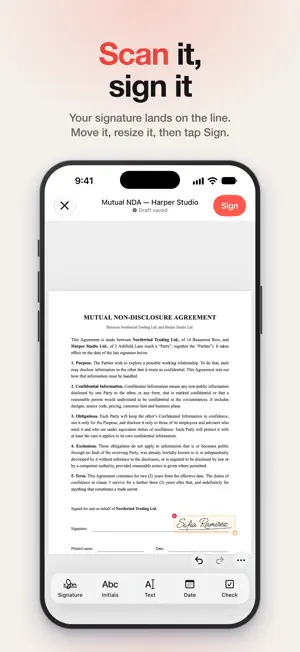
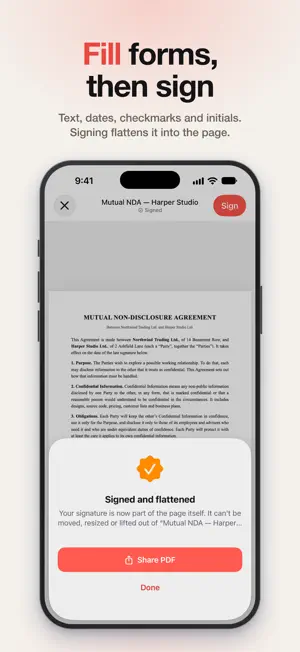
Make a signature you're proud of, then sign anything with it. Type your name and watch the pen write it in one of 12 signature styles or set it in 8 designer lettering styles, draw your own with a finger or Apple Pencil, or photograph the one you already sign on paper. Then scan a document and sign it in seconds. Everything happens on your iPhone or iPad. No account, no uploads: your signature stays yours. SIGNATURE STYLES • Type your name and watch it signed stroke by stroke, the way a pen writes • 20 styles in six groups: business, elegant, casual, bold, printed and lettering • Not quite right? Tap for another version of the same style • Five ink colours, from classic black to navy and coral • Save it like any signature and use it everywhere DRAW OR CAPTURE YOUR OWN • Draw with your finger or Apple Pencil, with three pen styles and a guide line • Photograph the signature you already write: PenSign squares up the paper, lifts the ink off the page and removes the background • Refine it: ink strength, thickness, specks and crop, with a before-and-after view • Keep initials alongside full signatures SCAN AND SIGN • Scan paper documents right in the app. PenSign finds the signature line and puts your signature on it • Or import a PDF, or a photo of a document: photos are cropped and squared up just like a scan • Add initials, text, dates and checkmarks, then tap Sign to flatten everything into the page • Sign every page at once; rotate, reorder, add and delete pages • Open password-protected PDFs • Scans stay small, so signed copies fit easily in an email OWN IT AS A FILE • Transparent PNG at print resolution • True SVG vector, built from the real strokes, so it stays sharp at any size • PDF stamp for documents that expect one • Save to Photos, copy it into Mail, Notes or Pages, or share it to any app PRIVATE BY DESIGN Capture, scanning, signing and export all run on your device. Nothing is uploaded, and there is no account to create. Optional iCloud sync keeps your library on your own devices, in your own private iCloud, not on our servers. • Face ID vault locks your signature library • Every edit is kept in version history, so an earlier version is always one tap away AUTOMATE IT Shortcuts actions sign a PDF or fetch your signature image from anywhere in iOS: the Share sheet, Siri, Spotlight and your own automations. Long-press the PenSign icon to scan a document or start a new signature. FREE TO TRY, ONE PRICE TO UNLOCK PenSign is free to try: keep one signature, sign up to three documents and use 13 of the 20 signature styles. The one-time unlock, a single purchase and not a subscription, adds unlimited signatures and initials, unlimited signed documents, every signature style, SVG export, iCloud sync, Shortcuts and the Face ID vault. Buy it once and it's yours. Terms of use: https://muxtor141.github.io/pensign-legal/terms.html Privacy policy: https://muxtor141.github.io/pensign-legal/privacy.html
What’s new
Version 1.1.1 · Updated October 22, 2026
New: Lettering. Eight signature styles set in designer script fonts, from bold brush to grand swashes. Six are free; the unlock adds two more. • Sign from Mail and Files: choose Sign with PenSign in the share sheet. • Imported PDFs open with your signature already on the signature line, and the date beside it. • Edit after signing: move a signature, fix a date or add a page, then sign again. • Stamps and seals, Sign in Person, Share as Video, Change Style, My Details and export options. • Snap to lines, letter boxes, ticks, crosses, redact, white-out and drawing on the page. • Search inside your documents, and keep signed copies in iCloud Drive. • PenSign now speaks Spanish, Portuguese, German, French, Italian and Dutch.
App privacy
The developer, Abdumukhtor Turgunboev, reported these privacy practices to Apple.
Data Not Collected
The developer does not collect any data from this app.
Alternatives to PenSign: Document Signer
Looking for apps like PenSign: Document Signer? Here are 6 similar apps on the App Store. The highest rated is Habit Journey - Stop giving up (1.0/5), and all 6 are free to download.
-
 TypePilot – The AI Keyboard
-
 PDF Signer: Sign, Stamp, Edit
-
 Habit Journey - Stop giving up
1.0
-
 ticks: offline browser
-
 Laynor: AI Keyboard
-
 Signature Maker: Scan&Sign PDF
| App | Rating | Price | Last updated | Compare |
|---|---|---|---|---|
| PenSign: Document Signer | – | Free | October 22, 2026 | |
| TypePilot – The AI Keyboard | – | Free | Apr 1, 2026 | Compare |
| PDF Signer: Sign, Stamp, Edit | – | Free | Jun 6, 2026 | Compare |
| Habit Journey - Stop giving up | 1.0 / 5 (1) | Free | Sep 3, 2025 | Compare |
| ticks: offline browser | – | Free | Aug 14, 2025 | Compare |
| Laynor: AI Keyboard | – | Free | Aug 2, 2026 | Compare |
| Signature Maker: Scan&Sign PDF | – | Free | Nov 5, 2025 | Compare |